


tee
Members
-
Joined
Everything posted by tee
-
thanks, I'll try again.
-
Hello, I have a question about the basic lspdfr transport function. For clarity, I do have Ultimate Backup installed, but I would like to know how to call for prisoner transport using the basic lspdfr. I arrest the ped by pressing "E", but I am unable to make them kneel to be able to call for regular prisoner transport. What button do I press to make them kneel?
-
-
-
Unfortunately, I did not snap a picture of this issue. I have the Lore-Friendly pack by 11john11 installed and I have an issue with the POLICE slot vehicle. the POLICE vehicle is to spawn with hubcaps that comes on the vehicle, but it does not. Instead, it spawns with steelies only. On my last patrol 1 car spawned with 1 hubcap and 3 steelies which prompt me to come ask the question of 1. How do I get the POLICE car slot to have the correct rims? 2. Is there a way for ai backup to respond with different wheel types?
-
 When I accept the HighSpeedPursuit Callout and I engage in pursuit with the vehicle after a minute or 2 LSPDFR crashes and my log says rage.vehicle or entity became invalid. It has happened twice today so far. is there a solution or a way around that? RagePluginHook.log
- 1,032 comments
- 65 reviews
-
.thumb.png.0ec9c395aeea573bc4c27b60d7c88eca.png) definitely will
definitely will -
omg somebody read my mind. I've been looking for these for the past week for my county's (Montgomery,AL) liveries and i found them!!! they look great thanks.
-
*deep sigh* I thought it was another way. thanks though
-
I identified the problem. For some reason, The latest update caused my carcols.meta files to render the crash. For example, as I said, I have 1 DLC Pack for my Civilian Cars. There are about 10 Civilian cars in this specific pack which means 10 seperate carcols.meta files are included in this pack. Before the latest update, I was able to load this 1 DLC pack without problems. After the update, this car pack no longer loads. I did some testing last night and found out that I can only have 1 carcols.meta per DLC Pack. In Conclusion, 1 DLC Pack multiple carcols equals crash; 1 DLC Pack 1 carcols meta file equal GTA loaded successfully. So now, I have a new question. Is there a XML Configurator that makes it easier to combine multiple carcols meta files into 1 ??
-
Are there any ideas on a solution for this because a lot of my vehicles were in a custom made DLC pack i created using Addon Creator program 2 years ago.
-
I checked all the files. They all my packs worked before the v3274.0 update. I disabled the dinput8 file and GTA V loaded with the custom gameconfig, but fatally crashed with the error of a bad gameconfig.
-
It did not work. I also tried to add a different car mod from GTA 5 Mods and that did not work either
-
I normally test all cars packs in story mode first, but after the last update, 2 of my custom car packs crash GTA 5 on the loading screen as soon as I press play for the singleplayer story mode option. I have the custom gameconfig from the LSPDFR website along with the heap limit adjuster and packfile limit adjuster. One of the affected packs has my civilian cars only. I did try to start from scratch and add one by one, but after adding the first vehicle in the pack for testing t still crashed on loading screen. any help or recommendations are appreciated.
-
-
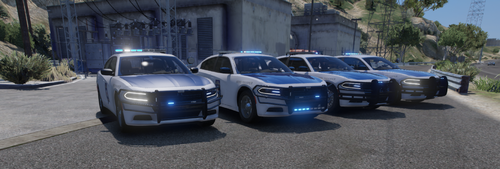 They have also added a Hellcat to the fleet. This was last seen in the Montgomery area.
- 33 comments
- 5 reviews
-
Is there a way to add uniforms and hats as an addon instead of replacing pieces of the default eup? I have TrpCharles Uniform pack and I am trying to add the Georgia State Patrol Campaign hats, but they replace the LSSD campaign hats. I've tried to rename the ydd & ytd files to reflect them as addon slots, but the textures are not loading on the ydd file
-
I figured it out. I had to copy the mp2023_02 folder to my mods folder and make changes to the carvariations & vehicle meta file in order to get it to work properly.
-
Hello, I recently replaced the polgauntlet with EmergencyDistributors slicktop Hellcat. When I spawn the replacement vehicle in game, it spawns all black instead of the livery I placed on it, How do I fix this?
-
It is the first callout of the session. It beings at the 9:16:29 PM.542 mark. RagePluginHook.log
- 1,032 comments
- 65 reviews
-
-

- 1
-
-
Did the update intend to fix The "Officers Under Fire in Grapeseed" Callout because it is still going Code 4 when arriving on scene?
- 1,032 comments
- 65 reviews
-
-
- 1
-
-
aww well that sucks for trying to make gameplay as realistic as possible.
-
Hello, I have been testing my game since my last post about the same issue, and it seems as though I still have the Bermuda Triangle Bug affecting certain areas of the map without Menyoo being installed. I may have narrowed it down to Firecallouts Beta as when I take Firecallouts beta out of my game the bug goes away, but the creator says it's not his callout pack that's causing the problem. I have attached my log with pics that show menyoo NOT being installed in my game. If it is not his mod causing the bug then what could it be? my graphics mod possibly? I'm looking for input and direction on what to do next please RagePluginHook.log
.thumb.png.72e0c686ede79efb1f2cca04404e799a.png)
.thumb.png.ad8b29c00173adb527a30cd5b4d003d8.png)
-
Can a Graphics/ENB Mod cause this issue because that, eup, & a gameconfig are all I have inside my mods folder.
-
I don't have Menyoo inside my game so that's why I'm here because I find that to be weird that I'm getting this bug without Menyoo being installed.

.thumb.png.0ec9c395aeea573bc4c27b60d7c88eca.png)

.png.e56c744ff1489e77b2e87e07fc035f71.png)
.png.49da3b6d479d75ab65e7cae4b462cf74.png)