


Molten
Members
-
Joined
-
Last visited
Everything posted by Molten
-
Try going into a subway and catching a train. Confined underground spaces with rioting people sporting RPG's. Makes for an interesting few seconds. But yeah guess that can be classed as an easter egg maybe
-
A Scotsman who is sober enough to make a post on new year. Now that's something I thought I would never see. A happy healthy and prosperous New Year to all who play LCPDFR. Those that don't can get stuffed.
-
Yeah your basic officer would never be allowed to take such risks these days but there are units still that can be seen now and then giving some :)
-
Cheers both of you. That does help a lot. As for stuff relating to just USA, well I'm not looking for 100% accuracy. Liberty allthough based on New York is still a fictional city after all. But I do like to keep the stuff I do at some level of realism. As I am the chief of police, and the Mayor of Liberty city and also the Govenor of New Liberty ("in my head") what I say goes :) And from what you have both said I don't think it's unreasonable for me to introduce such a system for heavy goods in my Liberty City. Looks like such a system may end up in practice anyway in the long term. In certain states anyway. Cheers for feedback.
-
Allthough I do agree mostly. I do find it really annoying that I have to turn my lights of when I get to a shootout. Reason I have to turn lights of is I like to use the car for cover and it adds 100% to realism if the car is taking gunshot damage. For me anyway.
-
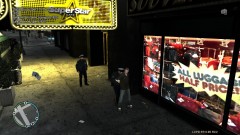 As soon as Francis hears about it he will be back on the street in no time
 -
We all play LCPDFR in different ways. I like to have a genuine reason for making a traffic stop if there isn't something like speeding, jumping red light, a light not working etc. I also like pulling over lorrys/ heavy goods just for routine stops and check license etc. Ok, I can always use the "routine check" reason for pulling someone over but for a good part of my working life I drove lorrys and in the UK we have tachographs for lorrys over a certain weight. This records how many hours the driver has been at the wheel to make sure he / she is taking breaks as required by law, and not exceeding the maxium amount of hours in a 24 hour period. It also records speed. Reason for this is to prevent lorry drivers who drive machines that can cause huge damage falling asleep at the wheel because of comercial presures to keep on driving when it's not safe to do so because of driver fatigue. In UK a driver of a lorry with a tacho fitted must at all times have in the lorry the last 7 days worth of tachographs to be inspected by traffic police at any time. So just wondering does the US have anything similar as it makes for a good genuine reason to do a traffic stop on a lorry and then check licesne etc. Of course it's a game and I don't need a reason, but to quote someone who makes a lot of LCPDFR vids "in my head" it makes sense. Also any other US laws that might not be obvious to me that can be used to pull someone over. And I don't just mean reasonable suspicion. While I'm at it. any laws that only apply to buses or taxis etc such as buses being restricted to a lower speed or anything like that ? But main question is do US have tachographs on lorrys ? Sorry for wall of text. I never use just one word when 10 will do. :p
-
I use Firefox, not getting those problems here Jack. Time to move on from IE maybe :)
-
heres a link for simple native trainer that allows you to do a thousand and one things in game. Including repair car. http://www.gtagaming...cript-mods/2115 Please note using in game menu you need to go to the second page of options (press 6 on number pad to get second page) then find "disable key bindings" otherwise the shortcut keys will mess with GTA IV / LCPDFR. You can also save that decission by saving to .ini file. Also found in options. There is another method but I don't want to confuse matters. Just mess about with trainer. It's a program worth getting used to. You can even clean your car or set weather and time etc etc.
-
Somehow I missed that post on this forum about the FXAA. Even though I posted in the same thread. Maybe at the time I just didn't understand it, or what it did. Will give the shader.fx modification a try too. I keep a seperate GTA IV folder for ENB just to see what can be achieved, even if most of the time I play without it.
-
Check the ENB thread on Modding Chest. On the first page is a usefull link for a FXAA effect, I tried it and it works well. A bit hard to follow at first but it does work. Also lots of photo's of various peoples ENB efforts. Cj is too moddest to link it hehe :) http://www.gta-modding-chest.com/board7-grand-theft-auto-iv/board8-gta-iv-discussion/30-gta-iv-enb-series/
-
Do you mean repair the car in game ? if so you need a third party program like Simple native trainer for that. Or as a side effect of ELS the car repairs itself. Other than that you have to return to station to get a replacement car. As you would in real life. Or call back up and take their car. as for installing mods google " how do i install mods into GTAIV" There are you tube tutorials. Edit: ninja Harper on the case :) Also he makes a point about in game console I had forgotten about.
-
There are in fact many many Easter eggs in GtaIV all across the city. Some very subtle though. As far as I know that's the only one in LCPDFR. Or at least the only one that has been spotted. Still expecting one day to run over a hooker on the street and at the right angle see "Sam was here" written in small letters on her underwear.
-
Are you using the antialiasing function in ENB ? Cause that works by resizeing your resolution and screws with police comp and the red circle markers. If you mean the police comp is not working at all, then thats not because of the antialising function.
-
Whether it works or not, and I have no reason to doubt him. It's a far more long winded approach than simply downloading a savegame file and replaceing it over your own. As to the origional question I recomend playing untill you get given the phone which is first or second mission. cant recall exactly :p After that LCPDFR opens all the islands so no need to go further imo. Unless you have a passion for the internet cafe's :/
-
-
http://www.killicon.com/GTAIVHANDLINGEDITORV1.zip Does that work ?
-
You need to lower the center of gravity. I have no idea what numbers represent that but my advice is use a handling editor. There is a good one I use and it has a you tube tutorial. Gimme a sec I will get a link. bit of advice. make small changes. Link for editor http://www.gtaforums...howtopic=385566 link for you tube series. (there are 3 parts) http://www.youtube.com/watch?v=ev3Pt17W1hU
-
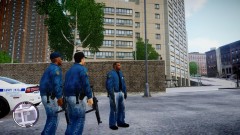 Very cool, and I can't do anything near as good so this is not a critism but my personal taste, The jackets are so crisp they kinda get let down by the trousers imo. The jeans allthough the right choice of clothes just don't seem the same quality as the Jackets to me. Maybe it's the fadeing on the jeans idk. Still that said I would still happily use them lol.
 -
-
Thank you both. You have convinced me to look into it further and download and try some some out. Cheers.
-
I use Dsound, but yep that sounds like it.
-
ok well I know my limitations and will bow out now so someone with more knowledge than me can get to grips with why your asi loader doesn't show. Just one last thing though. Open your GTA IV folder and see if the loader is actually there.
-
Right click / run as administrator
-
Post the report from the diagnostic tool. As mentioned ..."Run the diagnostic tool (found here: http://goo.gl/QEftp) then attach it to your post. " Also your not instaling Xlive and Dsound are you ? one or the other is needed not both.


