




TheRealNoodle
Members
-
Joined
-
Last visited
Everything posted by TheRealNoodle
-
those are the textures, not the materials I think
-
-
heres mine
-
meh I don't really like their new album
-
thx and im building this pc in like 1-2 months so up to date parts are always welcome :D
-
thx man, ill try that :D
-
oh... favorite music? all of the pink floyd songs :D my favorite song right now is High Hopes :D
-
so im going to build my first selfbuild gaming pc and I would like to know what parts I should buy my budget is 1000 euro (1178 $)
-
gta v better be 100000000x better that gta iv
-
o wow, first they say autumn then they say 26 january and now its 26 march... awesome :(
-
-
happy b-day :D
-
15, almost 16 here :p
-
no, GPM 4 the win :D
-
that always works for me so yea, try that :p
-
happy b-day :D
-
-
-
-
BUT... you make awesome 3D creations and cars :D
-
-
-
Donuts! One thing that needs to be in every police car. I have not seen many police cars with donuts nor have I seen any unlocked donuts (wait what). so here are my Low poly donuts. Enjoy these 2 versions: Chocolate and Sprinkles. credits: -Scratch modeled by officerluka130 -Textures by officerluka130 ps. I know that they look like stop signs but thats just because they are very low poly
- 12 comments
- 3 reviews
-
-

- 1
-
-
could you provide us with more pictures? you can't even see the lightning equipment here...
-
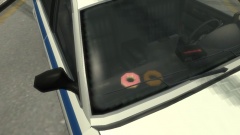 lol, thats because they are very low poly


