Troy
Members
-
Joined
-
Last visited
Everything posted by Troy
-
-
-
-
-
-
-
-
-
-
-
-
I'm not even saying IV is a good game. Because the definition of good highly relies on your perception and the circumstances of what you have and have not, got.
-
^ This. Up until now, people were all "make hay and celebrate" the mods we have for IV (a very good exapmle beng LCPDFR 1.0). Now that V's out, even the ones who used to appreciate IV and its mods are despising it vocally. Its in human nature. Our brain keeps comparing everything, all the time. And thats what R* and other AAA game dev companies capitalize on. People don't seem to understand IV's role in R*'s development of V. They just back V up and give it a high five, without realizing that there was a LOT, that R* learned from IV's reception and user feedbacks. Simply put, there would be no V without IV, as there would be no IV without SA, and so on.
-
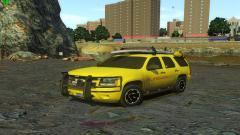 WANT. Release this! Two different versions- one with surfboard and one without.
 -
For one, I'm sure 0.95 RC2R2 + ELS v5 is a great non-crashing experience. Trust me. First hand experience. With same "other" mods in comparison to 1.1 + ELS v8.5. Two, you already know I'm using the same PC since 2010, Tom LOL.
-
-
Aren't the latest versions (of LCPDFR & ELS) supposed to be more stable than the previous ones? I've seen people who are finding their game run more stable with 0.95RC2 combined with ELS v5 these days LOL.
-
Neato.
-
Right. Fun fact- GTA IV's ZMod alpha filter took 6 months (post the announcement that the import filter was already written and fully funtional) to come out. Even then, Oleg himself was still fiddling to import a stock untouched model and export it properly on as-is basis without it glitching to a beautiful array of traingles all over or crashing the game itself to an SMPA60 error. Sigh! All, I am saying is, which I should mention before people start throwing terms like 'pessimist' at me, don't hold your breath. And this advice is meant for a couple of fellas who I see are getting overly excited.
-
-
The art of stating the obvious. Calm down, guys. You realize its gonna take much more than just that, right? First off, the stock cars aren't UV'ed the way you'd want them to, just like IV and SA's stock cars. The other thing is, even if you found the car files, which were obviously there the whole time, we don't have: 1) a program like Zmodeler to open/modify/replace them and, 2) we don't even know what the settings (mesh, dummies, lights and textures) do these new cars use in accordance with the new and modified RAGE engine that V uses. to kick off car modding yet.
-
-
Forgot to update it, but I figured it out right after posting my last comment. It was because of the "express" entry in the vehicles.ide line, which should be the name of the vehicle you are replacing so that the game can read its handling line from handling.dat..
- 9 comments
- 6 reviews
-
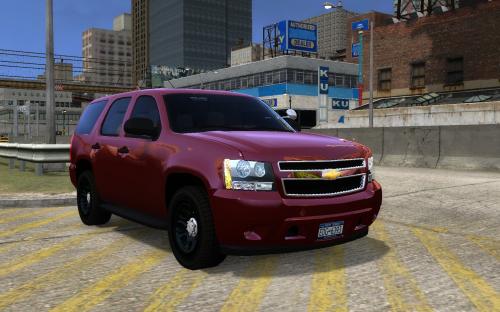 Nice car! Would love to see a fictional LCPD Crown Vic from you. Like maybe a NYPD CTB but with a SLR drot'ed setup. Just a wild idea.
 -
Yeah, man! I just installed it and it was halfway through the ground kinda floating. Then it flipped and stood in the air with no wheels. Next thing I know, I was falling in the sea in the middle of nowhere. Then the game crashed. I installed the handling and vehicles.ide settings alright!
- 9 comments
- 6 reviews