


KM964
Members
-
Joined
-
Last visited
Everything posted by KM964
-
2001 Volvo S60. I'm currently saving up for a new set of rims (I hate the chrome ones on there now). It came with an aftermarket Alpine radio with iPhone hookup, however I'm looking at changing the cable out since I'm getting an iPhone 5 this week. I'm also going to replace the Volvo badge on the trunk with the wider V O L V O badge seen on newer models.
-
+1. None of the local police agencies here use trucks. However, my county sheriff's office had an F150 for a few years before it went out of use about two years ago. But if I had to choose, I'd take the Silverado. Both of my parents have '13 Silverados and they're great trucks. However...if you're talking about an F150 Raptor, screw the Silverado.
-
You do know GMC's are pretty much Chevy's with different badges, right? I prefer the Crown Vic over the Impala. The majority of police agencies in my area (in addition to Texas State Troopers) use a mix of Crown Vics and Chargers as their 4-door sedan police vehicle. The only cities that I know of that use Impalas are Fort Worth, Dallas, and Plano. However, Fort Worth is in the process of replacing their Crown Vics with either the Taurus, new Charger, or new Caprice. In GTA4, all of my police vehicles are either Crown Vics or Tahoes.
-
Yup, it did. Thanks for the help!
-
I have the same skin for my CVPI. This is the one that I use. http://www.gtainside.com/en/download.php?do=comments&cat=371&start=0&id=47684&orderBy=
-
I'm having a bit of an issue with the Tahoe I'm using in my game. I used the Tahoe out of the Texas DPS pack for my Police Patriot. When I decided I wanted to add a Dallas PD paintjob, I replaced two of the four DPS skins with the Dallas PD skins out of the However, when I spawn it in the game, I only get the DPS skin, even though I have two DPD skins in the .wtd file. I could spawn 50 of them and not a single one would be DPD. Did I do something wrong? Or is it an issue with the model? For my FIB car, I have a Crown Vic with DHS Police and Border Patrol skins, and I get both skins. Also, the Tahoe from the DPS pack was the one by Alex and KevinDV, and the DPD skin was for that same model.
-
Texas, but I'm biased because I live there. But if I had to choose another state besides Texas, it'd probably be California, the California Highway Patrol . Even though this is more of a federal police, I like the livery that the Royal Canadian Mounted Police use.
-
I'd love one set in Texas...3-4 big cities could be based on Dallas, Fort Worth, El Paso, and Houston, with several smaller towns inbetween. Texas has everything that seems to be mentioned here...big cities, small towns, mountains, desert, coastline, backroads, rolling plains, and countryside. Plus, with El Paso, you would get US Border Patrol. And highways would obviously connect those cities, and you could stop at small towns along them. With a GTA6 release more than likely on the PS4, something that big may be possible.
-
You have a PM.
-
I may look into Maple Valley. Clockwork Mountain used alot of resources and I averaged 15-20fps while driving on the one main road. The invisible trees really aren't a huge problem to me. They may be annoying, but I can live with it. Most of the trees spawn anyway.
-
No. It actually adds on to it.
-
Got everything sorted out. Turns out all I had to do to get 6.4 to work was to change the keys...man I feel stupid. Now my only gruipe is the invisible trees. 70% will spawn for me, which is fine. Also, upon entrance via the bridge, my frames will drop slightly. However, I did notice there is a boat dock (with a road leading up to one of the main roads) in the northeastern corner. It's a very short distance from the Happiness Island and southern Algonquin.
-
I have 6.3, as that was the only version I could find for a laptop.
-
I like it. I'll give it 9/10. I have found where the villages are supposed to be. They are the white squares on the map, one is on the eastern side, while the other is in the northeastern corner. Before replacing the frontend_360.wtd file, some of the buildings would actually spawn, but in the air. So I replaced that file with the one provided and now they won't even spawn.
-
True. Though, I'm a big Initial D fan, and have the Fujiwara AE86 in the game. So, SAkina was a must for me. I had it in San Andreas, after all.
-
Man, after seeing pictures of this, this looks to be one of the best mods yet. I already have SAkina so this will go great with that.
-
Red Dead Desert Reloaded. It has both country and desert, and can have traffic from videos I've seen. A couple of small villages dot the landscape. The roads, however, are 95% dirt. EDIT-just looked at Countryside V....that destroys RDDRL by miles.
-
This is what I did (in this exact order) to get GTA4 to work on my Vaio laptop that's running W8. 1. Install in compatibility mode (make it compatible with your system). 2. Uninstall the GFWL that came with it. 3. Downloaded and installed the most recent GFWL. 4. Downloaded and installed the 1.0.7.0 patch. You must do this, otherwise you will probably get a fatal error message. Now, I have made a shortcut on my desktop to LaunchGTAIV in the root folder. I usually have to double click it to make the RSC login to come up. Occasionally it won't do anything but double clicking it again will bring the login up. Hope this helps. PS-if you try to modify your shortcut (change the thumbnail), you will get the invalid resource detected message.
-
From the album: My mods
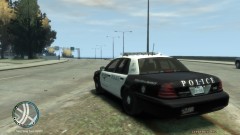
FWPD unit 1092 waiting for a speeder.
