KM964
Members
-
Joined
-
Last visited
Everything posted by KM964
-
I do have an addon pack from Tactical Donut installed, they weren't numbered in that exact way but it was along those lines. Looking at OIV, they are sheriff 3/4/5/21/31/51. I have those EXACT names in the agency file.
-
This is an issue with the various agency.xml files that I use with 0.4. Every other one works just fine, except for BCSO. If I put sheriff3/4/5/6 in the XML file no matter what sheriff and sheriff2 respond, not the others.
-
Bumping because I'm still having this issue and I haven't gotten any answers. Research brings up absolutely nothing. Anyone have any ideas?
-
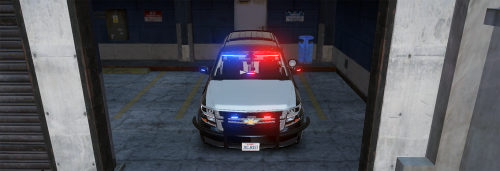 These can be applied to ELS cars too....
 -
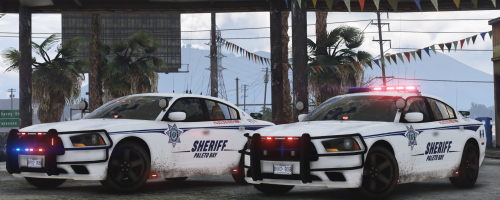 I really hope you put more cars in this pack, it's so nice to finally see a Tarrant County-inspired skin pack.
- 14 comments
- 1 review
-
I've been having an issue with custom backup lately. The backup I have listed for BCSO is addon vehicles, however no matter what I do only sheriff and sheriff2 respond. What do I need to edit? I've edited the custom agency file but it doesn't work.
-
Basically as the title says, every police car I drive acts like it's drunk. For example I could be going over a curve and when I try to turn right, nothing happens and I fly off the cliff. Or I could be turning left on my Xbox controller, and the car won't turn until two seconds later, and even then it only slightly turns. And just last night, I could not turn my car to the right at all. What should I look at to remedy this? The cars act normal when I don't have LSPDFR loaded.
-
So a weird bug I'm having. During routine patrol as a sheriff in Blaine County I have seen vehicles spawn outside of their jurisdiction, for example Sandy Shores and Grapeseed PD will spawn in Paleto Bay. Is there any way I can adjust it to have the cars spawn just in their respective jurisdictions?
-
Worked like a charm, thanks again.
-
Awesome, thanks for that. Do you happen to know how I would add the uniform I linked? And would I assign it the same way?
-
Hopefully this will be my last post in here for awhile. I actually have two questions. First question, how do I assign a different uniform to a different agency? I'm wanting to have my units in Sandy Shores and Paleto Bay wear the default LSPD outfit - currently they wear a BCSO outfit. Second, how would I actually go about adding a uniform to EUP? Uniform in question.
-
So, I'm finally getting the hang of 0.4, but a few more hiccups. I recently added some new uniforms from this pack, and have seen most of them work when choosing outfits for my custom character and with responding backup. However, when choosing an outfit for the LSPD it appears that instead of the uniform from the pack that I linked, I have the vanilla uniform. Responding LSPD units also wear the vanilla outfit, without the patch on the sleeve. What file do I need to edit to have the correct uniform spawn and be selected? Also, I plan on adding uniforms for Sandy Shores, Grapeseed, and Paleto - how would I go about adding said uniforms and editing the agency files to have units spawn in those uniforms?
-
Just a suggestion, I'd ditch the PS4 controller and get a wired Xbox controller. I used to use my PS4 controller on GTA V for PC (with LSPDFR) and had lots of mapping and compatibility problems. Mine was just $30.
-
Yes, vehicles I spawn myself work fine. Just tried it out again, and whenever I spawned a vehicle to drive I flipped the lights on just to test. Requested for backup from both LSPD and LSSD and they responded full code 3. Weird.
-
Yet another problem with 0.4. Whenever I request for code 3 backup via the backup menu, I hear the sirens but am disappointed to not see the lights when they show up. Isn't code 3 both lights AND siren? 🙄 What could be causing this? The cars in question are ELS-enabled.
-
Are the taillights lighting up? If they are, go to OpenIV > Tools > ASI Manager, and uninstall ASI Loader and OpenIV.asi, then reinstall them and restart your computer.
-
I've finally managed to get 0.4 running, but it is literally one problem after another. This one however is pretty annoying - when I call for backup I get the officers on scene but they're wearing plain clothes. Any idea what could be causing this? I have EUP and the menu installed.
-
-
-
-
Right here might be your problem.
-
 Apparently not compatible with the new update of the game, and will need to be updated too. My game doesn't crash when RAGE loads them, it just says that the current script version is incompatible with the game version and won't load. I also use a few other of Albo's scripts and I get the same message with those too.
- 1,081 comments
- 166 reviews
-
-

- 2
-
-
-
-