


nova2727
Members
-
Joined
-
Last visited
Everything posted by nova2727
-
 It’s a shame you can’t talk to dispatch like a normal one instead of having the old dispatch come over again
- 186 comments
- 4 reviews
-
-

- 2
-
-
-
 yes i dont use compulite anymore....this mod is far more enjoyable than compulite ever was and with custom backgrounds.....custom charges....custon icons you can make this as you want
- 256 comments
- 16 reviews
-
-

- 1
-
-
-
I think nve natural vision evolved the graphics mod has extra files one is a trash remover
-
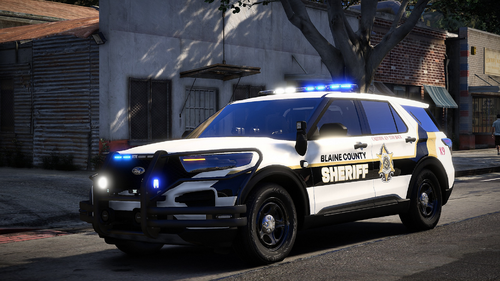 You can replace yourself go into the dlc vehicle rpf go to the vehicle you want then export to desktop then the desktop version rename to police police2 etc
 -
-
 Personalize Your Mobile Data Terminal: PDComp Custom IconsTake your immersion to the next level by customizing the desktop environment of pdComp. Whether you want to match your specific agency's branding (like LSPD, BCSO, or SAHP) or just prefer a more rugged, tactical aesthetic for your rugged laptop interface, replacing the default application icons is a straightforward process. Icon Installation DirectoryTo install your custom icons, you need to place your new image files into the dedicated assets folder within your LSPDFR directory. Ensure your icons are saved in .png format (preferably with transparent backgrounds) and move them to the following path: Note: Depending on your specific installation, the folder structure might use lowercase (lspdfr/pdcomp), but it will always live inside your main GTA V Plugins directory.
 -
in future update is it possible to move the icons as they are stuck in one possition.it be great we can move to desired location on pd computer
- 256 comments
- 16 reviews
-
-

- 1
-
-
-
-
Do you have a wardrobe file have a look in there to see what district your using if you have too many departments it will crash eup menu try removing a few departments then see how it goes.. make a backup first
-
 I have noticed the they spawn in front of you is there a way to have them spawn off screen or in traffic… it kills the immersion when they appear in front of you spawning
- 28 comments
- 2 reviews
-
-
-
-
-
-
-
 Amazing mod. Will it be possible in future to add more charges and citations to the mdt
- 83 comments
- 7 reviews
-
will this work with stop the ped as most of us still use that....also do we need to delete compulite
- 83 comments
- 7 reviews
-
All working now I’ve tested the faulty downloads files and now they all seem to work no network error
-
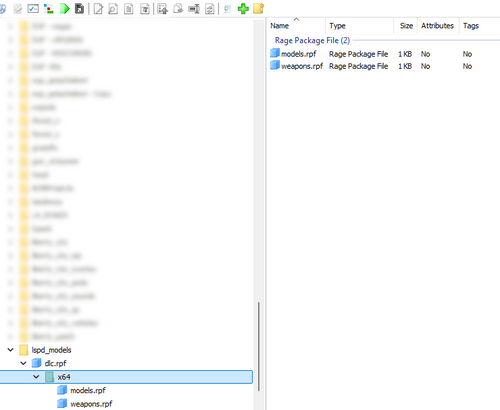 There’s one called modding look on lspdfr it’s for only vehicles any vehicles
 -
 Something like this Maybe it does need to flash just red and blue light that’s on or off with keybind
 -
 I would not install this at the moment I’m sticking to original siren cutoff extender
- 20 comments
- 1 review
-
-
- 1
-



