




K4te
Members
-
Joined
-
Last visited
Everything posted by K4te
-
PeterUCallouts - as united mentioned above; WildernessCallouts - keep eye on it, last update at 2019 so it can cause problems too; Better EMS - remove it, it's outdated and cause problems (you can use instead Ultimate Backup); 686 Callouts - it's ok, stable plugin (just remember to update to newest version); Custom Backup - as united said; Crazy Callouts - should be fine (just remember to update to newest version); Super Callouts - it's ok, stable plugin (just remember to update to newest version); CalloutManager - remove it, it's outdated (instead you can use Callout Interface);
-
Idk that you need ScriptHookVDotNet for this plugins but if you need it for smh else then I suggest install it correct and also use this version cuz others likes to crash game and cause problems. Afaik grammar police have included status features so if your game still gonna crash try to temp remove StatusMenu
-
Hi, yeah send some screenshots and logs
-
Hi! Sorry for that you had to wait so long but I was rly busy First of all - files like CalloutInterfaceAPI.dll, IPT.Common.dll, PyroCommon.dll and RawCanvasUI.dll must be at MAIN GTA5 FOLDER, not in gta5\plugins\lspdfr. Second thing: remove Callout Manager - it's outdated + u have CalloutInterface Third thing: if game still crash after first 2 steps then try also temp remove: NewCallouts, Lore Callouts, Regular Callouts, Swat Response Callouts
-
Rename mods to _mods and check if game gonna launch. Also make sure to use newest RNUI (this have to be in MAIN gta5 FOLDER)
-
They don't need to cause instant crash but for example after few minutes. Is this a solutions that will let you launch game? We will see - there can be smh else what can cause problem but we need to check every possibility way
-
Attach screenshots of your MAIN GTA5 FOLDER
-
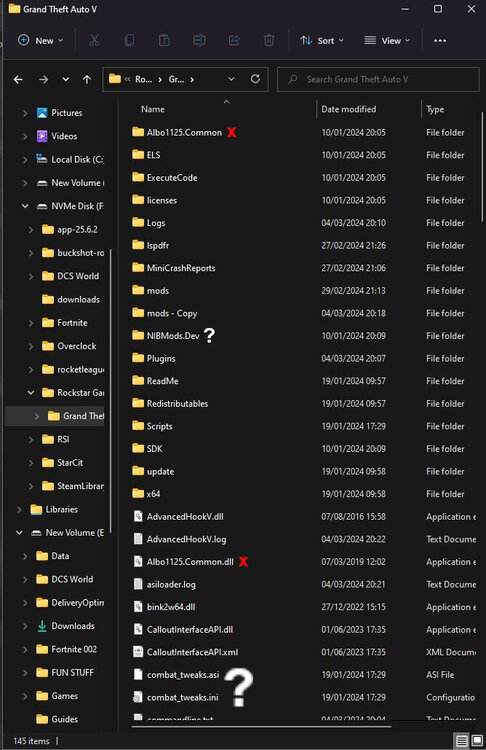
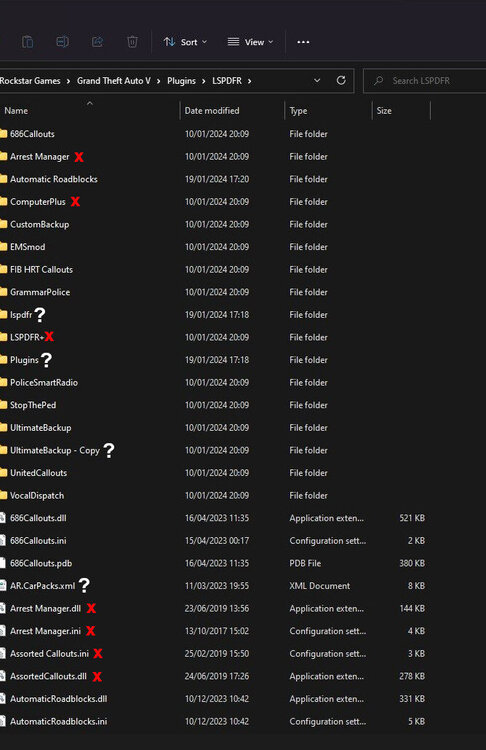
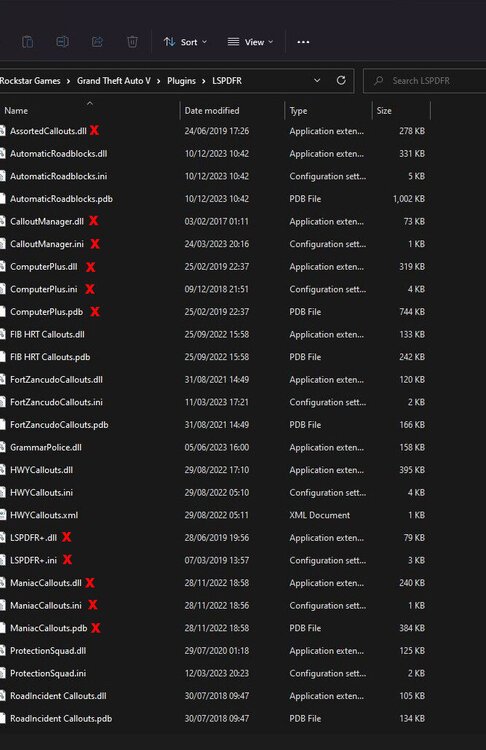
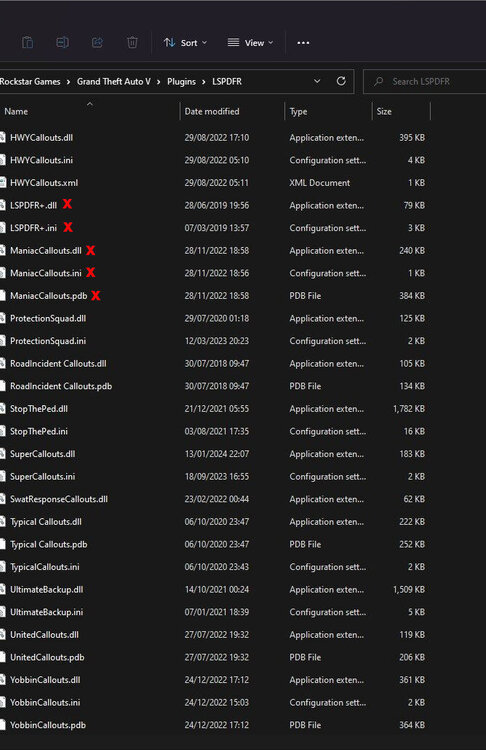
X - files/folders/plugins that you need to remove (outdated/don't work with current version of lspdfr etc) ? - files/folders that I don't understand what they are doing there/what it is also: - if it's not done yet then update gameconfig, heapadjuster, packfile - temporally remove this plugins and after we find solution then you can add them back (but add them 1 by 1 to see if smh more of this won't make game crash) : custom backup emsMod FIB HRT Callouts United Callouts Fort Zancudo Callouts HWY Callouts ProtectionSquad RoadIncident Callouts SwatResponse Callouts Typical Callouts Yobbin Callouts
-
Well.. you played for smh like 3 hours (if I didn't missed any crash during this time) what is really great time and I doubt there is possibility to fix it.. there will always persist some issue that finally gonna crash - sometimes 1 plugin, sometimes lspdfr plugin and sometimes whole game
-
okay, you can add it back then and tell me - have you edit some of .xml files in gta5\lspdfr folder? I see you have more police stations etc
-
UB can stay. but I would like to see if smh change if you temporally remove grammar police
-
Next time attach RagePluginHook log file (.txt or .log file in your MAIN gta5 FOLDER) instead this but this time we have luck that this logs give us answers update: gameconfig, heapadjuster, packfile if this won't help then you have 2 options: locate your mods and try fix it / remove it / rechange back with original files - do it 1 by 1 to find which one cause issue if it's impossible to find this mods then you have to delete whole mods folder and start with mods from 0 - this time add them 1 by 1 to check which one cause problem
-
Can you send here link for this car? Also attach screenshots of: carvariations.meta handling.meta vehicles.meta
-
remove Better EMS - it's outdated + you have installed UB and STP that have similar futures reinstall ParkTools correctly - there should be readme file in .rar/.zip of this plugin how to install it (or on plugin page) also: did you made some changes in any .xml file?
-
earlier u typed that don't change anything.. ok - first try to update gameconfig, heapjuster and packfile if this won't help then you have 2 options: locate your mods and remove them/rechange back with original ones (1 by 1 mod and check after which one your game gonna start to work again) if it's impossible to find this mods - delete whole mods folder and start with mods from 0 (this time add mods 1 by 1 to see if game still gonna work)
-
yes, it only needs to be in main gta5 folder
-
Attach screenshots of your main GTA5 folder
-
Attach screenshots of your main GTA5 folder
-
Attach screenshots od your main GTA5 folder, plugins folder and plugins\lspdfr folder
-
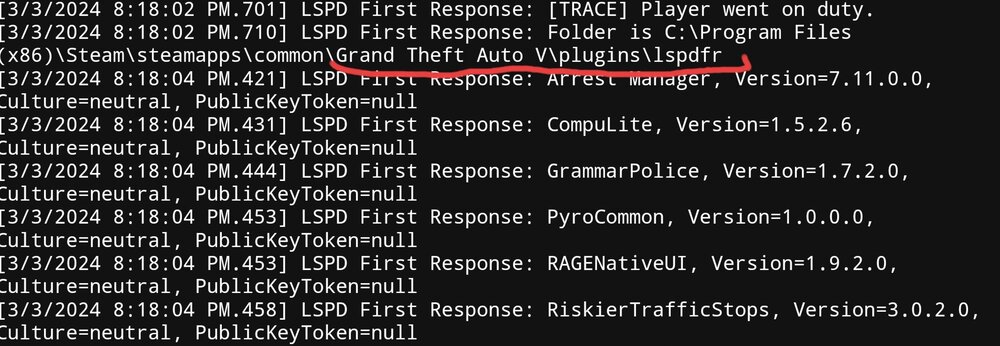
You have also them in gta5\plugins\lspdfr
-
Remove: arrest manager, traffic policer - albo mods are no more updated and they can make issues like this, afaik there is somewhere updated version of traffic policer but Idk where exactly Pyrocommon.dll and RageNagiveUI.dll need to be only in MAIN GTA5 FOLDER
-
Remove Better EMS - its outdated and known to cause problem like this + u have installed Ultimate Backup and Stop The Ped that have similar futures
-
Attach screenshots of your main gta5 folder
-
Attach RagePluginHook log file (.txt or .log file in your MAIN gta5 FOLDER) Attach screenshots of your gta5 folder
-
I only found this in log so check again .rar/.zip of this plugin and install this file (how to install it prob at readme file if problem still persist - temporally remove your custom files from gta5\lspdfr\data\custom (you can drag it to desktop etc) and check if this change something


