



.png.21c42c10539be5c9a4695b9f1f08fd95.png)
cherryaerie
Members
-
Joined
Everything posted by cherryaerie
-
Please attach your RagePluginHook.log from the main directory in a reply so myself or another person can help you 🙂
-
Try reinstalling/installing AdvancedHookV that comes with the ELS download.
-
Please attach your RagePluginHook.log from your main directory, which is a text document, in a reply so myself or another person can effectively help you 🙂
-
Go to update/x64/dlcpacks and open the patchday you are looking for, ensure edit mode is on, and look for the red banner on the top that will say "copy to mods folder".
-
It depends on what you are deleting, as all mods are different. For vehicles/clothing, simply find the item components. For plugins and the such, just delete the files associated with the plugins and the scripts. Anything deleted in the mods folder won't necessarily break your game, though if you have a mod that requires another mod to work, it might just do so. I would personally recommend finding the mods page and finding where it is installed, though instead just removing it.
-
Annoyingly enough, been looking around trying to find some and cannot find anything anywhere. I can find them for male peds, and can find them online for $20, though I am really not wanting to spend $20 on something so small and yet the fact I have 0 idea if I can use it on single player. I was eventually just going to do it myself but realized just how many things I need to modify. I've attached examples, it would be amazing if someone with EUP modification experience would do this for me. I simply do not have the time to try and find something to modify the textures of unfortunately like that, it would mean much to me! At this point, I have given up on the project or idea, unfortunately. Really not willing to pay $20 for them and can't find a proper texture.
-
It shouldn't turn off by itself. It turns off when reloading the LSPDFR plugin, initiating a traffic stop, or obviously going on a call. If you have a plugin like Grammar Police, make sure you are setting yourself as available. You need to either end the callout using the END key if you're playing complete vanilla LPSDFR or make sure you are actually on duty through plugins like Grammar Police and/or Callout Interface.
-
Try uninstalling LSPDFR and doing the manual install. You can find tutorials for 2023 on YouTube if you prefer a visual representation. Your log doesn't show any particular error. Does the base game load fine?
-
Can you add your ELS.log, RagePluginHook.log, and ASI.log from your main directory in a reply so myself or someone else can help you please?
-
Please attach your RaegPluginHook.log from the main directory in a reply so we can better help you 🙂
-
When going on duty, this is the default selection of weapons for some if not all the preset locker outfits, with the small change of each weapon. You can go to Grand Theft Auto V/lspdf/data and modify inventory.xml to contain the weapons you wish from the locker. Though I would personally recommend installing a plugin like Stop the Ped to have your Rifle/Shotgun eligible to be equipped when you need it instead of playing with the coding. In the spoiler, I attached an example of what you would be looking for and what you should modify (highlighted). Below are the components for each of the standard weapons. Make a backup before modifying this file though in case you do mess something up. Only add the bolded text, not the text before it. Carbine Rifle: <StunWeapon chance="">WEAPON_CARBINERIFLE</StunWeapon> Pump Shotgun: <Weapon chance="">WEAPON_PUMPSHOTGUN</Weapon> Combat Pistrol: <StunWeapon chance="">WEAPON_COMBATPISTOL</StunWeapon> Pistol: <StunWeapon chance="">WEAPON_PISTOL</StunWeapon> Tazer (Stun gun): <StunWeapon chance="">WEAPON_STUNGUN</StunWeapon>
-
All plugins are different, as some are LSDPFR dependent and some are RPH dependent, so there will be cases where plugins go into different locations. In most if not all plugin downloads, there will be a read me and should tell you properly where the plugins go. All plugins regardless will likely end up going into a plugins folder found in the main directory. Some plugins will also require other files, like ScriptHookV or ScriptHookVDotNet. There are various guides for visual interpretations and assistance on YouTube if you would like, depending on the plugin. For the stop the ped keybinds, you're weclomed to disable the conflicting keybinds in the LSPDFR.ini. Stop the ped uses the same interaction key (E) as LSPDFR to interact with stopped peds, or detaining them. Don't disable all of them though, just the ones it tells you conflicts. Conflicts just end up brining up double menus. Disabling all of them might bring you more issues compared to solving them, like entering your police garage or interacting with various things in the game.
-
Install CalloutInterfaceAPI from Callout Interface, or from the latest callout pack you installed that was integrated with it.
-
I am not quite sure what you mean by mission, but install UltimateBackup and its requirements. You can spawn a "team" of partners for whatever the purpose is.
-
Your ScriptHookV & ScriptHooKVDotNet content belongs in the main directory, not the scripts folder. Move all 6 files to your main directory and see if any of them work/load.
-
There are various things that a K9 is useful for, compared to that of the real world. When I am out patrolling, having an AI partner is sometimes beneficial, but there are a lot of occasions when I simply would like something much more useful in certain callouts. I personally use my K9 for the many foot pursuits, drug busts, and felony stops I am on, as it enables the ability to search for contraband in a vehicle and the such. There are callouts that are also dedicated to the use of the K9 too, for like drug detection, foot pursuits, and what not, but that's the basics of it. If you like to take your LPSDFR gameplay to some immersive level, I would personally every once and a while use a K9. Simply getting the most out of them would be doing ALPR patrols to detect subjects with warrants, some sort of Gang/Narcotics unit patrol, barricaded subjects callouts (such as next victim known, hostage negotiations, etc.), or just general felony stops. Also try giving your K9 a name, while it's not important at all to the gameplay as you can't exactly be vocal with your K9 as you would officers with something like Grammar Police, I find it fun every so often to act like I am calling my dog "Vi" (her names Violet) every time something happens, as I more as think its FIveM at times, but that's just me. Not everyone may do that and might even disagree with me. Short of it, get the right callouts, traffic stops, or patrol division (obviously that uses a K9) and a dog would make something mundane much more immersive. As unfortunate as it is, we're limited on what we can do from the real world to LSPDFR like explosives detections and search & rescues.
-
They added a Mission Row MLO Addon Map, found here. There are install instructions on the download, and there are a few tutorials on how to add it on YouTube if you wish to have a visual representation.
-
Here are some general ideas for you, since it is relatively unique for this to occur. Without the log message, I can't say for certain which, if any of these, will help you resolve the issue. Try step 1 first, as it is the most likely cause. Ensure the items listed in the error are listed in dlclist.xml (mods/update/update.rpf/common/data). You can find the base-game dlclist.xml in update/update.rpf/common/data and replace the modded one with that, though you will need to add all your addons back to this one. Ensure the patchdays are located in your mods folder (mods/update/x64/dlcpacks) and/or in EUP, and EUP is installed correctly. If you use the LML install version, try installing it using the .oiv version. Also ensure you have either Law & Order / Serve & Rescue installed, as it could simply be trying to look for missing files. Try removing the DLC's from your mods folder and base game and verifying your game files. There could be a corrupted archive.
-
You will need to add them manually for the game to recognize them as AI vehicles. Police 3 should already have been added to your garage, and should be found under the LSPD category. The bike is found under SAHP automatically. Though because police-police4 are considered LSPD vehicles, they aren't going to show under the SAHP category. Though you can simply change that. Go to Grand Theft Auto V\lspdfr\data and find dutyselection.xml. Open this file either with notepad, or a source code editor works if you have one (such as Kate as I am using in the pictures) though that is not required. Just open it with notepad. Go down to the bottom, where you will see a few agency selection vehicles. I have added two lines of code to add between the <VehicleDescriptions> arguments, found in the spoiler. If police3 is already shown, do not add the line, simply change "lspd" to "sahp". Arrows on the screenshot show where you can add them. -------------- For adding it to agency/AI response, find agency.xml in the same pathway. Again, edit it. police3 should already be here, but I have added the proper coding in the below spoiler if it does not happen to be there. Here, you will be finding <Vehicle>police</Vehicle> in the loadout area. Screenshots are attached to show you where to add the coding I have provided. Again, if police3 is here, do not add it. Simply add the police4 instead. Make sure both lines are added as new lines, not on the same line as other code, or you can risk crashes.
-
Ensure Damage Tracking Framework is installed correctly. Installation instructions are in the description of the file, and likely in the readme of the download.
-
Ensure the files of the old models are completely deleted and the files of your new models are named correctly. There is a possibility when you were dragging and dropping it was not replacing the old models. If you installed the old models to another patchday, go to that patchday and safely delete the old model files.
-
For someone to even try to check your log, you need to attach the file 🙂
-
If the Volvo mod you wish to install is in the correct format, i.e has the correct files, then yes. Just go to the place where you installed the X5 (police2) and drag and drop the files. All the files should be police 2, and not police3, police 4, what not. If the Volvo is a 3 or something along the lines, simply change only that number to a 2.
-
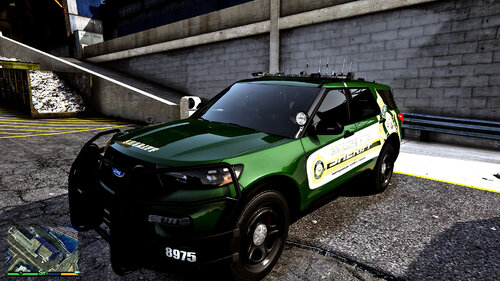 Absolute fan of these models. There are hardly any free relatively decent looking K-9 models, so I have been just making my own liveries and calling models without the K9 cage a K9 vehicle. I am sure K9 Violet enjoys 🙂
 -
Both mods folders are the same essentially, though OpenIV allows you to see the contents of the files. Any changes you have done to any file within the mods folder could be causing this, such as changes to your update.rpf files (typically the culprit). Unfortunately with mods there is nothing exactly saying what the file is that is causing the issue. If there are any mods that may need to be updated that became broken after your update could also be the culprit, but again there isn't necessarily any telling unfortunately. My simple recommendation would be to undo any changes you have done recently to the mods folder, through OpenIV.
.thumb.png.2dde6de0042b025b695ed82f6d2c1e50.png)

