



.png.21c42c10539be5c9a4695b9f1f08fd95.png)
cherryaerie
Members
-
Joined
Everything posted by cherryaerie
-
Your RagePluginHook.log is a text document, and may be titled "RagePluginHook". If you do cannot find this, please share screenshots of your main directory and I can try to highlight which file for you, if it is there. Meanwhile, here are some other things you can try; Run RPH as an administrator. (2 methods, both work the same) Click RPH and immediately hold left shift key to open the settings. At the bottom, click "restart with elevated privileges". Right click on RagePluginHook.exe and click "run as administrator". Add your Grand Theft Auto V folder and RagePluginHook.exe as an exception to your antivirus. Depending on which antivirus you use, this may be different. I have added instructions on Windows Defender, though it may vary depending on if you are using Windows 11 or Windows 10. Simply search the internet on how to do this for other antivirus software. Add an exception to Windows Defender
-
Rename your mods folder to _mods and see if it loads. If doing this loads, you have an issue with your mods folder (likely update.rpf, though its uncertain). Undo/uninstall any recent mods/changes you installed. If this does not solve it, verify the integrity of your game files.
-
If none of these work, please reply with a RagePluginHook.log from your main directory if you have one. Rename your mods folder to _mods and try again. If the issue no longer persists, your issue lies in your mods folder. Undo any recent changes. Update RPH, RageNativeUI, and LSPDFR to the support games version. You can check these by opening the RPH settings. When launching RPH, click and hold left shift and look at the bottom left of your screen. This will tell you the game version, and if it is supported or not.
-
Please attach your RagePluginHook.log from your main directory in a reply so someone can effectively help you 🙂
-
Update RageNativeUI.
-
I am not sure if you actually got this solved, as you marked Cyans moving response as a solution, which doesn't really indicate anything. If you did get this solved, then ignore this. If you have installed any weapons mods, attachments, or sounds recently, try removing them, specifically anything involving a "flashlight". Your game is trying to load and give you a 'weapon' that it cannot load/find. If that does not work, here are some other things you can try; Rename your mods folder to _mods and see if the issue persists. If this does not crash your game doing what you were doing, then the issue lies with your mods folder. Undo any recent changes or installations you have made to it. Move any files from Grand Theft Auto V/lspdfr/chars to another location and try loading again. Undo any changes you have made to the inventory.xml in Grand Theft Auto V/lspdfr/data Reinstall the Grand Theft Auto V/lspdfr folder from the LPSDFR manual installation download and load the game. This will wipe your character data and other presets if you do not back up any of those files. Uninstall and reinstall LSPDFR as a whole using the manual installation.
-
Update RageNativeUI. Also when launching RPH, hold in your left shift key to open the settings, change the "Plugin Threshold Timeout" to 60000, this is unrelated but good to have in the future to prevent issues. ---- ¡Aquí hay una versión en español de las instrucciones anteriores para usted! Actualizar RageNativeUI. Además, al iniciar RPH, mantenga presionada la tecla Mayús a la izquierda para mostrar la configuración, cambie el "Tiempo de espera del umbral del complemento" a 60000, esto no está relacionado, pero es bueno tenerlo en el futuro para evitar problemas.
-
Disable the Realistic Weapons System in stop the peds menu (G). Having this enabled will only allow you to have the Pistol, Stungun, and Flashlight without needing to go to a vehicle to obtain the Rifle or Shotgun.
-
Did you launch the game with RPH loaded? Can you reply with a screenshot of your main directory please?
-
I mean, they are making a 2024 Chevrolet Blazer PPV. Though its not as common, there are currently 2021/2020's in service. I don't personally see a traverse being a patrol vehicle itself, but maybe something like Camaros where they are unique to a specific division, or maybe a federal department. Though anything really is possible, like the fact NYPD ended up using Mustang Mach Es. Departments are trying to go EV, so I mean either are possible. Though me being me, I really don't see the 2024 Silverado being something that is brought into a fleet design wise, though I could be wrong. It is really based on performance, though I just don't see that being a thing.
-
Definitely has a unique style to it! Looking forward!
-
Please share a screenshot of your main directory and your ScriptHookV.log.
-
Sounds like a faulty XML for the vehicle. Reinstall ELS.asi and see if that works. If that doesn't, install the ASI manager through tools in OpenIV.
-
Make sure you are editing it in both pathways. In lspdfr/data; (regions.xml) Ensure <Zone>DAVIS</Zone> and <Zone>RANCHO</Zone> are under the LosSantosCounty region. (backup.xml) Ensure under the name "Los Santos County", agency "lssd" is defined for patrol unit. (You can interchange this for state patrol, swat, etc) (dutyselection.xml) Ensure your police vehicle (ex Sheriff2) has a agency reference of LSSD and has the vehicle name. <Description name="Sheriff Cruiser" fullName="Vapid Police Cruiser" agencyRef="lssd">sheriff</Description> In lspdfr/data/custom (if you have this from Jurisdictions+); (agency_lssd.xml) Ensure your vehicles here have a spawn chance equaling to 100 (ex 80 and 20) and have the sheriff vehicles. In plugins/lspdfr/UltimateBackup; (customregions.xml) Go to "CountyPatch" and on the zones, it contains DAVIS and RANCHO as the zones. Do this to both "CountyPatch" labels. (defaultregions.xml) Under the Los Santos County argument, ensure both sheriff vehicles are selected under the vehicles (spawn chances should also equal 100) If that doesn't end up working, you can try switching your Jurisdictions+ map OR you can swap out whatever departments vehicles is patrolling that area, though that affects more than that area specifically.
-
In default regions, make sure your vehicles are only sheriff vehicles and not police slots. Also increase the chances from 18 (default) to 50. Should look like <LosSantosCounty> <VehicleSet spawn_distance="150"> <Vehicles> <Vehicle chance="50" pax="1" pax_chance="40">SHERIFF</Vehicle> <Vehicle chance="50" pax="1" pax_chance="25">SHERIFF2</Vehicle> </Vehicles> If you are still confused, there are custom ones you can try downloading for UltimateBackup, as I was completely unaware of the fact you were using that.
-
If you have no already, remove DAVIS and RANCHO from the "LosSantosCity" portion.
-
Install RageNativeUI
-
Please attach your RagePluginHook.log to a reply so myself or another person can help you 🙂 Also attach screenshots of your plugins and plugins/lspdfr folders. Ahead of time, ensure these plugins are in the correct pathways and you have the proper requirements for each.
-
Make sure the car you are trying to use this with are ELS compatible and have the ELS file (xml) installed in pack_default. Also make sure your ASI loader in OpenIV is installed and active. (Open OpenIV and go to Tools -> ASI manager) While you're here, ensure all 3 are installed. Also ensure you have the proper ELS requirements, like ScriptHookV.
-
Ensure ELS as a whole is updated and remove any VCFs (.xmls) from your pack_default folder and see if the issue persists.
-
Please attach the RagePluginHook.log from your main directory, which is a text file, so myself or someone else can efficiently help you 🙂
-
Rancho and Davis are defaulted as "Los Santos County Sheriff", though since there is no default LCSO vehicles, it uses default BCSO vehicle slots. One thing you can try doing is editing your regions.xml to contain what "Los Santos County" is, though you do need to know where you want them to spawn. Go to Grand Theft Auto V\lspdfr\data to find the file. There is already a list of preset regions for you.
-
Ensure your LSPDFR folder and the LSPDFR.dll is something your system user can access, though it is also good to ensure that the full GTAV folder has access. Right click on either of these first, and open properties. You should from there see a security tab, go to permissions and modify the permissions to all, and click save. You can then try to run this again. Also ensure you installed LSPDFR via the manual install.
-
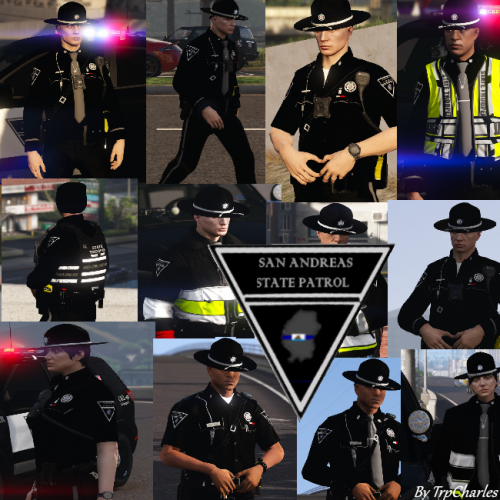 One of the very few developers I know of that makes content for female EUP for the current version of free EUP (9.3). While yes, there is room for improvement I won't bother reiterating again as said on many other pages by him, I for one love the ability to have something customizable I am not having to pay so much money for, especially just to have something fit a ped.
- 14 comments
- 4 reviews
-
 Love the unique aspects of the callouts implemented, much more backstory and not the same callouts everyone seems to have nowadays. Taking suggestions for callouts and making them into your own little creative world was a great move on your part, and I look forward to this callout packs development!
.thumb.png.2dde6de0042b025b695ed82f6d2c1e50.png)


