.png.21c42c10539be5c9a4695b9f1f08fd95.png)
cherryaerie
Members
-
Joined
Everything posted by cherryaerie
-
If when running RagePluginHook it gives you the option to "allow" the blocked file, click allow. The file it is blocking is a file that RPH creates to "hook" to the game. If it doesn't give you this option, go into Windows Settings -> Privacy & Security -> Virus & Protection -> Protection History -> Allow the file it flags
-
Those of which are not loading are either outdated, missing a dependency, has an outdated dependency or are simply discontinued in terms of updates. Some recognizable ones by reading your log are; 686 Callouts (Outdated/Outdated Dependency) UK Callouts (Outdated, not quite sure if discontinued based on the files comments) Airport Callouts (Outdated/Discontinued) County Callouts (Likely outdated, not 100% positive) Typical Callouts (Outdated) Custom Pullover (Outdated/Outdated Dependency) I could very well have missed something, though anything not currently loading is either outdated, which you can simply update, or discontinued.
-
I unfortunately do not think I can respond back to you and engage in a conversation in Spanish as much as I would love to help you in Spanish because of moderation restrictions. I will attempt to guide you in my response to the best of my ability in hopes you understand. Your Antivirus/Firewall likely flagged LSPDFR or one of its dependencies as a virus, which it blocked to protect your computer. This is known as a false positive, which is stated on the LSPDFR download page. Assuming you are on Windows, you will need to add your Grand Theft Auto V folder to an exclusion. You can do this by visiting the following pathway on your computers settings: Windows Settings -> Privacy & Security -> Virus & Threat Protection -> Manage Settings -> Add or remove exclusions -> (Add your Grand Theft Auto V folder here) -> Save -> Relaunch RPH/LSPDFR If you are using a different Antivirus Software, you will need to search how to add an exclusion to your antivirus. Simply search this via Google or another browser.
-
You seem to be missing a required file for LSPDFR to work. Ensure you have the latest version of LSPDFR and RageNativeUI along with the required files in the downloads. If you have mods such as ELS, ensure to update ScriptHookV as well, though that is not necessarily part of your error.
-
All I have seen is an issue with your ambient game blips. In addition to the below instructions, ensure all your required files are updated. Grand Theft Auto V\lspdfr There, find lspdfr.ini (LSPDFR configuration file) Search for Main.DisableGameBlipHiding Set false to true Save and relaunch.
-
I personally would recommend re-doing your "custom" vehicles.meta file if you have made a lot of changes. It's a lengthy process, though you seemed to make a lot of changes especially to handling IDs. If you only made a few changes like just the handling IDs, I would recommend running the game per ID you change. Otherwise like Gelse said, it's difficult to try to navigate your enter file and pinpoint the exact issue with it being so much code.
-
Attempt to remove the Window Tint using the temporary measure. I recommend installing SimpleTrainer and removing the window tint that way. Again this is only a temporary measure as you exclaim you cannot find the permanent method I earlier mentioned. You could use another menu use, though I cannot confidently tell you how to navigate that menu to remove the tint. With simple trainer installed; Navigate to Vehicle Options -> Vehicle Mods -> Window Tint. Navigate the menu up/down with the number pad 8 and 2 keys. Use the number pad 4 and 6 key to navigate the Window Tint Option (Ensure you have the numlock key on) When you find the window tint option, cycle through the window tint using the buttons stated in the previous step. This should not be whatever the current tint is. If this fixes your lights and you would like to permanently fix it without needing to change this setting everytime you open the game, refer to the previous method. If you have difficulty finding something, please let me know what it is you cannot find.
-
You may be missing required files, or having corrupted files that the game is having issues loading. Here are some things you can try: Launch GTAV without RPH or LSPDFR loaded. If this causes a crash, it is with the game. Verify the integrity of your game files via Steam or Epic Games Reinstall LSPDFR, RageNativeUI, and ScriptHookV. If you have any mods, temporarily move them to a new folder or rename your mods folder to _mods Ensure you add all the required files within the downloads. You could be simply missing one of those required files, or they may be installed to the wrong place. Remove any faulty or recently installed mods. You may have installed something incorrectly that LSPDFR is having complications with. Add your GTAV folder to an antivirus/firewall exclusion. (This is not likely) Search via Google depending on what antivirus system you have installed. Do not fully disable your firewall/antivirus.
-
There are various scripts that would do this, mainly for police addon-vehicles automatically without the need of editing files. You will need to find the vehicle file name you would like to add. (Banshee -> "banshee"). Using open IV, follow: Find propgroups.ymt in: mods -> update-> update.rpf -> x64-> levels -> gta5 Edit propgroups.ymt and search for VEH_RICH Here, add a new line. I have added an example in the spoiler below of what you should copy+paste should you need it. Ensure to save the file.
-
I am not quite sure the difference between LML and downloading it manually. Though if it makes it easier for you to install, then you are welcomed to go for it. Though just make sure the files are going in the correct locations. Your vehicles should always go in your latest patchday (within dlcpacks). OpenIV is a definite requirement for any vehicle installs. You will not be able to find the correct pathway for the vehicle files without OpenIV. Gameconfig is optional depending on what you are installing, though it is really only recommended/required for addon vehicles, props, or more/less traffic. All it does is increase the memory limits of your game to allow such things. Though again, ELS only requires an updated ScriptHookV, in which then you should have an updated LSPDFR and RageNative.
-
Sounds like you need to update ScripthookV, which ELS depends on to work. Install the v2944 updated version here and try utilizing it again. It is also unlikely, though ensure your scroll lock key (SL) is not active. In other words, ensure there is nothing saying ELS is locked/disabled.
-
When installing that pack, install the vehicles.meta file into the same pathway as previously stated (found in the data folder of the download). Follow the install instructions for other files in the installation.pdf provided in the download. Pathway for meta file: mods\update\update.rpf\common\data\levels\gta5 Also ensure you have ScripthookV installed to the newest version when you reinstall ELS itself.
-
This is a false positive likely previously stated. If you are unsure or skeptical, you can run a scan via Windows Defender by visiting Microsoft's Support Article on how to do so, assuming you are on Windows. Though, most antivirus software flags LSDPFR and the such as a virus, which is stated on the LSPDFR download page in an information notice. My advice would be to add an exclusion to your GTAV main directory. Again assuming you are on Windows, you can do this by visiting Windows Settings -> Privacy & Security -> Virus & Threat Protection -> Manage Settings -> Add or remove exclusions
-
I personally use a simple game config file as I use addon vehicles. If you don't utilize addon vehicles, then it is not much of a change, though it doesn't really affect your flow of finding a vehicle anyways unless you were to add a lot. I personally like more traffic, like 4x, though depending on other mods and the such, you may have conflicts or some... interesting vehicle behaviors. Download the other requirements as stated in the description (heap and packetfile) and start off with a low amount and gradually go higher as you please. https://www.gta5-mods.com/misc/gta-5-gameconfig-300-cars
-
This sounds a lot like you are have window tint on your vehicle, or tinted lightbars. Depending on the vehicle slot you are using (police, police3, fbi) you will need to search for different options, they are all found in the same location and in the same file. For the purpose of me helping you, I will be using fbi as an example. Assuming you already have a mods folder, which is always recommended, find vehicles.meta in the following pathway: mods\update\update.rpf\common\data\levels\gta5 Search for the vehicle slot using Control F or F3. A list of all the available slots are found below in a marked spoiler. You may need to retrace your steps to where you downloaded the vehicle mod into to find the correct slot, though the spoiler container is a hit/miss resort. Once you find the correct option, scroll until you find diffuseTint value = Change the value (that of whatever is in the quotation marks) to the value of 0x00FFFFFF Ensure to save. Another solution is to simply remove the tint in a trainer. Though this is temporary and will need to be done every time you wish to spawn the vehicle. If you still have issues, please reply with the link to the vehicle mod you are trying to use and I will likely be able to direct you to the correct slot.
-
This is not a suggestion in all fairness, though it simply looks like your window tint is too dark, also referred to as "tinted lights". Go to mods\update\update.rpf\common\data\levels\gta5 to find vehicles.meta. Search for "fbi" (or whatever slot it is, though that vehicle is defaulted to the fbi slot) in the file and scroll to find <diffuseTint value="{somevalue}" />. (Simply look for the diffuseTint option for that vehicle) Replace the 0x________ value to 0x00FFFFFF Another solution is to remove the window tint via a trainer, though this will only remove the tint while the vehicle is spawned.
-
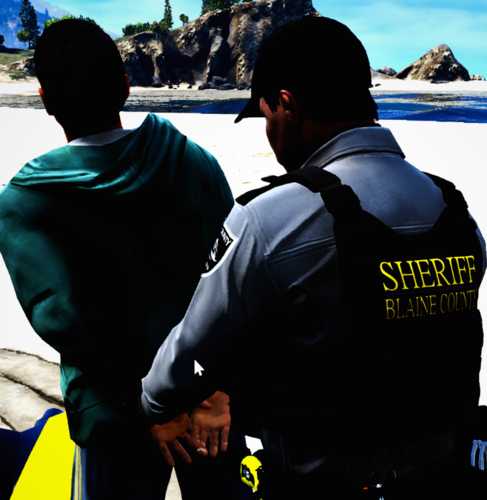 This is probably going to sound like such a weird, random, stupid question. Though, I was wondering what font you are using for the vests here? I was hoping to make female versions, though trying to find appropriate custom fonts that look relatively good is such a pain to do. I thought I would ask, nothing major or anything. I apologize for such a weird hassle of a question lol.
 -
.thumb.png.7b018185db2ef152e68c330015b2bf39.png) Though I already did such a thing because it was more regular trigger discipline, this helps much more than thinking about how fast I should be shooting without any such restrictions. I love the idea!
Though I already did such a thing because it was more regular trigger discipline, this helps much more than thinking about how fast I should be shooting without any such restrictions. I love the idea! -
 Patrols are much more immersive with something like this. With the previous version, I wasn't so big on having it as it was so simple and felt redundant, though I cannot stop using this after it's recent update. Absolutely love this!
- 450 comments
- 47 reviews
-
 I may be asking a bit much, was playing around a few minutes ago and went to pull over a bike, in which tried to ram my vehicle, but fell off instantly and went into insanity. I don't know if there is a way for you to prevent a certain vehicle from doing such a thing, but if that is something you could do, I would love to see it! If not I completely understand. 🙂
- 234 comments
- 32 reviews
-
An absolute game changer (no pun intended)! I personally love the need to have a reason to take extra precaution with how I approach vehicles on a traffic stop, though the randomness of other mods with the shooting aspect, not quite sure if there is a difference. Not complaining thoughh!
- 234 comments
- 32 reviews
-
-

- 1
-
-
-
I recall having this issue suddenly before so I figure I would relay it to you. If I remember correctly this is caused by a keybind in simple trainer or another trainer, although I am not quite sure the "power" of other trainers. While it seems frustrating, I simply fixed this with disabling the keybind option in "options" of simple trainer.
-
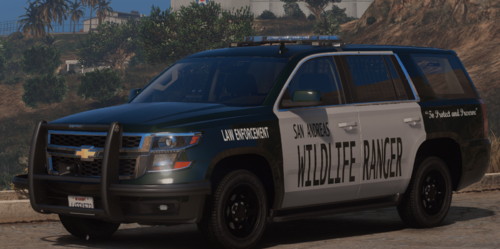 Currently in the works of making my own vehicle livery for this model, but I will say by far my favorite looking park ranger vehicle I have had in a long time. Job well done!
 -
I have a ton of doubts a modder would consider this, as it seems to be a trend, but there is simply little to no decently free-made EUP content that isn't outdated or simply PNGs that are left for me to figure out where to install them too. I would love to see more made, as I am sure the currently small female LSPDFR "group" is wanting. Everything I have found that is decently made that I am not currently using are paid mods, which I find simply ridiculous. There are some that say "I'll do it at some point", and then abandon the project and hasn't been seen for 3 years. Please! Show and do more female-based textures even!
.thumb.png.2dde6de0042b025b695ed82f6d2c1e50.png)


.thumb.png.7b018185db2ef152e68c330015b2bf39.png)