


GTAbear
Members
-
Joined
-
Last visited
Everything posted by GTAbear
-
Often it is your timeout What value do you have click cogwheel and check it should be 60000 Also how do you launch? This https://www.lcpdfr.com/forums/topic/125624-rph-does-not-open-game/?do=findComment&comment=728667 works best
-
Do you have an assembly-statement Just after your using-statements Mine is: [assembly: Plugin("BaseGame Police Utilities", Description = "Features for more realistic gameplay", Author = "mB")] Mandatory element! -But often forgotten. Also, testing plugin should be done on a vanilla GTAV without any other plugins, do you do that? Your log is irrelevant, if you have issue you need to show code.
-
There are issues with money in LSPDFR. The money you see is not really available to your police-avatar, they belong to the game-character that you used as you enter LSPDFR. I have given up on getting GTA-money for my police-avatar, and simply made my own money for LSPDFR
-
If STP cant do what you want let me know if you want to see my lame method
-
Unfortunately, no. AI-cars drives from A to B then to C eg they just drives around and they can be made to PIT very nicely, i made that in code, and thought that i had fixed the PIT scenario ..But Pursued cars are completely different. They are controlled with 'showers' of directional and speed control commands by the base-game-engine. It means that if a pursued car is forced into a different direction it will imediately be commanded back on the chase-course by the game-engine, that is what you feel like 'being heavy'. So real physic PIT where one car uses momentum to spin another car around, that cant bee done. I have made a pitiful version where the chased car is thrown into a 90 dg directional change, but that is done with a press of a button, so not at all realistic, but by all means.. It feels a bit like a PIT. I can shoot a short video and show what it is if you are interested, just let me know.
-
You have added some plugin that mess things up. If you only have added one plugin then its not that difficult, un-install it again! But if you have added many and also simultaneous, then it can be a drag to find a faulty plugin. If only installations was done in singleton fashion, help-requests would properly be reduced with 79+% Read https://www.lcpdfr.com/forums/topic/139769-lspfr-goin-to-black-screen/?do=findComment&comment=776090
-
No that is not the right log Post the one in GTAV/ Post it on RAGE-Discord I believe the mods there are the only ones that has an updated insight in outdated or faulty plugins But DO attach the right log. The 'culture' on that Discord can be a 'bit' harsh.......
-
Surprisingly this has been said before, but the whole GTA-franchise is about simulated driving of powerful cars. That type of cars does make wheel-spins, when you accelerate. Can it be avoided..? Yes, a pugin that simply set the fw speed to n-km/h. As you accelerate it will be silent with no spinning wheels, its easy, i can give you the code, or i can write you one, but really........ Is it that important??
-
Unfortunately there is no listing of current state of plugins You can visit RAGE-Discord post your GTAV/ragepuginhook.log, and ask if you have outdated / problematic plugins.
-
What about default police-vehicles? If they are fine there is an issue with that DLC vehicle
-
Do you have any issues if you only use your pc for Like surfing on youtube or similar Do you have any issues if you do not play LSPDFR but only GTAV? When your pc freeze, try if you can activate either win-key or switch to desktop with ALT-TAB. If either is possible, you should be able to break the freeze, by rightclicking your taskbar Then Select Task Manager | Processes <browse to GTAV> Rightclick it Select End Task At least that should make you avoid to have to re-boot..
-
What? If you do not activate RAGE, but just enter story-mode, there are no ways for RAGE to show you a popup for a crash?!??! If RAGE is not running, You wont get that message So .. Do you activate RAGE or do you ONLY go into Story-mode? What if any popup is shown when you enter ONLY story-mode? -Surely NOT anything from RAGE....
-
Either take a list to of your installed plugins the good people at RAGE-Discord-server, or uninstall all plugins, then try base LSPDFR without plugins. The reason for getting this problem is multi-installation of plugings without testing inter-compatibility between the plugins, and or between current version of LSPDFR. Each update of LSPDFR may ..MAY make one or several plugins have issues. If the dev of the plugin no longer maintain the plugin, you will have a crash or a hang or other issues. Most often posting your RagePluginHook.log here or at RAGE, will result in advise of either un-installing or updating some plugin(s). I have given up on having up-to-date knowledge .. It could be a good spot here for some pointers for Best-practice in regards to installing plugins in general: 1) Dont install random found "cool" plugins. Only install plugins from trusted sites -like the one here. 2. Search for other peeps comments on plugins before installing. 3. Never install more than ONE plugin at the same time!!! 4. Always test game-functionality thoroughly (for hours) after installing a plugin BEFORE installing ANYTHING else!!! 5. DO read any and all instructions inside a plugin-download ALWAYS before installing -Most have a readme and an INI.
-
This is called key-conflicts, and is almost always a result of installing multiple plugins. The solution depends on the installed plugins having user-configuration through INI-file setup. You need to look for key-conflicts between the plugins you have installed, and the key-setting for default LSPDFR. Since you have this as a new issue, the best candidate for the problem is the the latest / newest plugin you have installed.
-
Do you have any plugin loaded? Post your GTAV/RagePluginHook.log here
-
You should not just be Micheal. If you are, then you are only in Story-mode, and has yet to startup RAGE. Only after you have done that, you will have LSPDFR loaded. The avatar of Micheal should then change to the avatar you should have build in side LSPDFR (Did you build one???) I link you to the fail-safe modus for starting RAGE from desktop Let us know if you still cant activate LSPDFR when you follow that guide: https://www.lcpdfr.com/forums/topic/125624-rph-does-not-open-game/?do=findComment&comment=728667
-
Afaik there is no plugin especially for that, but police-officers DO enter civilian cars and use them for chases IF their police-car is smashed up, that happens in LSPDfr itself. Partners will often leave your car during a chase provided that the fleeing car is temporary blocked or crashed. That officer will also use a civilian car if the fleeing somehow breaks free and accelerate. Again, that is native LSPDfr behaviour, with no plugins loaded.
-
It is in your GTAV-folder Eg the same folder where your GTAV.exe is It is build new every time you start RAGE, so if you sort by-newest-date, it is the first file in that folder:

-
What did they say? If no plugin is in need of updating, then some error is the problem. Then you need to trouble-shoot the whole installation. Guide: https://www.lcpdfr.com/forums/topic/139634-im-first-plug-in-crash/?do=findComment&comment=775591
-
Also: https://www.lcpdfr.com/forums/topic/125624-rph-does-not-open-game/?do=findComment&comment=728667 Works with all versions, (unless there are errors)
-
What i thinking is that this task needs a timeout or an other way to stop. public Task FightAgainst( Ped target, int timeout ) -should give you that. You may also try to stun the fighting Ped. Peds from callouts will surrender after a stun with stungun, but there is a problem.. STP does not allow stungun. That is one of the absurdities in STP, and one to remember: Dont ever set limitations on what Player can do just because your plugin is loaded. Dictator-ship through plugin is never popular by users
-
You need to post a list of your installed plugins, and your ragepluginhook.log from your GTAV-game folder
-
There is most likely a mod ..or several, in the list that is outdated. Sadly there is no updated list that can be used as a dictionary where you can find the mods you have installed and see the mods present update-status. On Discord' RAGE-server you can post your list, and one of the RAGE mods will tell you witch of your plugins that are dysfunctional.
-
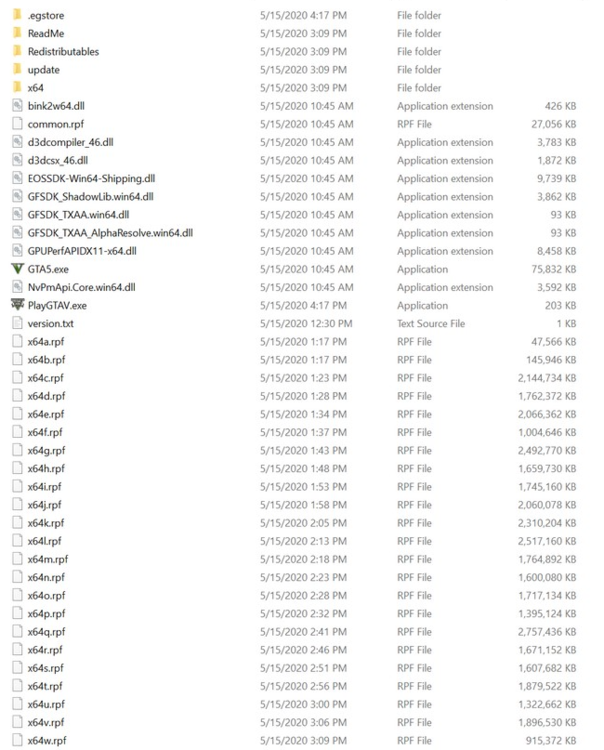
Does it happen constantly? Do you have any custom-plugins installed? -If so witch. A best-practice for general bug-hunt: Make a folder-structure that mirrors your current install. These we will use for containers of files that are currently installed, but does NOT belong in a vanilla-GTAV installation with RAGE & LSPDfr. These are all the files that must be in your LSPDfr-folders: (.egStore is specific for EPIC, and you only have it if your game i from EPIC). Move all the other folder/ files to the container-folders dont delete anything! Do take screenshots, and name them logically! When you are done, you should have a vanilla-GTAV-LSPDfr folder structure. Test if you can play! Not only native GTAV but also base-game LSPDFR If you can you know two things: *) Your base-game is fine! *) One or more of your installed addon-plugins are crashing your game! Now you can re-establish your addon-plugins ONE AT THE TIME!!!! -And retry if you can play both games. When it crashes, you have found a bad plugin, and you can remove it, then continue.
-
Oh.. i posted in Discussion & Suggestions because of " as well as any suggestions. " I felt that this was the closest to reporting a bug. I hope i never need to post another 🙂 -But in case i will post it in support.



