


Slimory
Members
-
Joined
-
Last visited
Everything posted by Slimory
-
Sadly, i don't tink so, i'd love to have one with a Whelen Liberty or Federal Signal.
-
 finally got'em eh?
 -
I really don't think there are many "newer" suburban models out there besides the one Bugz made.
-
I don't think PC makes them any money (hardly) cause console version has everything a PC Gamer would have to install manually, though most definetely buying both.
-
Don't they just use the ones O.P.P use? O.P.P use Arjent S2 i think.
-
you need to edit the lighting files in the police.wtd or whatever it's named.wtd, it's a Michigan State Police Vehicle, so i doubt it, i've never used the vehicles, don't like their setup.
-
You can check them in .IVAUD editor, the bad news is, you may have to check them individually, however, you could always just edit the vehicles.ide.
-
Oh yeah bud, A CVPI, Tahoe and Charger have been made for Michigan state police, i'll see about a taurus, EDIT: Here ya go 2012 Dodge Charger: ?do=embed' frameborder='0' data-embedContent> Slicktop 2008 MSP Charger: ?do=embed' frameborder='0' data-embedContent> Taurus: Tahoe: http://gtapolicemods.com/downloads.php?do=file&id=40 all of which have the MSP setup, except the slicktop, but it has the stop stick on the hood, just edit the textures for the light glass ELS settings and light color. Hope this help's!
-
:ohmy: :ohmy: :ohmy:
-
That's Kit's Strobes mod, it's a seperate mod, you can turn them on or off by themselves, cannot WAIT for this release
-
If you want both you and i could bang these off as a pack, we could do strooper uniform's for Policeman456's uniform's with the radio, cop uniform's as well as Traffic Cop?
-
It say's you have .NET Framework 4.0 as well as Visual C++ 2010 Redistributable.
-
You need an Asi Loader bro
-
![[W.I.P] ELS Enabled Invetero Coquette - Day](//s3-gallery.int-cdn.lcpdfrusercontent.com/gallery/album_285/sml_gallery_3182_285_890324.png) Looking godly, Harper
Looking godly, Harper -
Your welcome :)
-
I think Skyrim is WAY better coded for PC then IV, seem's like GTAIV is like a money hungry trophy wife that eat's all your resources.... i mean it's a VERY power hungry game.. However, my Graphics' card is an AMD Sapphire Radeon HD 6790 and i run my game on high setting's, might be your CPU
-
If you guy's find me a decent looking patch, i'll do the texture.
-
everything in the siren .IVAUD is all together in 1 file, so i doubt it
-
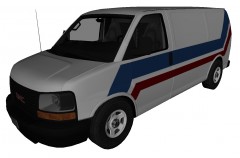 :O Have my babies corleone!
 -
Who's sam? have you guy's checked the downloads section? the Toronto Mod is still there, just gotta edit the uniform pant's.
-
wait.. are you releasing this savanna unlocked? i really hope you do since i have been either looking for an unlocked model, or someone to make my local PD's Paddy Wagon version of the GMC Savanna, seem's as though i'll have better luck finding an unlocked version, but ya never know, nice work corleone!
-
I know that he has an LCPD "NYPD" livery Charger with a Whelen Justice over at GTA 4 Mods.com, however, doesn't sound like him to release mods there, so could be stolen.
-
either pstockade, or nstockade, you can't replace the skin on it, you need to replace the vehicle itself.
-
My mistake, i could have swore they had a red stripe on the pant's. @aripearlman- it wouldn't be hard at all, just put the patch on the arm, that's it, i can't get my photo capturer working so i can't take in game shot's, do you want anything specific added to them? I know how it feel's to make a request, and not have it done, so i learned to texture my own stuff, i rarely use other peoples' unless i like design, then i edit it for personal use only.
-
It would be nivce if a CHP CVPI was mapped so it could have both, steady burn as well as regular flash pattern, you think that's possible? to have let's say secondaries light up a whole Whelen Liberty with secondaries and have primaries light strobes? if it's did, i would probably download a CHP Vehicle :biggrin:


![[W.I.P] ELS Enabled Invetero Coquette - Day](http://s3-gallery.int-cdn.lcpdfrusercontent.com/gallery/album_285/sml_gallery_3182_285_890324.png)
