




Lennyy
Community Team
-
Joined
-
Last visited
Everything posted by Lennyy
-
Navigate to your GTAV/lspdfr/lspdfr.ini and set AmbientSpawn.DisableRandomUnits = true.
-
Next would be a clean reinstall of RPH which comes with the manual version of LSPDFR.
-
Maybe load GTA V with the mapmod installed first and then alt tab once you’re fully loaded in game and then start Rage.
-
Rename LSPDFR inside plugins to _LSPDFR and retry.
-
Have you pressed Y when offered dialogue? Moist callout devs use that key.
-
It only happens with grammar police right? When using the backup menu, the handheld is working as intended?
-
You have the famous SlimDX error. There’s not set troubleshooting for it but a variety of things we can try. Fyi, the advice you received on Reddit is rather poor and generally speaking, 7/10 times the people trying to help have no clue what to do. 1. Try to make the GTA folder an exception to your antivirus. You can utilise google to find out how that’s done on your program. Most of the time it’s just stock windows defender. If that fails to work, report back and we continue from there.
-
Did you rename the LSPDFR folder inside the Plugins folder to _LSPDFR?
-
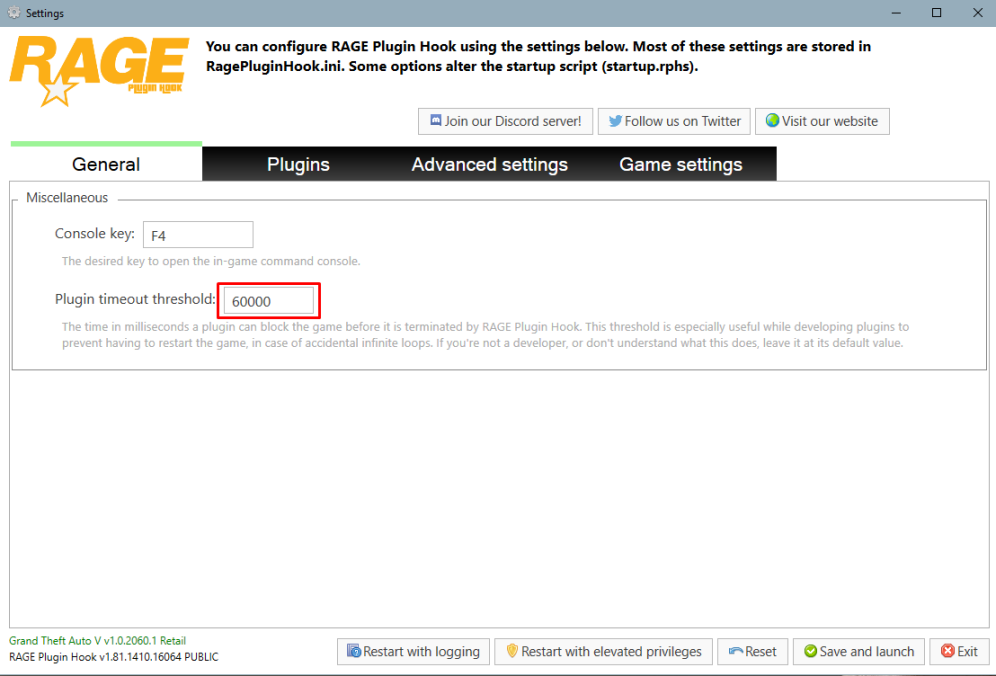
Start Rage and hold shift or click on the cog ⚙️ icon. Set the displayed number to 60000 instead of 10000.
-
Rename mods to _mods and retry.
-
Ah I see. Such as the liberty city map? Those always been a 50% if it works. Try installing that and launch GTA fully into story mode without RPH. Does that make the entire map work?
-
Did you install a custom prop? Easiest to find out what caused this is renaming your mods folder to _mods temporarily.
-
Press M and select the radio action you want in the menu.
-
I‘m not sure what you’re doing but you still have the 3 same errors as in the first log. Delete the .ls file I already mentioned above and retry.
-
Show me your main directory please.
-
Drag the .log file into the opened text window please.
-
Try to launch GTA V without RagePluginHook please. Your topic has been moved to GTA V Support, this is not LSPDFR related. Please post in the correct location in the future.
-
I don't know if I understand you correctly but are asking about a custom minimap?
-
GTA story mode without RPH, then report back.
-
That’s not a plugin, just a class from the LSPDFR code. Always attach the entire log, your screenshotted lines of the console show nothing important.
-
https://www.nuget.org/packages/RagePluginHook/
-
Plugins\LSPDFR\UltimateBackup. Take a look at the xmls.
-
You’re using Ultimate Backup right?
-
I don’t quite get your question. The file you linked supposedly removes all MP models and only have peds spawn in the game world. The guy that stands in front of you isn’t an ambiently spawned cop, it’s a backup unit.
-
This topic has been moved to the appropriate forum. Please post in the correct location in the future.

