




Lennyy
Community Team
-
Joined
-
Last visited
Everything posted by Lennyy
-
-
Forestry Callouts would be something I’d recommend for you.
-
Hi. Please remember this is an English only speaking forum. Translate your request to English in order to receive proper help please.
-
System.IO.FileNotFoundException: Failed to find file:lspdfr/data/outfits.xml Make sure the file mentioned is in the path from above.
-
Try to remove stop the ped and see if the stats change. I’m not 100% sure how and why STP interferes with the vanilla arrest function and its stats. Also make sure it’s the correct character which you are using. Also ensure it’s properly synced.
-
Are you using StopThePed?
-
-
Your topic has been moved to LSPDFR 0.4 Support. Please post in the correct location in the future.
-
-
This topic has been moved to the appropriate forum. Please post in the correct location in the future.
-
Progress further in the story until you are allowed back into the city again. Alternatively install a 100% gamesave to skip these missions.
-
Glad I could assist!
-
Rename your mods folder to _mods and retry to start GTA please.
-
You’re welcome!
-
Start GTA first and once you are in story mode, alt tab out of the game and start RPH.
-
Can you launch GTA without Rage at all?
-
You’re welcome!
-
Take a look at .\lspdfr\data\ and the following subfolders. One of the xmls is used to edit which weapons you get going on duty.
-
That is sadly not possible since these files are copyrighted and can only obtained via the official sources. You’d have to ask the EUP team if they want to give you the older versions. No guarantees this will work out.
-
Disable stop the peds realistic weapon system in the ini. You can also customise loadouts via the LSPDFR configuration files or use a trainer as you already mentioned.
-
There’s isn’t really a proven fix I’m aware of for this bug. If you have menyoo installed try to remove that and see how it goes.
-
Automatic siren cutout from Rich. Friendly Honk: A fun little feature that makes other emergency vehicles honk their horn or blip their siren at you if you honk or blip your siren at them.
-
Your topic has been moved to LSPDFR 0.4 Support. Please post in the correct location in the future.
-
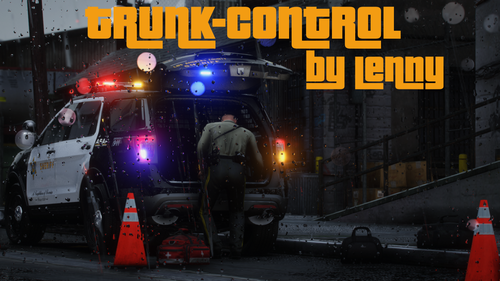 🕴️ All the core features are listed in the plugin description. Its intended for players who like to roleplay while they are on duty. For example when using the police tape plugin you just pull it out of your pocket. With my plugin you could act as if it’s in your trunk and grab it from there. It can also serve as a hotkey as the binding is fully customisable in the .ini. I hope this clears it up for you.
- 47 comments
- 14 reviews
-
-

- 1
-
-
You can do this now in the new version I just uploaded. @Charlie686 was kind enough to test it and said you're probably looking for a range of 3 instead of 5 (default value). Play around with it a little and let me know how it works for you :).
- 47 comments
- 14 reviews


