


OfficerArchie
Members
-
Joined
-
Last visited
Everything posted by OfficerArchie
-
+1 That would be perfect
-
NYPD Old school (1980's) for Kinksta's Classic LAPD Cars -Vehicle: '?do=embed' frameborder='0' data-embedContent>> Skins for both the 85 Impala and the 87 Ford LTD -Skin Request: NYPD 1980's style - Link(s) to pictures of the skin:
-
If you have followed the series, SH5 is just 3 revisited (ie in the Atlantic) with better graphics. To get the most out of it, you must have the big mods installed (just like LCPDFR is to GTAIV). To get an idea of where things sit at the present, go to the Subsim website (http://www.subsim.com/radioroom/index.php) and have a look through the discussion and mods forums. I have been a member over there for many, many years, but dropped out of the sub community a few years back when I lost interest.
-
McSersdome6035 ....dammit, but your new name sounds way cool
-
False. What is a PPM anyways? The person below me once gave a homeless guy $10 for a meal.
-
I am OfficerArchie on this site as I have had the tag 'ArchieGates' as my online presence since 1999. Anyone remember the movie Three Kings with Clooney, Wahlberg and Ice Cube? Took the name from the lead character, Major Archie Gates and have had it all these years.
-
-
-
-
-
Nice try, but deal breaking flaws, but given the quality of Kinksta's recent classic releases (including the same vehicle) maybe you should have focused your efforts on something to complement them, not compete against them, for example a classic 80's police van or similar.
- 16 comments
- 6 reviews
-
Following the release of Kinksta's awesome LAPD and CHP classic packs I have worked my image file to the bone to drag it back to 1989 as best I could. Using my own versions of the LAPD and CHP schemes altered to Liberty City so it fits in. Have Stepvans for SWAT, LT Caines Rancher for Polpatriots, Smokeys 1983 GMC van for my pstockade prisoner transport etc. With the streets filled with old school classics from the 70's and 80's it has changed the whole feel of the game. Strangely enough my vehicle image file has actually dropped from 220Mb down to 185Mb (a lot of original GTAIV vehicles actually fit quite well in the late 80's era, like the Emporer). Before the big change I either used Philly or San Fransisco (both altered to Liberty City) as the base.
-
-
-
Great work Sentinel, love them 5/5. Can I ask where you got the CHP ped from?
- 40 comments
- 17 reviews
-
-
I disagree Sharp, you have certainly 'made' a lot of my cvpi's, made them amazing with your repaints :-)
-
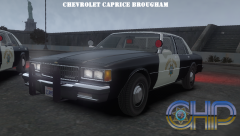 Just.....stunning....perfect.....awesome.....
 -
I'm no expert, but they look absolutely perfect to me mate. They are the perfect accomplices to your LAPD pack for my NOOSE and FBI slots. I will wait at the downloads page and refresh every minute or two ;-) Thank you so much for your interest in the early era cars Kinksta, just in awe of your work.
-
-
-
-
-
-
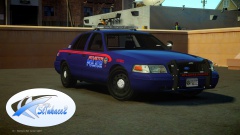 Just awesome, can't wait for it's release! 5/5


