




KN1IGHT
Members
-
Joined
Everything posted by KN1IGHT
-
![[View 4] Triple Vehicle Collision](//s3-gallery.int-cdn.lcpdfrusercontent.com/gallery/album_1463/sml_gallery_43345_1463_452405.jpg)
From the album: LCPDFR Scenarios
-
![[View 3] Triple Vehicle Collision](//s3-gallery.int-cdn.lcpdfrusercontent.com/gallery/album_1463/sml_gallery_43345_1463_3104600.jpg)
From the album: LCPDFR Scenarios
-
![[View 2] Triple Vehicle Collision](//s3-gallery.int-cdn.lcpdfrusercontent.com/gallery/album_1463/sml_gallery_43345_1463_341403.jpg)
From the album: LCPDFR Scenarios
-
I tried that, and my Norton 360 was set off, by one of the files I downloaded from there. So, I never got to try that method. Is it safe to say, it's running slowly because of my Graphics Card? Only thing I can think of. Other than trying Xeceor's suggestion. Xeceor, I never got to trying your suggestion. I will do so tomorrow, when I get a chance. Best, KRI ~ Posted using iPhone
-
![[View 1] Triple Vehicle Collision](//s3-gallery.int-cdn.lcpdfrusercontent.com/gallery/album_1463/sml_gallery_43345_1463_155668.jpg)
From the album: LCPDFR Scenarios
The Black Ford Taurus was speeding down the Broker Dukes Expressway, when suddenly it swerved to attempt to go on the airport turn off, but instead ended up hitting the barrier separating the Expressway from the Airport turn-off. Liberty County Ambulance and Fire Department were the first on the scene. As they arrived a Black Banshee (Not visible in this photo) involved earlier in a hit & run came speeding down the expressway, lost control and rear-ended the Taurus, sending it to where it sits now. Not to long after, a green colored minivan involved in the same hit & run, also came speeding down the express way and rear-ended the Banshee. (Diagonally to the right of the minivan) With Liberty County Ambulance and Fire already on scene, Liberty City Transit & Roads (Black Chevy diagonally left behind Fire Dept.) was dispatched to the scene, to start clearing up the debris from the accident. Meanwhile, in need of some containment and Police on the scene, one RCMP Unit was dispatched (Crown Vic behind Fire Dept.) to help set up Traffic Control, for anyone taking the airport turn off. In need of more containment and traffic control, another RCMP Unit was dispatched (F-150 behind L.C. Transit & Roads) to help block off the lane directly to the right of the accident. Still in need of more Traffic Control, a Liberty City Police Dept. van (Behind RCMP F-150) was dispatched to the scene to further block off that lane on the airport turn-off. This was enough for a short time, until Liberty City citizens began to just barely miss the Black Ford Taurus, so a Metro Police unit was dispatched, to help direct traffic around the wreck of the Ford Taurus. The Liberty County Sheriff (Taurus behind Metro Police Jeep), was dispatched to the scene, to help setup traffic control, in the lane the Ford Taurus wreck was pushed into. The Ford Taurus had to be towed, and was called a write-off by the driver's insurance company. The Banshee and Minivan were towed to a body-shop, and the total cost to fix the Banshee was $800 and $500 for the minivan. The driver of the Ford Taurus was taken to Liberty City Hospital, with life-threatening injuries. The driver of the Banshee was taken to hospital with non-life threatening injuries and was also arrested and charged with: Hit & Run, Fleeing the scene of an accident, and Reckless Driving. The driver of the Minivan had some minor cuts and bruises, and was also arrested and charged with: Hit & Run, Fleeing the scene of an accident, and Reckless Driving. The Liberty City Police, and Liberty City Transit & Roads are investigating the area of this accident to determine the cause of this collision, and the previous 2 vehicle collision in the same place earlier today. -
![[View 2] 2 Vehicle Collision](//s3-gallery.int-cdn.lcpdfrusercontent.com/gallery/album_1463/sml_gallery_43345_1463_1131205.jpg) Yes, I did, so sorry for any bad quality pics. My PrtSc function on my PC didn't like taking pics. I tried it once, and all I got was a black screen. I tried to be sure no vehicles were driving by to avoid any blurs. Guess I missed that taxi. :P But so far, in my opinion the pictures are turning out good. Btw, any thoughts or ideas, for a next "scene"?
Yes, I did, so sorry for any bad quality pics. My PrtSc function on my PC didn't like taking pics. I tried it once, and all I got was a black screen. I tried to be sure no vehicles were driving by to avoid any blurs. Guess I missed that taxi. :P But so far, in my opinion the pictures are turning out good. Btw, any thoughts or ideas, for a next "scene"? -
-
![[View 5] 2 Vehicle Collision](//s3-gallery.int-cdn.lcpdfrusercontent.com/gallery/album_1463/sml_gallery_43345_1463_888102.jpg)
From the album: LCPDFR Scenarios
-
![[View 4] 2 Vehicle Collision](//s3-gallery.int-cdn.lcpdfrusercontent.com/gallery/album_1463/sml_gallery_43345_1463_1863866.jpg)
From the album: LCPDFR Scenarios
-
![[View 3] 2 Vehicle Collision](//s3-gallery.int-cdn.lcpdfrusercontent.com/gallery/album_1463/sml_gallery_43345_1463_408316.jpg)
From the album: LCPDFR Scenarios
-
From the album: LCPDFR Scenarios
-
![[View 1] 2 Vehicle Collision](//s3-gallery.int-cdn.lcpdfrusercontent.com/gallery/album_1463/sml_gallery_43345_1463_2679637.jpg)
From the album: LCPDFR Scenarios
Blue F-150 turned to go to airport, and crashed into the barrier separating the Broker Dukes Expressway from the Airport turn-off. A Black Ford Taurus speeding down the Expressway attempting to flee from police from an earlier crime, attempted to turn on to the Airport turn off, but instead ended up rear ending the F-150. The drivers of the F-150 and Taurus fled the scene, and are now wanted by Liberty City Police. RCMP Unit was the first to arrive on the scene, and try establish some Traffic Control. Liberty County Ambulance was the second to arrive on the scene, followed by Liberty County Fire Department. Liberty County Sheriff was the 4th to arrive on the scene. (Ford Taurus next to RCMP Unit behind Fire Dept.) The RCMP and Liberty County Sheriff attempted to set up traffic control and containment around the collision, but Liberty City citizens would not co-operate. Liberty County Sheriff called in two temp Traffic Control Units, one from NYPD (Van directly behind RCMP Unit) and the other from Palm Beach County Sheriff's Office (Van directly beside NYPD Unit). Only after the two temp Traffic Control units showed up, only then was the scene contained, and Liberty City citizens finally made their way around the scene in a cautious manner. 5 citations were given out for speeding around the scene and in the presence of emergency services personnel. (Not in photo) 3 arrests were made as well, for people deliberately crashing into Liberty City/County Emergency Units and killing 3 Liberty City Emergency Services Personnel. (Not in photo) -
-
At the time, I didn't because I figured it would work. (My biggest problem: I don't make backups. :P) It does work, just this small "lag" problem. (If you wanna call it lag). Some times it works just fine in SP. Then slowly slows down after a while. :P Best, KRI
-
No, I haven't re-installed and played the game without any MODs, per the bit in my first post: It was a big enough pain for me to install and get it working the first time, so I'm not re-installing anything at this time. :P I don't mean any disrespect but that's the way it is with my PC. If I uninstall it'll probably take me forever to get it installed and working again And since my GTA IV folder appears to be Read Only, re-installing LCPDFR is also not an option. Best, KRI
-
Thanks for the reply. I'll keep this thread open, for some more suggestions. I like to see what people offer/suggest before I just go and do the first thing a person suggested to do. Would it have something to do with my Graphics Card possibly? My PC is still under warranty, so I may be able to get a different graphics card. Best, KRI
-
Hi guys, Per my signature I got a new PC. However, GTA IV seems to have a bit of lag. Example: I press A to turn left, and the car will start turning left about 1-2 seconds after I pressed A. How would I go about fixing this? I've turned down all the settings I could, to low, in my Graphics settings, and lowered view distance, along with vehicle density and one other one, all to 30. Still does the slow thing. However, when I've created a LIVE MP Game, it runs normally. No slowness/lag whatsoever. Thoughts? Suggestions? (Re-install of GTA IV not an option) Best, KRI
-
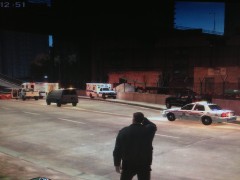
From the album: LCPDFR Scenarios
F-150 hit the barrier between the expressway and the turn off, and it appears the driver fled the scene. He/she is now wanted by Liberty City Police. Liberty County Sheriff (Ford Taurus), Fire and EMS are on scene. Liberty City Transit & Roads on scene. (Black Chevy) Temp Traffic Control Unit on scene (White van behind F-150) RCMP Unit on scene for traffic control as well. -
Yes But I've found out that, any recording software that uses hotkeys, to start and stop, doesn't work while GTA IV is open. I'll keep looking, but I'm still open to suggestions Best, KRI
-
I need one that if there's any hot keys, that they'll work while GTA IV is open Microsoft's Encoder Screen Capture had hotkeys, but they only worked on desktop. Any idea how to use their video editor/ clip capture and save to your PC? Seems like that's my only option, I just gotta find a way to set it so it records my mic, to Best, KRI ~ Posted using iPhone
-
Hi guys, Since I got GTA IV and LCPDFR working properly, I plan on making videos of my LCPDFR Game sessions. However, their clip capture in game, is to confusing for me. :P And it doesn't record any mic input So, I'm looking for a good, free, and unlimited record time software, that will let me record my screen and any input from my mic. I tried Microsoft Expression Encoder Screen Capture, but it didn't get along with GTA IV, and had to be started while GTA IV was minimized, and didn't show GTA IV anyways. If anyone has some good suggestions, please link me to them. Or explain to me how to get GTA IV's Clip Capture working properly, that it isn't recording at the beginning. Best, KRI
-
This is IP.Board See bottom right hand corner of forum on any page
-
Lol. Yes I do know But, I decided since no one made an Edmonton Police Service one, that I would. :P Best, KRI
-
I tried that, and it doesn't work if ur in a vehicle. :P Best, KRI
-
In my Vir. Server area, the fields are (from top to bottom): - Name - Private IP - Protocol Type (TCP, UDP, Both) - Private Port - Public Port I've added all the ports listed above, and have used my PC's IP listed on the router config area, and used that for "Private IP" However, it still doesn't work For Private IP what would I put? I tried 0.0.0.0. Wouldn't let me use that IP of 0 Best, KRI

![[View 4] Triple Vehicle Collision](http://s3-gallery.int-cdn.lcpdfrusercontent.com/gallery/album_1463/sml_gallery_43345_1463_452405.jpg)
![[View 3] Triple Vehicle Collision](http://s3-gallery.int-cdn.lcpdfrusercontent.com/gallery/album_1463/sml_gallery_43345_1463_3104600.jpg)
![[View 2] Triple Vehicle Collision](http://s3-gallery.int-cdn.lcpdfrusercontent.com/gallery/album_1463/sml_gallery_43345_1463_341403.jpg)
![[View 1] Triple Vehicle Collision](http://s3-gallery.int-cdn.lcpdfrusercontent.com/gallery/album_1463/sml_gallery_43345_1463_155668.jpg)
![[View 2] 2 Vehicle Collision](http://s3-gallery.int-cdn.lcpdfrusercontent.com/gallery/album_1463/sml_gallery_43345_1463_1131205.jpg)
![[View 5] 2 Vehicle Collision](http://s3-gallery.int-cdn.lcpdfrusercontent.com/gallery/album_1463/sml_gallery_43345_1463_888102.jpg)
![[View 4] 2 Vehicle Collision](http://s3-gallery.int-cdn.lcpdfrusercontent.com/gallery/album_1463/sml_gallery_43345_1463_1863866.jpg)
![[View 3] 2 Vehicle Collision](http://s3-gallery.int-cdn.lcpdfrusercontent.com/gallery/album_1463/sml_gallery_43345_1463_408316.jpg)
![[View 1] 2 Vehicle Collision](http://s3-gallery.int-cdn.lcpdfrusercontent.com/gallery/album_1463/sml_gallery_43345_1463_2679637.jpg)
