


MattexD
Members
-
Joined
-
Last visited
Everything posted by MattexD
-
You should check the integrity of the game files. You can do this procedure either from Steam (if you purchased GTA 5 through Steam) or the Rockstar Games Launcher (if you purchased GTA 5 through Rockstar Games Launcher)
-
Would you tell me where you installed RageNativeUI.dll please?
-
Remove BasicParkingTickets, because it is obsolete. If the problem persists, try to delete everything that is inside the commandline file (.txt) and if this also bears bad fruit, also try disabling the mods folder, renaming it differently, for example, in _mods
-
It's a pleasure 😉
-
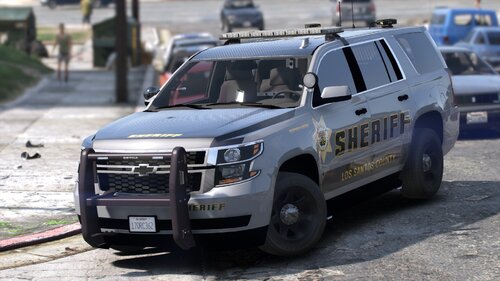 Your packages are fabulous. The only flaw is that the Explorer tend to tip over if you turn fast enough. Otherwise good
 -
Please forward an updated log
-
I notice that you have installed some outdated plugins; remove: CalloutManager XScanner and update: StopThePed to the version 4.9.5.0
-
Please paste your Ragepluginhook.log file
-
So if the folder is disabled, there is still something else that crashes the game, did i get it right?
-
Reinstall LSPDFR, using manual installation
-
It looks like you didn't install RageNativeUI; install the latest version from here: Releases · alexguirre/RAGENativeUI · GitHub
-
Exactly, that's a road
-
No sorry, because it's not a plugin (as far as I know). You should investigate. In fact maybe let me know if you find it and where
-
Please paste your Ragepluginhook.log file
-
Your registry did not detect any specific errors. If there is you, try disabling the mods folder, renaming it, for example, to _mods
-
What value is reported in the Threesold Timeout?
-
Please forward your Ragepluginhook.log file
-
Please forward your Ragepluginhook.log file
-
I notice that you have installed some outdated plugins; remove: Arrest Manager Officer_Status_Plugin PoliceSmartRadio Traffic Policer In addition to that, head inside the lspdfr folder and after in the LSPDFR (.ini) file; at this point overwrite these two options with those of the file: WorldEvents.IntervalMultiplier = 0.0f WorldEvents.MaxNumberOfEvents = 0
-
Reinstall PeterUCallouts
-
I notice that you have installed some outdated plugins; remove: BasicParkingTickets CalloutManager OfficerporciPlugin Interop.WMPLib TrafficCallouts TrafficTool XScanner and update: CalloutPack to the version 2.1.0.0 Chill Callouts to the version 1.1.0.0 CountyCalls to the version 0.5.0.0 ForestryCallouts to the version 1.2.3.0 LeroyCallouts to the version 1.3.0.0 RegularCallouts to the version 1.1.4.0 RichsPoliceEnhancements to the version 1.5.4.0 UnitedCallouts to the version 1.5.7.7
-
To decrease the frequency of calls, you must change the following option to a lower value (250 is the default) in the LSPDFR file.ini file: Callouts.Multiplier = 250
-
I notice that you have installed some outdated plugins; remove: Interop.WMPLib and update: Section136Callouts to the version 1.0.2.1
-
Yes
-
Try to check the integrity of your game files

