


MattexD
Members
-
Joined
-
Last visited
Everything posted by MattexD
-
The error you're receiving is caused by a GTA V mod, most likely one related to adding or modifying apartments in the game. A script file that manages properties is attempting to run an animation, but it appears to be invalid or corrupted. Make sure your apartment mod, LSPDFR, and the RAGE Plugin Hook are all updated to the latest available versions. Try disabling other mods you've installed, especially recently added ones, leaving only the apartment mod and LSPDFR enabled. If the game works, re-enable the mods one by one until you find the one causing the conflict. Completely remove the mod you suspect is causing the error and reinstall it, carefully following the instructions. Make sure you've also installed all dependencies required by the mod (such as Script Hook V, Community Script Hook V .NET, etc.). If none of the above solutions work, the mod may simply be incompatible with your current game configuration.
-
Delete Script Hook V Dot Net, it's the real culprit and it's very old. Update Scripthook V to the latest version if you haven't already.
-
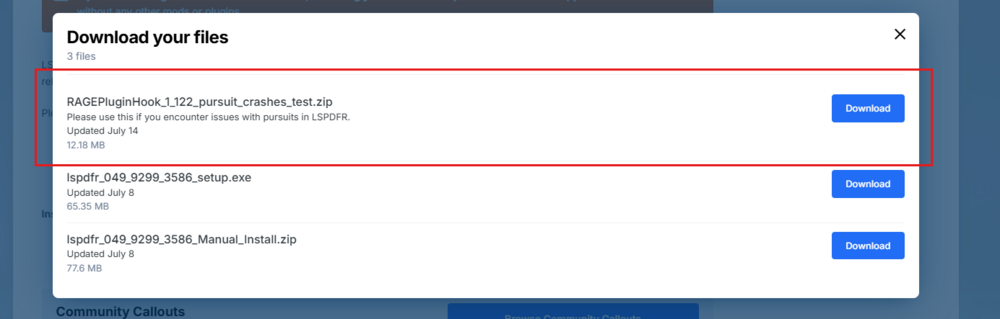
The crash is known and is caused by a chase call. There's a workaround. Install the attached file.
-
One of the Ultimate Backup configuration files has a syntax error - try restoring any UB xml files.
-
I've noticed several errors like these here: [9/10/2025 9:16:43 PM.759] ERROR: The path "C:\Program Files (x86)\Steam\steamapps\common\Grand Theft Auto V\Plugins\RiseHigh.dll" does not exist. [9/10/2025 9:16:41 PM.750] ERROR: The path "C:\Program Files (x86)\Steam\steamapps\common\Grand Theft Auto V\Plugins\MaxSpeed.dll" does not exist. Make sure you've installed the following plugins correctly: Rise High and MaxSpeed.
-
The error indicates that the ELS mod is causing Script Hook V to crash, likely due to an incompatibility or incorrect installation. I recommend completely reinstalling ELS and Scripthook V.dll. This will ensure you have installed all the necessary components.
-
I confirm that the problem is related to ELS.asi. Update ScriptHook V (if you haven't already); Reinstall ELS; Make sure all files are in the correct location.
-
It's most likely caused by missing files, Windows permissions, or a flawed installation. Follow these steps in order: Make sure you have the latest .NET Framework and Visual C++; Unlock Files and Use Administrator Permissions; Verify the Game integrity files; If it still doesn't work, open the RagePluginHook.log file in your GTA V folder and share it here.
-
The problem is caused by the IntelligentAI plugin. Please remove it permanently, as it's too outdated.
-
Please paste your Ragepluginhook.log file. Is located in the root folder of Grand Theft Auto V.
-
Great! I'm glad you managed to resolve it.
-
The version of Grand Theft Auto V is very old. Where did you buy the game? I ask because if you have a pirated version, you won't be able to play LSPDFR.
-
Try renaming the mods folder to _mods.
-
The game appears to crash during startup. I recommend disabling the mods folder in _mods, launching Ragepluginhook, and seeing if it opens without problems.
-
LSPDFR attempted to load other plugins (such as StopThePed, UltimateBackup, etc.) when the user went online. One of these plugins attempted to use RAGENativeUI.dll for its menus, but the file was not found, causing the entire process to crash. I recommend updating RageNativeUI to the latest version, making sure to load the RAGENativeUI.dll and RAGENativeUI.xml files into the GTA 5 root folder.
-
Hi, please forward your Ragepluginhook.log file located in your Grand Theft Auto V root folder.
-
Since your situation appears complex, the best course of action is to proceed step by step: Uninstall all plugins, LSPDFR, and Ragepluginhook; Launch GTA in story mode to ensure there are no underlying issues, i.e., the main game.; If there are problems, you have two options: verify the integrity of the game files using the Rockstar Launcher; if that doesn't work, reinstall GTA 5 from scratch.; If it starts without problems, reinstall LSPDFR using the manual installation (including Ragepluginhook) and launch Ragepluginhook (checking LSPD First Response in the Plugins section of Ragepluginhook, which you can open with the gray gear icon before launching). If there are no problems, check the previous issue: if it's resolved, you can try adding the other plugins; otherwise, install the "RAGEPluginHook_1_122_pursuit_crashes_test.zip" version.
-
The main cause is the "Terrorist Attack" callout from the "686 Callouts" plugin. This specific mission is programmed to spawn an excessive number of characters and gunfire in a small area. This overloads LSPDFR's CPedCache, leading to an internal conflict and subsequent game crash. Solution: Go to your GTA V main folder and open the following path: plugins\LSPDFR\686Callouts. Edit the .ini file: Inside that folder, look for a file called 686Callouts.ini (or something similar, perhaps config.ini). Open it with a text editor like Notepad. Disable the callout: Scroll through the file until you find a section that lists all the callouts. Find the line for TerroristAttack and set its value to false. It should look like this: TerroristAttack = false Salva e chiudi: Salva le modifiche al file e chiudi l'editor di testo
-
Unfortunately, the registry doesn't show much of anything interesting. Does GTA 5 open correctly without Ragepluginhook? Have you tried running it with administrator privileges?
-
The problem is a crash that occurs immediately after accessing services, caused by a conflict or a corrupt file in one of the many plugins you've installed. I recommend temporarily removing JMCalloutsRemastered (more suspicious). Try launching the game and see if it launches correctly.
-
Your problem is already known; to resolve it, you should redownload LSPDFR using the original installation: RAGEPluginHook_1_122_pursuit_crashes_test.zip
-
The fact is, if you purchased a legal copy of GTA 5 for PC, you shouldn't have any problems. Otherwise, you won't. In the first case, installation must be done by uploading the files to the main Grand Theft Auto V folder.
-
-
Nice 🙂
-
This issue is known, please install LSPDFR with the first installation.



