



dominikexe
Members
-
Joined
-
Last visited
Everything posted by dominikexe
-
Hey @rajveersmann, how are you? I assume the problem no longer exists? I look forward to your response!
-
Hey @LordBlitzo, du kannst gerne mit mir deutsch reden. Wie geht's dir? Gerne würden wir / die Community auch wissen, was denn im Endeffekt der Fehler war. Wie kannst du es am besten Dokumentieren: Füge deinen vorherigen RagePluginHook.log in deiner Nachricht mit an. Beschreibe, welche Wege bzw. Aktionen zu gemacht hast, bis dein Problem gelöst wurde. Schreibe dann in deine Nachricht, dass du dein Problem schon behoben hast. (hast du ja schon perfekt gemacht!) 😉 Bei weiteren Fragen kannst du unseren Support fast rund um die Uhr auf unserem Discord oder LiveChat erreichen.
-
Hey @Will Aten, how are you? If you've been banned, there is a high chance you won't even get into the forum. It's more a problem with your PC / browser. Have you tried another browser before? And which browser are you currently using? I look forward to your response!
-
Hey @h3llst4ff, It was a pleasure for me. If you have further questions, please feel free to create a new topic. Have fun. This issue has been resolved. For further questions you can look in the message above.

-
Hey @jrcrabs, how are you? Did you add the exception? If you need help with this, you can easily reply. I'm happy to help you add an exception. I look forward to your response!
-
Hey @ASTTim, how are you? You don't have to feel stupid. Everyone has such flaws. It was a pleasure for me! Have fun. This issue has been resolved. For further questions you can look in the message above.

-
Hey @Kurkkis, Thanks for the fast respond. What has usually already helped is if you add the EUPMenu.dll as a file exception in your antivirus program. Are you using another antivirus program or Windows Defender? I look forward to your response!
-
Hey @h3llst4ff, how are you? So you just reinstalled the whole game? Do you have any further questions? I look forward to your response!
-
Hey @Kurkkis, how are you? Did you also have the latest version of ScriptHook and RageNativeUI installed? I look forward to your response!
-
Hey @Sweet T Gaming, mhhh.. okay. Then let's go. Create / reinstall your mods. I'm sorry. The thing with the antivirus is still ... if you want to try it ... I'm not giving up that easily ... I look forward to your response!
-
Hey @Sweet T Gaming, Do you have a file with the name "Albo1125.Common.dll" in our GTA 5 main directory? I look forward to your response!
-
Hey @Charlie686, Then he should have checked the game files for errors in the launcher. I just didn't see he'd tried it without RPH. @Sweet T Gaming, so: rename the mods folder in _mods (underscore + mods) and see if it loads / works. If not, check the gamefiles in the launcher. I look forward to your response!
-
Hey @Charlie686, may well be possible. In any case, an error occurs here when loading the files. You can never rule out that files are up to date. I look forward to your response!
-
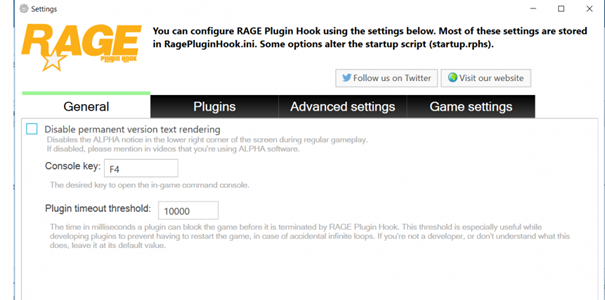
Hey @IHGuy, hey @GalacticDude542, how are you? Have you already increased the maximum load limit in RagePluginHook? You can try this: Go in your Settings of RagePluginHook (start RPH -> click after start on the gear) then the settings will open on the first page you finde the option "plugin timeout threshold" set this value on "30000" then click on "Save & Restart" AND @GalacticDude542 If your game simply crashes after a while without mods, I would recommend you to check your game files in the launcher. If you tell me which launcher you are using, I can give you a little guide on how to do it. ~ I would also recommend that you take the step from above. I look forward to your response!
-
Hey @Sweet T Gaming, Thanks for the quick response! Can you please clear your "commandline.txt" in the main directory of Grand Theft Auto V. (Just the content!) And please create a folder exception for the GTA 5 main directory in your antivirus program. I look forward to your response!
-
Hey @fire2903rescue, how are you? In the M menu you should have an option where and how to spawn. "Spawn Location" For the Problem with the "basic" uniforms: You can set your Uniform as default in the F4 Console. First, put on your uniform via the menu or in the clothing store. Then open the LSPDFR console with the key stored in your .ini (usually F4) and enter "SetUniformAsDefault" (or something like that) I look forward to your response!
-
Hey @Sweet T Gaming, how are you? You can try this: Go in your Settings of RagePluginHook (start RPH -> click after start on the gear) then the settings will open on the first page you finde the option "plugin timeout threshold" set this value on "30000" then click on "Save & Restart" I look forward to your response!

-
Hey @KM964, how are you? The vehicles sheriff 3 to 6 do not exist in the game. GTA 5 only has certain vehicle slots that are also used to replace the vehicle. With Sheriff, for example, there are only "Sheriff" and "Sheriff2", which exist as slots from the game. With "Police" things look different. GTA 5 has 4 slots here. "Police", "Police2", "Police3", "Police4" .... If you haven't added vehicles as add-ons, you can wait a long time for such units. So delete the "nonexistent slots" (sheriff 3-6) from the configurations. Thus, no further error should occur. I hope I could help you in this way. I look forward to your response!
-
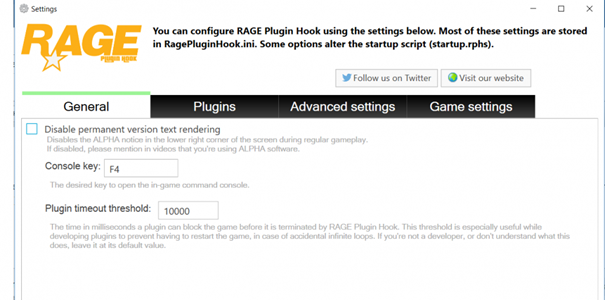
Hey @ryad88 and @nuryzuu, how are you? You can try this: Go in your Settings of RagePluginHook (start RPH -> click after start on the gear) then the settings will open on the first page you finde the option "plugin timeout threshold" set this value on "30000" then click on "Save & Restart" AND Delete your cop-character: Go in "Grand Theft Auto V\lspdfr\chars\" and deletes all files except for the files which have "default" in their name! So only the files where the names of your characters are. I look forward to your response!
-
Hey @Camc1, how are you? Did you removed the plugins BetterEMS as Matteov2.0 said? We look forward to your feedback.
-
Hey @SoulOfFox, wie geht's dir? Wir freuen uns, wenn du hier her kommst, wenn du ein Problem hast. Gerne würden wir uns auch freuen wenn wir erfahren könnten, was dein Fehler/Error war und wie dieser behoben wurde, damit andere Personen evtl. auch somit Ihr Problem gelöst bekommen. ~ Nur für die Zukunft 😉 Bei weiteren Fragen kannst du dich auch gerne bei uns auf dem Discord melden. Unser Support ist fast rund um die Uhr erreichbar. https://blackaditum.de/discord This issue has been resolved. For further questions you can look in the message above.

-
Hey @rajveersmann, how are you? The terror comes from Police SmartRadio. Please check whether all buttons have been correctly saved / entered in the PoliceSmartRadio.ini. You can find the .ini file in "Grand Theft Auto V\plugins\lspdfr\PoliceSmartRadio\Config\KeyboardConfig.ini" (when you play with the keyboard) If you cannot see any errors here, I recommend that you reinstall the plug-in once. I look forward to your response!
-
Hey @ASTTim, how are you? You shouldn't have done anything wrong here. Please make sure that you also create the changes in the dedicated mods folder. If you start the game with RagePluginHook, this folder is "preferred". This means that no further data will be requested from RockstarGames for verification. You don't have a mods folder yet? The Mods folder is not installed by default. You have to create this yourself at the beginning of LSPDFR. To do this, simply create a folder called "mods". Simply copy the following folders from your GTA 5 main directory into the mods folder: "x64" and "update". This can take some time as you are copying your entire game. Please make sure you have enough storage space! Important! Never edit / change your original files! I look forward to your response!
-
Hey @Johnny45839, how are you? Please be sure that you are using a good anti-virus program! Nowadays the virus scan / security scan from Windows in Windows Defender is sufficient. That should help you. Please contact us if you have downloaded certain add-ons in order to report this to the creators or website operators. I look forward to your response.
-
Hey @Justin815714, wie geht's dir? Damit ich evtl. Fehlerquellen anschauen kann benötige ich deinen `RagePluginHook.log`. Diesen findest du in deinem GTA 5 Hauptverzeichnis. Kopiere diesen einfach hier rein, damit ich mir einmal anschauen kann, was dein Spiel beim Laden macht. Unter anderem denke ich mal, dass du einem "mods"-Ordner als auch Mods installiert hast. Bitte benne deinen "mods"-Ordner einmal um in "_mods" (Unterstrich + mods) und starte dann das Spiel. Somit können wir schauen, ob das lange Laden evtl. mit den Mods zusammen hängt. Keine Sorge, durch das Umbenennen werden nur die Mods deaktiviert! Ich freue mich über deine Rückmeldung. Bei weiteren Fragen sind wir auch fast rund um die Uhr über unseren Discord erreichbar. https://blackaditum.de/discord



