


Palfy205
Members
-
Joined
-
Last visited
Everything posted by Palfy205
-
I've been having this issue, I personally just keep shutting the game down if it doesn't hook right away. Eventually for me it hooks.
-
Load plugins one at a time to find out which one is crashing it, also post your RagePluginHook file here.
-
All the files that would be requested are going to be located in your main Grand Theft Auto V file directory.
-
I've found this issue as well, since you're forcing your game to run scenarios and loading more plugins which take up more memory your game is not going to run as smooth as without LSPDFR, this is just a downside to running multiple plugins, mods and scripts. If you just run LSPDFR it shouldn't affect it, but it's when you add more plugins.
-
If you could be more descriptive that would help us figure out what the issue is. Could you post your asiloader.txt file please?
-
There are lots of Rage errors being thrown, have you recently done a clean installation of RagePluginHook? If not I would suggest that, also try launch it with logging enabled and see what the launcher log says, if you could post that here it would help.
-
If you could post your RagePluginHook.txt that way we can see if there are any errors that are occurring.
-
Does you game run if you launch it without using RagePluginHook? If you just launch it through Steam?
-
If you've changed your screen resolution size make sure you correct it in your DisplayPositioning.ini it should show up if you force full-screen, then you can adjust it again to the correct location.
-
 Hello, fresh install GTA-V and LSPDFR installed your plugin, crashed the game every-time. Here is the RPH error log I got. I have other scripts in the folder that do run, so it's not that I've improperly installed SHVDN. Removed your scriptand now startups no issues, let me know if anything changes because I really want to use your script.
- 329 comments
- 24 reviews
-
Hello there, I've run into this issue before. I've found the best help was completely removing LSPDFR from GTA-V (use the uninstaller) if you have saved characters, just drag those files to the desktop to reapply them afterwards. Download a new LSPDFR file (I use manual install) then drag and drop it back into your GTA-V directory and see if that works, if not it may be a problem with you not giving RagePluginHook the proper privileges to modify files, so you might have to add it as an exception to your anti-virus program you're running. If it still doesn't work, try running RagePluginHook in elevated privileges mode, see if it's able to adjust files that way.
-
Has anyone seen this error message before upon attempting to startup LSPDFR.dll? Seems that I can start the plugin in-game and it not crash, but I can't auto-load it without crashing. Apparently it was SHVDN means ScriptHookVDotNet and there was a script that was interfering with startup called NoMoreFeatheringV4, upon removing this script the game launched perfectly fine. Not sure if there is a problem with it or not.
-
1.) thing I would do is try run RagePluginHook in elevated privileges mode.If that doesn't work then don't load any plugins on startup, instead wait until you're in-game then use the RPH menu (f4 default) to type "loadplugin LSPDFirstResponse.dll" see if it works that way, if not, completely remove LSPDFR from your game files with a freshly downloaded LSPDFR, happened to me the other day. I just re-downloaded a new one and it worked.
-
I'm running the game on a 500gb M.2 SSD Samsung Evo 960 still doesn't hook every time,
-
Yeah, that's what I get for being creative. A crash log and corrupt files, restart time!
-
That one is a patch so the interiors are populated with people, does not work with LSPDFR just a heads up.
-
Open Interiors map editor patch, yes it happens every time. https://www.gta5-mods.com/maps/open-all-interiors-npc-patch-212new-peds-map-editor
-
Figured out the problem, Open Interiors Ped Patch interferes with the ambient spawn of LSPDFR so it conflicts and doesn't spawn people at callouts. removed it and working fine.
-
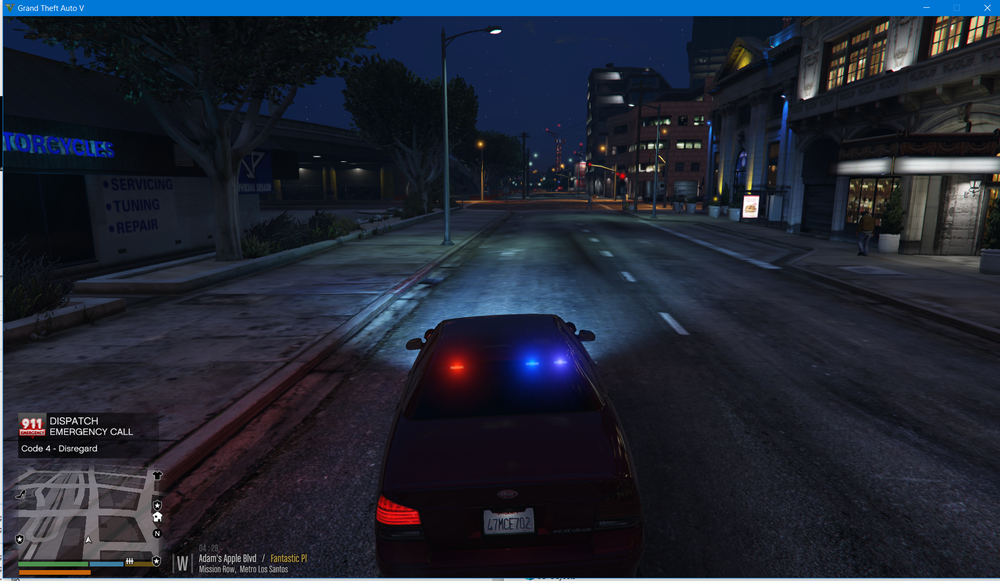
Has anyone else got this before? Happens every time I go to accept a call and I'm wondering why. Is it suppose to Code 4 Disregard?
-
Got it working one time, honestly did nothing different, but after it loaded in I tried to force a "Loadplugin LSPDFR" and I got this crash report, haven't been able to get RPH hooking since then... So that rules out permissions. RagePluginHook.log I reinstalled LSPDFR and removed the corrupt memory error, seems to be running now with LSPDFR but I can't get it to hook every time, it's defiantly a swing or a miss.
-
Even talked to the RPH guys they couldn't help either, I guess I'll wait for a patch since i'm not the only one experiencing this issue. If anyone figures it out, please post it up!
-
I have the options set that no file I install is blocked, I know most people who run Windows don't program it to work how they want it to, so sadly that's not the issue either :S. Just moved my file over, going to see if it works.
-
It's a SSD Samsung Evo 960 500gb. I've always run my games on a that SSD everytime it's been installed and worked fine before, I haven't ran it off my E:) Drive which is a 4tb HDD. But I run ownership over all my drives. So which location shouldn't matter in my opinion. RagePluginHookLauncher.log Everything was the same since the last time I installed LSPDFR, same location, same computer nothing has changed. I just reinstalled all new Download files, like and LSPDFR, all the plugins and mods too, I have tried running RPH in elevated privileges but it does not work either. Running out of ideas to be honest, I was usually the one to help people with issues like this and now I'm completely stumped. For the sake of this though, I'm going to move GTA-V to my OS folder for now and see if it changes anything.
-
Grand Theft Auto V (D:\SteamLibrary\steamapps\common\Grand Theft Auto V)
-
Reinstalled RPH, LSPDFR and GTA V now about 4 times in the last day it's not missing anything. Just doesn't want to work, I've given up. No logs to read, no code to decipher. Just some stupid glitch in the system.

