


Palfy205
Members
-
Joined
-
Last visited
Everything posted by Palfy205
-
Make sure you're running the most up-to-date RageNativeUI https://github.com/alexguirre/RAGENativeUI/releases
-
What I would try is, #1.) Load into the game, after doing so. Press "Esc (or "P") for the in-game menu. (With LSPDFR Running but not attempted on Duty) #2.) Go to the LSPDFR Tab in the menu and select "Switch Character" see if you have one there, and try to use one of those. It may just not know which character you're trying to use. I didn't notice anything out of the normal after LSPDFR was loaded besides it loading EUP and LSPDFR. Also try get this file edit if you haven't already http://LSPDFR EUP Configurations let me know if any of the suggestions above worked.
-
One of the issues you had was There is an LSPDFR.ini adjustment to avoid this issue. Main.DisableGameBlipHiding = true Let us know if you still need some help.
-
SAProtect is a PUP. Remove it with Malwarebytes they offer a free premium 14-day trial. It should flag it as malware and quarantine it, then you can delete it.
-
Yah it'll always say disabled twice. I meant that you have enabled checked and disabled checked. So there overwriting each other.
-
I know this isn't necessarily related but you have this checked both times the enable and disable part. Command line option "enableCustomLoadingBackgrounds-disableCustomLoadingScreen" is specified twice. Please remove one. [9/5/2020 10:33:44 AM.729] Command line option "disableCustomLoadingScreen" is specified twice. Please remove one. [9/5/2020 10:33:44 AM.729] Command line option -disableCustomLoadingScreen is specified; disabling custom loading screen rendering. I think it a problem with scenemanager.dll remove that one. Never mind the callout Anyways, I need sleep. So I will check the post tomorrow to see how it's going. On my phone is kind of hard to replicate haha.
-
Try removing RegularCallouts.dll from your plugins/lspdfr folder and see what that does. Post another log too afterwards.
-
Ok I'll keep looking into it.
-
Your log shows unitedcallouts is outdated. Did you update that already?
-
I would first set your plugin threshold to 60000 from 10000. Secondly, I'd remove your persistent flashlight.dll because it's causing an issue. Only run LSPDFR.dll nothing else. Does it let you load into the game? Or does it crash before the game loads? Also, these come up as unable to be found. 9/4/2020 6:45:36 AM.820] LSPD First Response: [WARN] Invalid vehicle model hwaycar [9/4/2020 6:45:36 AM.821] LSPD First Response: [WARN] Invalid vehicle model hwaycar2 [9/4/2020 6:45:36 AM.821] LSPD First Response: [WARN] Invalid vehicle model hwaycar3 [9/4/2020 6:45:36 AM.822] LSPD First Response: [WARN] Invalid vehicle model hwayb2 [9/4/2020 6:45:36 AM.823] LSPD First Response: [WARN] Invalid vehicle model hwayb2 [9/4/2020 6:45:36 AM.826] LSPD First Response: [WARN] Invalid vehicle model rhpolice [9/4/2020 6:45:36 AM.827] LSPD First Response: [WARN] Invalid vehicle model rhpolice2 [9/4/2020 6:45:36 AM.827] LSPD First Response: [WARN] Invalid vehicle model rhpolice3 [9/4/2020 6:45:36 AM.827] LSPD First Response: [WARN] Invalid vehicle model rhpolice4
-
I'd try customize your LSPDFR.ini file in Grand Theft Auto V\lspdfr and add these settings: AmbientSpawn.DisableRandomUnits = True PoliceStation.DisableAmbientSpawn = True Main.DisableGameBlipHiding = True Also you could try removing all LSPDFR file in Grand Theft Auto V\lspdfr and re installing it, no harm trying that option. Also rename mods to something else and try load LSPDFR and forceduty see if that does anything. Sometimes I get random crashes when loading LSPDFR, but no real reason. I try launch GTA V get into story mode, then once in, launch RPH and once it connects use the CMD and type "reloadplugins" it'll load up everything and usually works for me.
-
Have you added a gameconfig modification like https://www.gta5-mods.com/misc/gta-5-gameconfig-300-cars ? If not I would suggest doing so, if that doesn't work. Simply rename mods folder, if it still crashes you know there is an issue with the game files, so vaildate and start from scratch. I'm going to bed now, but I'll see if you need help tomorrow morning. Best of luck! Maybe just redo your lspdfr.ini and backup files just incase something is the matter there.
-
What exactly were you trying to edit in the vehicles.meta file? Because FBI2, and Pranger handling are completely stock it seems. Make sure you grab the handling.meta from this location "D:\Steam\steamapps\common\Grand Theft Auto V\mods\update\update.rpf\common\data" Simply put, what I would do it redo any changes you made to those 3 vehicles (example replace the two files with original vanilla) once put back in, load the game spawn those cars, if it works you know there was an error in the vehicle files. Do the modifications you were planning on doing, step by step, not changing more than one thing at a time, I know this takes lots of time. But it's well worth it for stabilities sake. Hope some of this information helped.
-
If you let me see them, I can point out what's making it crash.
-
Post your Vehicle.meta and Handling.meta files, chances are that you've edited a file and it's unreadable, so when the game tries to access it, it crashes. This happened to me when I tried adding DLC vehicle sounds and handling lines to my Police vehicles. Have you modified those two files at all?
-
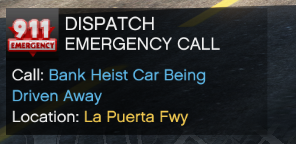 I did these callouts a few times before reviewing this script. I was really disappointed that the Bank Getaway Car callout didn't work, I was really looking forward to this one. Brandishing a knife is something a little more on the unique side, I would prefer that the suspect walked up to you instead of ran, it would more simulate a person attempting a Police assisted suicide, not often are people charged with knives while they have a gun, though it does happen. The homeless call I thought was very odd, I drove up to the scene, the individual was just walking around. I didn't notice him bothering anyone, he wasn't loitering he did have an odor of alcohol on him, but he was not staggering about disrupting people, so I decided to let him walk since we can't just search people without probable cause. Lastly the stolen police vehicle, I'm not entirely sure why every stolen police vehicle is now being driven by a cop, but there are a couple other callouts that contain stolen emergency vehicles which are also driven by police officers. Here is the link of the video I did on it. The police chase was not in the recording because Ultimate Backup had an issue after LSPDFR Crash at the end of the video and without backup, the pursuit didn't feel appropriate. All in all, keep up the good work making plugins, add some more variety and you've got yourself a good setup, thanks for your effort @AwsumTurtle
 -
 Before reviewing this callout, I attempted each callouts several times. This is my honest review. I tested it with very minimal plugins (CompuLite, DeadlyWeapons, GrammarPolice, OP Immersive Dispatch, RedCallouts (for callout menu audio bypass and force ped to drop weapon) Stop the Ped, Traffic Policer and Ultimate Backup.) I was quite surprised with it to be honest, since the last update you can disable ambient events because lets face it, the littering ambient event was terrible, so I removed the ambient events before I tested it. I ran into a few issues: Indecent Exposure, Naked Girl (NSFW) - Girl running around in a bikini (it's simulated California this happens all the time) I wouldn't call it a crime. Paparazo - I arrived at the beach and there was an individual taking pictures of the walk way and people on it, didn't see anything wrong with that, I let him go. You're allowed to take pictures of people in a public area. Helpless Person - Was an overdose or something at the beach, automatically calls for EMS and cancels the call, seems odd to me you just show up and press Y and it completes itself. Disruption - Random guy with a dog in the bar, after you tell him he's going to get a ticket, him and his dog attack you. Very needless because the dog wont back down so you need to kill it. Sex Harassement/Raping - Victim runs and won't stop to talk to you, but the dialogue acts like she is right next to you. Perverted man running around with a dildo in his holster. Dead Body found - 4/5 times I did it nothing happened ,maybe it was just glitched for me but I can't rate this one. When I finally got the callout in Sandy Shores I was able to see the body, and find 1 piece of evidence (Pills) suspecting of an overdose, didn't get to collect any witness statements callout ended after picking up a nearby knife. Silent Alarm in Cluckin Bell Factory; Contanimated food; Criminal Employeers - Everyone you talk to has the same name Katie Rhodes, Lily Ward, upon finding the two suspected of poisoning the food, they pull a fully automatic weapon out of their ass and shoot you dead, no time to even remove your weapon from its holster. Unmanned Luggage; explosives suspected - String to call explosives technician doesn't work, so nothing you can really do, I wasn't prompted to do anything else. Active shooter at university - Possible Covid incident doesn't even work. Data theft / hacking at the server farm (thx @sEbi3 for helping) - The most intriguing callout, SWAT rushes into the Data Farm and you kill a lot of people, can't arrest anyone they all end up dying. Fare Dodger - Random guy in the subway "lost his ticket" you fine him $60 and it's done. I really think that the type of callouts are unique and captivating, but the fact that pressing "Y" on most of them handles the entire situation there isn't much left for you to do. Wish they let you write out the ticket, or be able to change the outcome of a situation by how you act and how you play it out, but it seemed to be rather cut in stone. Hope this helped some of you come to the conclusion if you wanted to use it or not.
- 255 comments
- 16 reviews
-
-

- 1
-
-
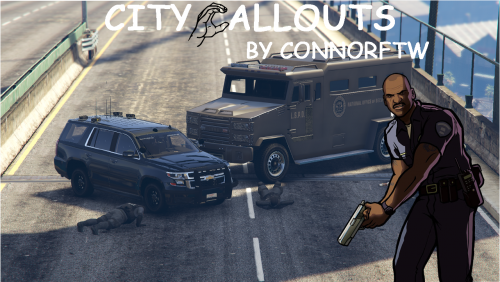 So far the callouts are great, they don't show targets so you have to do a bit of police work before arresting people. The silent alarm one I found odd that the suspect was already half way down the street with a crowbar as I arrived, and the problem with none of the callouts ending properly after you've been code 4 and 10-8 but they are fun to use near the end of your session so the yellow areas don't stay on. That's the only concern I have, hopefully that gets fixed in the next update.
 -
 I had a question about this step in the installation guide: 3.Change the "TASK"(Please check the table below for categories.) category in the game. Do we have to change all the ones to the specific catagory? So changing the name of the YTD and YDD file from "task_000_u" to "vest_000_u" and "task_diff_000_a_uni" to "vest_diff_000_a_uni" Component Category MASK,BERD=earpiece ACCESSORY=belt TASK=vest TEEF=holster UNDER COAT,TORSO2=shirt Because that's what I got from the information, just wanting to double check before I proceed any further.
- 550 comments
- 44 reviews
-
 Worked great for me until I got NVE, now it crashes every time. Removed it and it's working fine, sadly I really enjoyed this pack. I took a couple of the models out of the DLC and put it as an vanilla override and it seems to be fine. Anyone else have this issue?
- 483 comments
- 78 reviews
-
Hello there, here is my RagePluginHook.txt of when the crash occurred. Just started the game and spawned into apartment.
-
Yup, you got it.
-
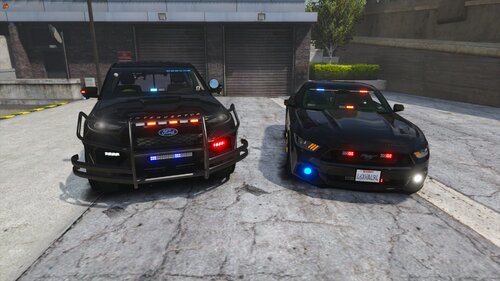 Cars look great, but I think for undercover vehicles they're running way too many lights. You only need one rear light-bar not a bottom and a rear, if that changed it would be perfect. Models look great, works well. Keep up the great work!
- 46 comments
- 4 reviews
-
I talked to the plugin developer and he said it will be removed next patch he releases. IT was set as a key-bound debug, and it will be disabled later on.
-
Whenever I get a 'System.AccessViolationException' I rename my mods folder so it doesn't get loaded, try run the game through RagePluginHook and see if that does anything, if not you know it's nothing you've adjusted in the mods folder, if it works, then something you've done recently is being problematic, though I think firstly you should try to launch the RagePluginHook Launcher without any plugins, then when you're in-game Go to F4 command line and enter 'loadplugin LSPD First Response.dll' see if it works that way, then 'forceduty' Let me know if any of that worked.

