


Palfy205
Members
-
Joined
-
Last visited
Everything posted by Palfy205
-
I see your plugin timeout threshold is only at 20000 change it to 60000 see if that makes any difference.
-
That's pretty good, I would try to swap the 1660 for a 1660 super, the cost difference is minuscule but the performance gain is about 5% for less than $10 GPU Comparison
-
I posted a response to this build in another thread. Here is the spoiler.
-
I'd personally stick with Intel for gaming, the i5-9400 is an affordable gaming CPU that will run amazingly. Here is a CPU comparison using the same GPU nearly 20 FPS difference from AMD to Intel and only a $20 difference. Let me know if you need anymore help 🙂 Link to CPU Comparison
-
The 2070 is a great card, especially the super. OF course improving your GPU is going to get you FPS gains, but remember the amount of plugins, scripts, and mods you run are going to inhibit your max FPS while on duty, since the game only has a set amount of resources, running memory intensive plugins are going to limit for FPS. Couldn't find 1060TI but compared the 1060 6gb vs the 2070 Super, big gains. For a final answer, post your CPU Model, as long as you have over 8GB of ram you'll be fine in that department.
-
Honestly, having a great monitor is going to make GTA V look better than changing from 1080p to 1440p. Lower resolution on a bigger screen always looks grainy, but in the settings you can adjust resolution multiplier so it'll look even better and you can customize it between 1080p and 4k if you really wanted to. Since CPUs have very little impact on FPS, I wouldn't worry about it. The difference between your 6 year old CPU and a brand new one is 10% performance on the average game. 1070 is a good card, it should run 1440p no problem. But remember, GTA V is not coded very well, so mods and plugins are going to drain the games resources lowering it's FPS
-
Hands down best value for performance = 1660 Super you can go for the 2070 but it's a bit more and about a 30% performance gain and it would last you longer.
-
It's a tad above the minimal requirements for Grand Theft Auto V - You could do it, but if you're still rocking a 550 TI in 2020, it may be time to upgrade. That Xenon and GPU are almost 10 years old now. I can help you set something up, just message me if you want. But short answer, you can run it. Not sure how well though.
-
For gaming? That would literally make almost no difference... i9 is for servers, wouldn't suggest it for gaming. Hyper-threading isn't really good when it comes to gaming. I use this comparison website, it's the best to test your specs. https://www.gpucheck.com/en-usd/compare/nvidia-geforce-gtx-1080-ti-vs-nvidia-geforce-gtx-1080-ti/intel-core-i7-9700k-3-60ghz-vs-intel-core-i9-9900k-3-60ghz/ultra/ultra/-vs-
-
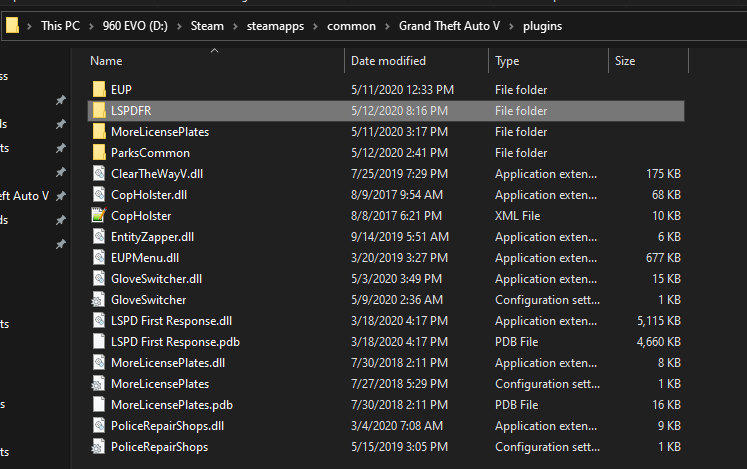
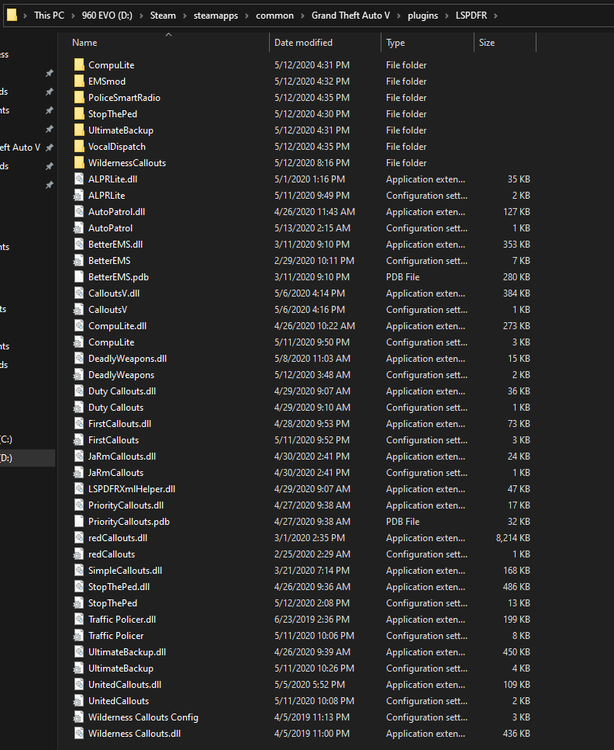
Remember those are not standalone plugins, they're LSPDFR dependent, so you need to create a folder in your plugins folder called "LSPDFR" It should look like this, Grand Theft Auto V\Plugins\LSPDFR The plugins in where the LSPD First Response.dll would be where you put standalone plugins such as EUPMenu, ClearTheWayV, EntityZapper, plugins that you can run without needing LSPDFR to be active on duty. Other plugins you place inside the LSPDFR folder only get activated once you go on Duty. Hope that makes sense.
-
Sounds like LSPD First Response.dll didnt' load, post your RagePluginHook.txt files here and we can take a look.
-
You're very welcome, glad I could help.
-
Open the RAGEPluginHook settings menu (hold down SHIFT immediately after clicking RPH) Increase 'Plugin timeout threshold' to a higher value (e.g. 60000) Save and Launch Make sure sure your RageNativeUI is properly installed, and I would disable UltimateBackup and LSPDFR+ to see if that helps. If it still doesn't work, let me know.
-
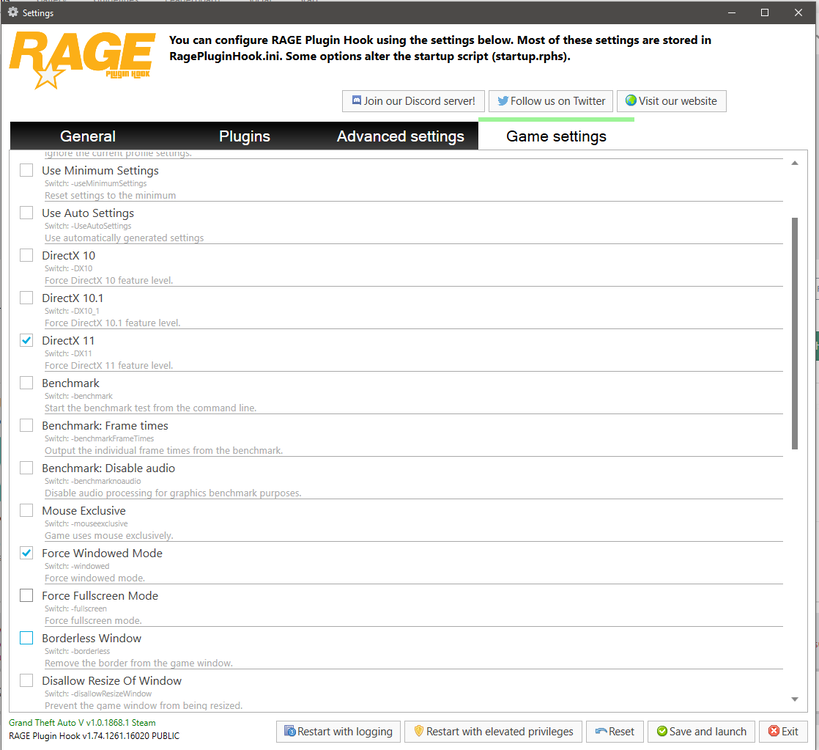
Make sure those settings are checked on, doesn't seem to be throwing any errors, I'd also try just starting the game without RPH once and go into story mode, then restart with RagePluginHook.
-
You're very welcome, feel free to mention me if you need any more help.
-
So I did some digging, because this annoyed me also. I found out that it's a result key-bind from the Plugin "CalloutsV" not sure why, But I'll try figure out more about it. Try removing CalloutsV from your plugin list and see if it still occurs.
-
I would make sure your game is stable outside of RPH, make sure your mod file wasn't corrupted on some recent edit. Two things you can do, change your mod folders name to something else so it doesn't get loaded in, or just launch the game without RagePluginHook, I would suggest doing them in that order. It looks to be crashing over the time frame of 30 minutes. So give it some time to test, I would double check and make sure your UltimateBackup plugin is installed correctly with the required files.
-
Hey guys, make sure your custom vehicles you added are ELS compatible, then make sure you upload the appropriate XML into your "\Grand Theft Auto V\ELS\pack_default" folder. Another reason is that ELS requires "Script Hook V (Alexander Blade)" here is a link for it if you don't already have it "Scripthookv"
-
FPS drops is normal, because your game is running a lot more data usage, has nothing to do with your PC, the game is limited to a certain amount of memory, some plugins run way harder on the system than others, I just went through and did this sequence to find the culprits. #1.) Start Game - F4 - "forceduty" #2.) Remove one plugin by Cut pasting to desktop, #3.) F4 - 'Unloadplugin LSPD First Response.dll' #4.) F4 'Loadplugin LSPD First Response.dll' #5.) F4 'forceduty' test FPS to look for increase. Repeat these steps with each plugin, or you can just remove them all, and add them one by one, when you're editing Plugins folder you don't have to restart the game, you only have to restart LSPDFR, sometimes you can just forceduty on and off and the non-standalone plugins will reset, but I prefer to fully reset LSPDFR. Once in a while I randomly get FPS drops, playing a little while and moving locations helps, forcing all the peds/cars to reset and the police spawned. Hope this helps, it's the way I look for FPS intensive plugins.
-
ELS just changes the lighting on backround objects not the actual brightness of the lights. Make sure your settings are at the required level to actually see visual light edits. Make sure shader quality is above high and post Fx to high. I would suggest using "Link to Real Radiance for VisualV NNR" if you're using a visual mod, and if not use "If you're not using visual edits"
-
Getting tired of hearing my guy yell "I NEED SOME BACKUP!" every time I press B accidentally or on purpose. Is there anyway to disable this?
-
Did you modify a "mods" folder or the actual files themselves? I'd try verify the regular files to make sure you didn't overwrite anything, then let us know back. Also trying to launch the game without RagePluginHook will tell if your modded files made a difference to it crashing, or it it actually is RPH that's causing the problem. There are some options you can adjust in the RPH startup (while holding shift) that can make it more stable. Forcing Direct x11 also forcing windowed mode, would be a start.
-
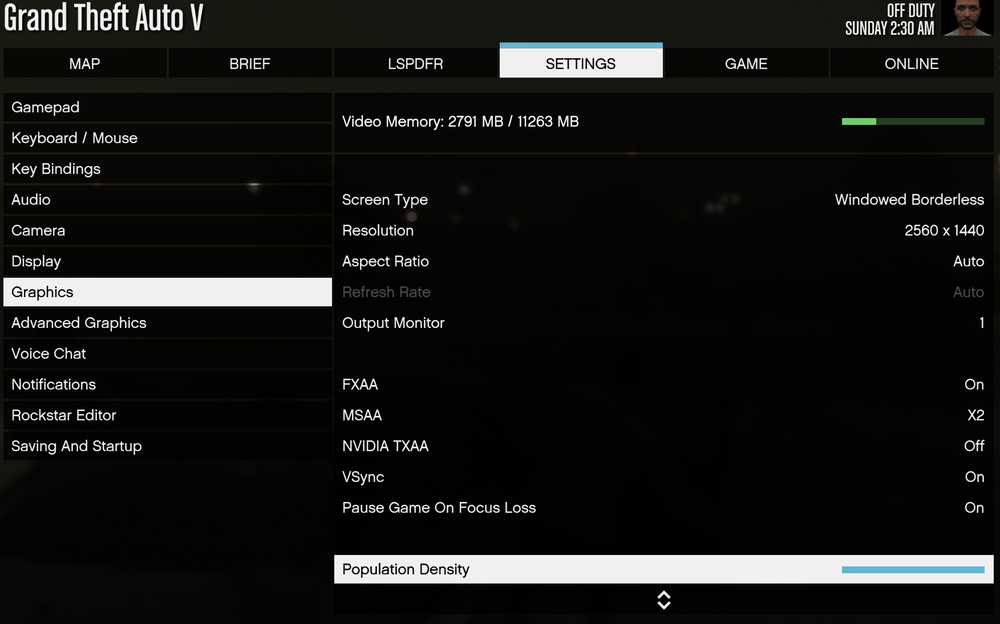
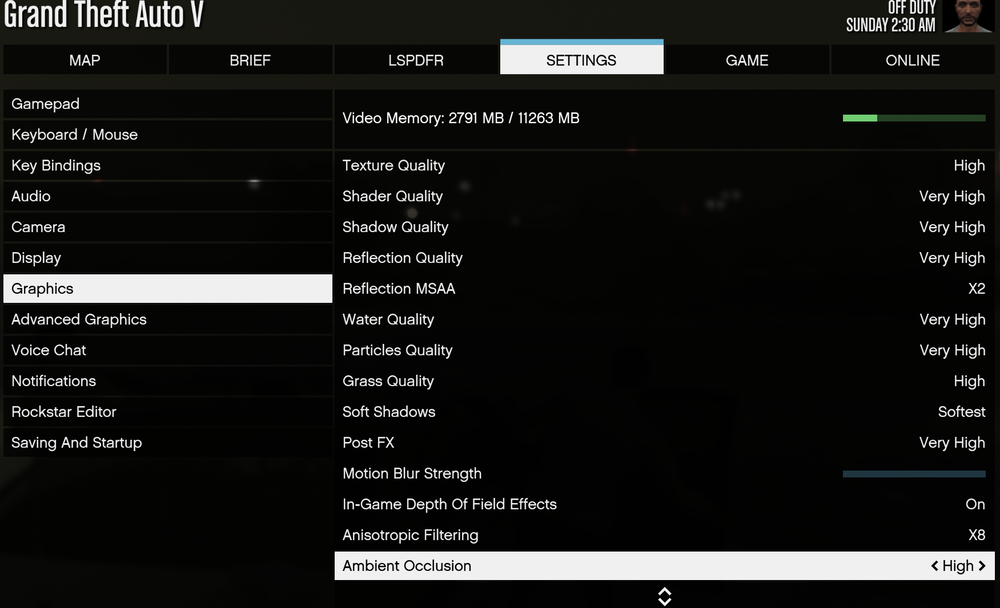
Hello there @Officer. Fleming A posting of your graphics settings would be nice to have a look at. I know "Main.PreloadAllModels = false" is the first step, but mainly GTA V can only handle so many textures at once before it starts to shit out. Mainly car textures are the biggest drain on your overall capacity, mainly because every car model creator wants theirs to look the best so they cram 4k textures on things that you don't even look at, a start is to lower your in-game graphic settings. Here is a picture of my in-game settings. Also added my settings.xml which is located in your C:\Users\NAME\Documents\Rockstar Games\GTA V Once you get all that information to me we can see if further help is needed. Though I would start by turning the grass setting down, textures to either high or normal, and then distance scaling down. settings.xml
-
Hello there @JohnEmbaughI'd really like to help you out here, But I'll have to ask for some more information before hand. I noticed you said you've already installed Scripthook and ASI Loader yet you're still having issues? Can you send me a picture of your GTA V main folder. I'm mainly wanting to see your current ASI,APP EXT files and config files. Also uploading your asiloader.txt would be a good start.
-
 This man is a pro, honestly I was so lost on why it wasn't working, I added both those files, almost gave up. Than I read your post and BOOM. Works like a charm.
- 329 comments
- 24 reviews
-
-

- 1
-


