OJS
Members
-
Joined
Everything posted by OJS
-
-
Oh thank God! I thought I did something wrong, thanks man!
-
Forgive me if this is the incorrect place to post this question, but I uploaded my first plugin yesterday and you know it has to be reviewed because increase site activity during the COVID 19 pandemic. Here is my question: Why does it say "Blaine County Callouts.rar - Your submission contains executable code."? Am I miss interpreting what it is telling me or did I do something wrong. I hope this is the correct forum topic. I am 100% sure my Plugin does not contain an EXE file. Here is the file structure of the RAR File:



-
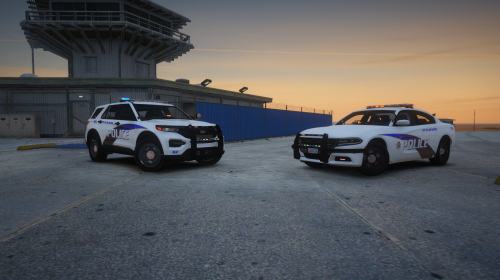 For some reason the lights on Charger and Explorer don't work for me, although Taurus works perfectly fine. And the AI appear to have no issue with the other vehicles. I was going to screenshot the Charger but the lights just won't turn on. And for the explorer it is constantly on, like headlights. Although I do enjoy the Taurus. Screenshot of explorer issue,
- 14 comments
- 2 reviews
-
-
Thanks mate! I will try this. Question, in OpenIV which folder are these textures located? Is it a certain patchday or somewhere else?
-
Hello, so I have been working on my plugin and I was wondering, how exactly do you add an image to be displayed in a game notification? When my plugin loads I would like to display an image to the left of my notification title. Here is my current code: Game.DisplayNotification("Blaine County Callouts " + System.Reflection.Assembly.GetExecutingAssembly().GetName().Version.ToString() + " has loaded successfully, thank you for downloading!"); Any help will be gladly appreciated.
-
 Thanks m8! Btw even when off duty I can't open the bottom one, I figured this might be useful info.
- 174 comments
- 13 reviews
-
1. The Pacific Standard Public Deposit Bank at Alta St. / Vinewood Blvd. Downtown Vinewood, Los Santos and... 2. The Blaine County Savings Bank at Paleto Blvd. / Cascabel Ave. Paleto Bay, Blaine County. At the first one, (refer to image "20200712205437_1.jpg" and "20200712205747_1.jpg". For the Second one, (refer to image "20200712210404_1.jpg". These are the specific doors that have refused to open when I am on duty.
- 174 comments
- 13 reviews
-
Hello, I noticed that on the "Security Guard requesting additional unit" call out, the plugin doesn't detect when I arrest the individual. I tried it twice and on both times it didn't detect that I had located the suspect and arrested them, also the blips were never deleted even when I went off duty. One other thing, on the Guard Duty for the Bank I had to use Simple Trainer "Go Through Doors" command to continue the patrol inside the building, other than that the plugin has worked flawlessly. Question, is ELS required for the vehicles?
- 174 comments
- 13 reviews
-
-

- 1
-
-
Hello fellow developers, I am still developing a call out for the mod, but I have a question. Is it possible to set a vehicle as "Stolen" in LSPD: FR? I am creating two pursuit of stolen vehicle call outs, both of which I have added the following code to my script: //Setting the vehicle as stolen. myVehicle.IsStolen = true; Here is the problem though, I went into LSPD: FR and started it up. I spawned one of the call outs and I apprehended the suspect. Although when I scan the license plate to check if the car is actually stolen, it doesn't show it as stolen. It just states the type of vehicle, license plate number, and registered owner. So, is there a way to set the suspect vehicle as stolen? Because the above code doesn't seem to work. Unless I am using it wrong.
-
-
.thumb.png.da31fac1cdbed476577a0aaf4ab60f16.png) Will you be updating this to the latest 0.4.7 (BUILD: 7383) API? Because right now I am having to use the bodyguard section of the Simple Trainer to get a partner and it is kind buggy at times. I'd like to be able to play this with the latest version.
Will you be updating this to the latest 0.4.7 (BUILD: 7383) API? Because right now I am having to use the bodyguard section of the Simple Trainer to get a partner and it is kind buggy at times. I'd like to be able to play this with the latest version.- 156 comments
- 25 reviews
-
-
It worked m8, thank you so much!
-
Thanks m8, I will try it in a little bit.
-
 Can someone help? For some reason my mouse cursor can only move in a small box area of the bottom right of my game. I couldn't even click the X to close the window so I had to Reload LSPDFR.
- 1,743 comments
- 172 reviews
-
Hello folks, I almost finished my first callout plugin when all of a sudden, while testing it. I show up on scene and the largest frame drop ever in my entire history of playing the game happens. The game won't stop spawning backup units. I only told it to spawn two. Here is my code: public override void Process() { base.Process(); { //This states that if the player is less than or equal to 100 meters away from SpawnPoint, then it will do whatever is in the brackets. if (Game.LocalPlayer.Character.Position.DistanceTo(SpawnPoint) <= 100f) { //Create the pursuit. this.pursuit = Functions.CreatePursuit(); //Add mySuspect to the pursuit. Functions.AddPedToPursuit(this.pursuit, mySuspect); //Request backup for one air unit and one local patrol unit to join the pursuit Functions.RequestBackup(Game.LocalPlayer.Character.Position, LSPD_First_Response.EBackupResponseType.Pursuit, LSPD_First_Response.EBackupUnitType.AirUnit); Functions.RequestBackup(Game.LocalPlayer.Character.Position, LSPD_First_Response.EBackupResponseType.Pursuit, LSPD_First_Response.EBackupUnitType.LocalUnit); } } }
-
OMG Thank you so much!
-
I think so, my computer doesn't even have a dedicated GPU and it runs LSPDFR fine. I only have: Intel Core i5-3330S Intel HD Graphics 620 8 GB RAM I mean I don't play at full screen but considering you actually have a dedicated card you could run it in full screen and even at a higher resolution. I think if you can run GTA smoothly you should be fine.
-
 I love it! Good work! Here is me and my partner standing by it. Excuse the low resolution I don't have a good enough PC to play the game in full screen.
- 11 comments
- 4 reviews
-
Hello everyone. I am trying to develop my first plugin, but I was wondering through programming the addon is it possible to set set my call out to spawn on a specific street in the game? I am learning from ToastinYou's post at: And I notice they are showing us how to make a pursuit in progress call out specifically, but if I am reading the code correctly it is choosing the spawn point to be on any street within 300f of the players current street. As stated by the line of code below: SpawnPoint = World.GetNextPositionOnStreet(Game.LocalPlayer.Character.Position.Around(300f)); Here is my question, under "Game" is their a way to call a specific street name or do I need to use co-ordinates? And if I do have to use co ordinates how do I get those co-ordinates from the game? You see I am trying to make a call out plugin that focuses around the Blaine County area and the first call out on my list is one that happens at a store. Any help would be gladly appreciated. In the meantime I will look through all that is available under "Game."
-
I think I found a bug with the Demonstration Call out, I was driving around Los Santos near the Rockford Hills Area, and I got the demonstration call out so, naturally I accepted and headed to the scene. When I got there I walked over to the commanding officer and began to talk to him he asked what we should to do and I said we should wait and see what they do. After a minute or so they shot flares at us like they are probably meant to do (the protesters), but here is the problem when the protester opened fire with the flare gun some of the crowd scattered and ran from the scene which I assumed was supposed to happen, but even after we arrested or subdued all the suspects still at the scene the call out would not go Code 4. Idk what happened I stood there for about 15 minutes, then looked around maybe I missed someone? No one in sight, although I did see one of the police officers from the scene running around with their baton out. So I just closed the game for tonight and I am about to go to sleep. Idk how to replicate the issue, so I hope this helps regardless.
-
-



.thumb.png.da31fac1cdbed476577a0aaf4ab60f16.png)