OJS
Members
-
Joined
Everything posted by OJS
-
Thanks I will try it later.
-
I'm not entirely sure how to use this, could you explain a bit about what this script is doing? I noticed the "VehicleColor GetColors(this vehicle v)" method, but I am not sure how to incorporate this into my callouts.
-
Okay, so I have been trying to get the primary color of the suspects vehicle for a little over 3 days so far. The farthest I got was getting the HEX Code of the color, but not the actual name which is what I need. When I tried to translate the HEX Code with the ColorTranslator in C# it keeps crashing LSPDFR claiming the data provided is not the correct type. I could really use some help with trying to get the actual name of the color. You know like whether or not it is red, blue, green, yellow, etc. Because I am 100% certain no one is going to understand the notification statement if it says something like: Or something like that. Now you're probably wondering what have I tried? Well at first I was thinking it would be as simple as creating a var that is like this: var vColor = SuspectVehicle.PrimaryColor; And just including vColor.ToString() into the notification, but that just gives me: Which is definitely not helpful at all. Then I tried using the ColorTranslator with the FromHTML() method using the PrimaryColor.Name and at one point for some reason I only got the number 0 returned in the notification. Please help.
-
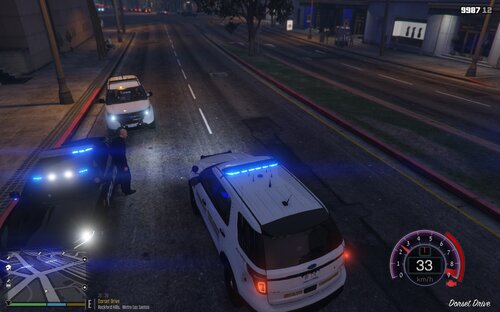 Well when you first start creating callouts you're taught the same thing (usually). Most tutorials teach you how to get a basic pursuit callout up and running. Then it is usually up to the original creator to deviate from that and make more interesting. This is probably done because at heart most callouts are pursuits. It's just the pursuit may or may not be triggered or a very specific set of events must be triggered to start the pursuit. This could be a foot or vehicle pursuit, it depends. One time in on of my callouts (while I was testing) the AI suspect (which I was chasing on foot) ran over to a car to commit Grand Theft Auto. Some foot pursuits have the ability to turn into a vehicular pursuit. true dat
 -
Would license plate numbers, vehicle colors, and vehicle model names be ~p~ or something else?
-
Oh, well that explains a lot lol My bad, thanks mate! I feel so stupid for overlooking that.
-
Okay, here is the pastebin link: https://pastebin.com/u8C84f6M
-
I think I might of just realized what was wrong, could this error be caused due to the "SuspectVehicle" variable being static: private static Vehicle SuspectVehicle; // The stolen vehicle. Previously when I was making the variables (on line 48, 49, and 50) in the class rather than in the method I made it static since Visual Studio suggested it after I made the vars as private readonly strings.
-
SuspectVehicle = new Vehicle(GroundVehiclesToSelectFrom[rnd.Next(GroundVehiclesToSelectFrom.Length)], SVLCGSDSpawnPoint) // Sets the vehicle to be a random vehicle from the "GroundVehiclesToSelectFrom" array. { IsPersistent = true, // Makes the vehicle Persistent. EngineHealth = eDamage, // Set's the engine health. IsStolen = true, // Marks the vehicle as stolen. Heading = 352.9712f // Sets the vehicles heading. };
-
Line 48 is: var modelName = SuspectVehicle.Model.Name;
-
I love the new design, fancy!
-
Okay, so I have come across an issue with my code, and I have absolutely no idea why it crashes the game. So, it happens in my "Stolen Vehicle" callouts whenever the callout is accepted. I know that it deals with these lines of the code below: // Vehicle Info. var modelName = SuspectVehicle.Model.Name; // The vehicle's model name. var vColor = SuspectVehicle.PrimaryColor.ToKnownColor(); // The vehicle's known primary color. var licensePlateNum = SuspectVehicle.LicensePlate; // The vehicle's license plate number. Game.DisplayNotification("Respond Code 3! The vehicle is a " + vColor + " " + modelName + " with license plate number " + licensePlateNum); // Display's a notification for the player specifying Response type and a description of the suspect vehicle. Previously the variables above were set as private readonly strings. And I added a ".ToString()" method to the end of it's assigned values. This didn't help at all. So, I switched it to be vars, hoping the program could sort it automatically (I assume that's why the var type exists). I've even moved the vars outside of the "OnCalloutAccepted" method, that didn't help much at all. Here is what the Log says: Basically, what I am trying to do with this code is display a notification to notify the player of how to respond (Code 2, Code 3, Code 99, etc.), and give a description of the suspect's vehicle. Since, the player will, more times than not need to search for it. I could really use some help for this. Thanks, - OfficerohnnyShumway
-
Thank you so much!
-
So, I was wondering if it would be possible to randomize the Scanner Audio for a callout? You know like different combinations of the audio files rather than one for every time? Here is what I was thinking: Mostly I want to do this for the Response Code part of the Scanner Audio since I noticed there are these files for Response Codes: UNITS_RESPOND_CODE_02_01.wav UNITS_RESPOND_CODE_02_02.wav UNITS_RESPOND_CODE_03_01.wav UNITS_RESPOND_CODE_03_02.wav UNITS_RESPOND_CODE_99_01.wav UNITS_RESPOND_CODE_99_02.wav UNITS_RESPOND_CODE_99_03.wav I was thinking I might be able to randomize the audio files played by doing this: private readonly String[] ResponseCodes = new String[] { "UNITS_RESPOND_CODE_03_01", "UNITS_RESPOND_CODE_03_02" }; // A list of possible "said" response codes. private String ChosenResponseCode; // Assigned later. private readonly Random rnd = new Random(); // A new random (used later). ChosenResponseCode = ResponseCodes[rnd.Next(ResponseCodes.Length)]; // Chooses random string from "ResponseCodes" String Array. Functions.PlayScannerAudioUsingPosition("WE_HAVE CRIME_GRAND_THEFT_AUTO IN_OR_ON_POSITION" + ChosenResponseCode, SVLCGSDSpawnPoint); // Plays the scanner audio. Would this be a good way of handling this? Or is there a simpler way of doing this? Can LSPDFR Figure out which file it is or choose a random files if I only put in "UNITS_RESPOND_CODE_03" or do I need to specify? Thanks in advanced, - Johnny Shumway
-
It works, thanks!
-
I'll check it again a few more times. Thanks for the help!
-
Okay so it kind of works, but the blip somehow disappeared from the map even though I was right behind the suspect?
-
Hold on, brb
-
Well I didn't know that. I was taught to attach the blip in "bool OnCalloutAccepted()" and I've done it ever since.
-
Hello, everyone. I am trying to iron out a few bugs in my callouts plugin. One of which is a bug where if you lose visual of the suspect LSPDFR will attempt to make it where the suspect is no longer visible on the mini map, but for my callouts plugin the blip stays there. Here is what I've tried. Added this in the void Process(): // EXPERIMENTAL // if (Functions.IsPedVisualLost(p_Suspect)) { if (SuspectBlip.Exists()) { SuspectBlip.Delete(); // Deletes the blip when the player loses the suspect. } } if (p_Suspect.IsOnScreen || !Functions.IsPedVisualLost(p_Suspect)) { if (!SuspectBlip.Exists()) { SuspectBlip = p_Suspect.AttachBlip(); // Attaches blip to the suspect. SuspectBlip.IsFriendly = false; // Suspect is not friendly. } } // END EXPERIMENTAL // Any help would be gladly appreciated, thanks!
-
Thank you LMS!
-
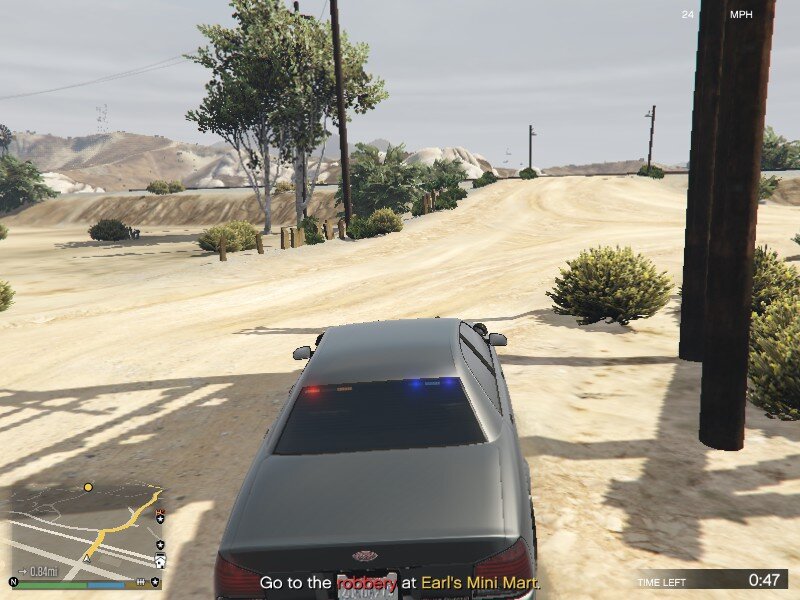
I mean like this:
-
Hello everyone, I am in the middle of redoing my callouts plugin. And some of the feedback I received suggested the addition of a timer similar to the one used in the default store robbery LSPDFR callouts. My question is, how exactly do you add that, is it something in Rage Plugin Hook's API or LSPDFR's API? Also, is there anything I should know about using this timer? Thanks in advance, - Johnny
-
Thanks, sorry for late reply. I have been inactive for quite a while.
-