


TreadRed
Members
-
Joined
-
Last visited
Everything posted by TreadRed
-
try increasing the threshold in rage settings to 30000
-
-
-
 I crash without adding anything to the regions folders but this one ped in, is exactly what is in trainer, says corrupt memory. <Ped comp_face="1" comp_beard="1" comp_shirt="5" comp_pants="26" comp_hands="49" comp_shoes="52" comp_eyes="9" comp_accessories="39" comp_tasks="15" comp_decals="1" comp_shirtoverlap="151" prop_hats="14" prop_watches="4">MP_M_FREEMODE_01</Ped>
- 195 comments
- 24 reviews
-
-
Is that in the .dll? I don't even know how to open that file so I should probably stay away from it haha
- 195 comments
- 24 reviews
-
Well I been doing a lot of testing and I was not defining a component if it equaled 1. Figured out if you don't define something then lspdfr will do a random variation, and random variations can change the upper and lower, pretty sure every component will have to be defined, Idk if you did that or not but if you did and its not working please let me know, because Im fixing to have to start all over lol
- 195 comments
- 24 reviews
-
I been trying to get CustomRegions to work for hours now lol. FIxing to try defining every component even if it equals 1
- 195 comments
- 24 reviews
-
Post the log file
-
No prob got you got it going
-
If you post the log I can tell you if its because of a typo
-
If Ultimate Backup is doing that its probably due to you making a typo when editing your vehicles
-
Any one know why La Peurta has 2 zones? I only see 1 area. There is DELSOL(LAPUERTA) and LOSPUER(LAPUERTA)
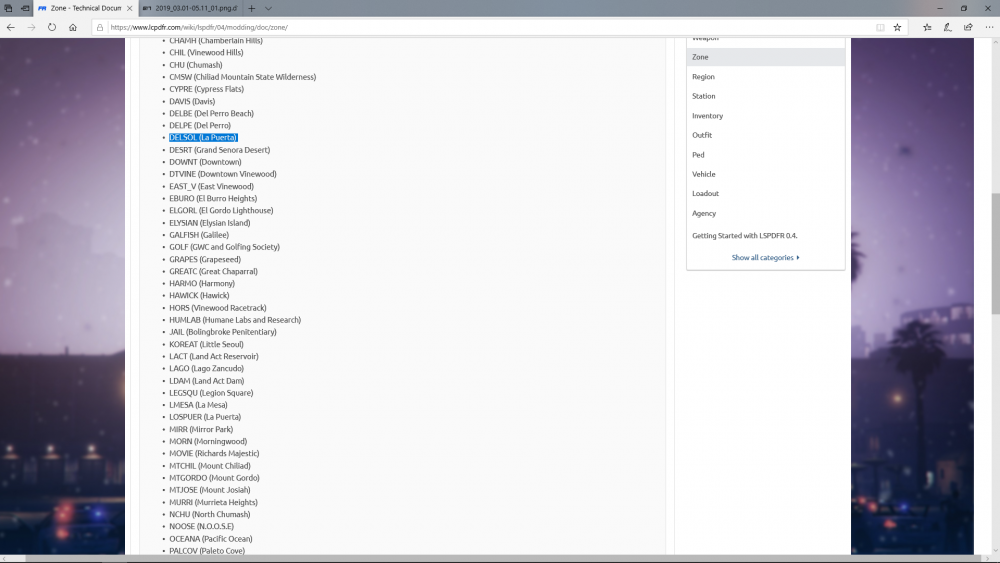
-
From Cheep Callouts
-
will have to post the log
-
Even updated albo1125.common in the misc section?
-
Have you checked the downloads page and installed lastest updates for Albos mods and Stop the Ped and Ultimate Backup?
-
Download and install this
-
ok, you should follow this video before trying to start lspdfr
-
can you post the log file
-
are you able to play on gta without lspdfr?
-
need the full log
-
Idk if that will help or not. You do only have one Grand Theft Auto V folder right? make sure you rename any others
-
Doesn't make any sense to me. Maybe the process is being used by another program, in a sense of being blocked. Download lspdfr file and after is downloads right click on the file you download and go to properties, make sure your in the general tab and look for an unblock button. Also try disabling any programs and/or make sure there is a exception made for the GTA folder and the Rage executable file.
-
Ok well I see you have disabled the loading screen so that may be what it is, start rage and press settings, in the advanced settings untick disable custom loading screen [2019-02-28 01:24:51.327] Command line option -disableCustomLoadingScreen is specified; disabling custom loading screen rendering.


