


liverlande
Members
-
Joined
-
Last visited
Everything posted by liverlande
-
OnCalloutNotAccepted is triggered. It's an override in the Callout class.
-
Based on the name, I assume this is called after the ped is arrested. Someone would need to check the behavior here and confirm.
-
Being arrested and being cuffed are two different things in LSPDFR. BeingArrested is the stage where: 1) The takedown is initiated 2) The player starts holding down the E key In the first case, the player could literally just stand there and aim their pistol at a grounded suspect - they'll still be counted as being arrested. Not sure if this is something you want. In this event, you could potentially be "arresting" multiple peds. The same is technically true for AI, but I don't think they're allowed to arrest multiple at once. Assuming that is something you intend, there are no practical reasons the methods you gave wouldn't work. You could optimize further by maintaining a cache of Peds so you're not calling World.GetAllPeds every time. Mockup code with no such caching benefits: https://gist.github.com/RiverGrande/6361b57bb5231762c75d127df5a4cb02 No one is forcing you to play or develop a modification developed for free by a group of individuals who reverse engineer a game with no real support from Rockstar Games. If you have issues with LSPDFR (and specifically the API, as this is the topic for the API), you should provide information so a patch can be introduced in a future update.
-
This thread can be used to post "snippets" - a small amount of code that is either almost or fully independent of the script it's used in. Unless otherwise specified, snippets hold the following terms: Credit must be given to the author of the snippet if used in another project Posting a snippet gives the above license for use Snippets: Name: RandomCallouts Author: LiverLande Description: Caches all callouts and adds a function for calling a random callout. Requirements: LSPDFR 0.3.1 Link: https://gist.github.com/RiverGrande/d27b7506d5eb1372e53f1840a8a647c8 Name: WaitForDismissal Author: LiverLande Description: Monitors all stopped Peds and waits until they're dismissed. Requirements: LSPDFR 0.4.0 Link: https://gist.github.com/RiverGrande/712b8678baf6b6365ffa8e9c56b63134 Name: OnScreenKeyboard Author: NoNameSet Description: Draws a keyboard on the users screen (used in such things as the cheat menu) Link: https://gist.github.com/NoNameSet/33dbed309e48428e8b5d498fa15165fa Name: SynchronizedScene Author: NoNameSet Description: Plays synchronized animations (animations that are meant to be used to play together, like the cuffing animation) Link: https://gist.Github.com/NoNameSet/048d8d7bac259236c25f6280a9918ce0 Name: Trains Author: NoNameSet Description: A class to easily create trains Link: https://gist.github.com/NoNameSet/0a90a9652643c795abe30fb23c187640 Name: PursuitExtensions Author: NoNameSet Description: Pursuit extension methods Link: https://gist.github.com/NoNameSet/046464b917b3bc8f181fe5c9e6fa1a85 Post with the following format to have a snippet added to the main post: Name: Author: Description: Link: Using GitHub gists is recommended for ease of use and access - discussion regarding snippets is also allowed in this thread. The goal is to produce a valuable resource for developers to share code.
-
This is something up to the individual plugin developers. As far as I know, there is currently no way to natively fetch random ped and vehicle data from agency.xml without parsing the .xml yourself (which is a bad idea, especially if something changes with a minor LSPDFR update such as LSPDFR 0.4.1). This is why this isn't already an on-going practice. Hopefully this functionality is added to the API for LSPDFR 0.4.2 (especially since you can get an agency name for a location as of LSPDFR 0.4.1), and then it'll be up to individual plugin developers to implement.
-
Glad to see there are more functions available for arrests, especially checking if a ped is being cuffed. Are there plans to add an API function to set a ped as handcuffed (with the object and animation) in a future update? Edit: It seems that Functions.IsPedBeingCuffed* doesn't apply to takedown arrests and only triggers when cuffing a stopped ped. Can this behavior be modified? This was not the intent of my request as it only makes what I'm doing apply to 1/2 of possible scenarios.
-
You should be able to detect this by waiting until Functions.IsPedStoppedByPlayer returns false (run this check in a separate thread). This won't work correctly with StopThePed since it uses its own functions and not the LSPDFR API. StopThePed might offer other functions through its own API for you to integrate. Example untested module that you can expand on: https://gist.githubusercontent.com/RiverGrande/712b8678baf6b6365ffa8e9c56b63134/raw/dae92b3542fdb43a0b77b006bd84a489840767ec/WaitForDismissal
-
CalloutPacker is a work in progress plugin for LSPDFR 0.4 that allows you to choose which callouts can be called naturally through “callout packs”. This means that you can have a pack allowing all callouts, a pack allowing traffic related callouts, and so on. These packs are their own .xml files, which means they can be distributed by plugin developers for their own mods. How It Works The native callout dispatching system is disabled and replaced with one controlled by this plugin. Only callouts that are enabled are triggered. A chance modifier is planned for the future. The native available for calls functionality will be accounted for. A menu is available in game to manage callout packs or enable/disable callouts for just the current session. Estimated Release This type of plugin involves a lot of different code to tie things together. I won’t be setting a release date in stone, but hope to have an initial stable release out before April. No promises.
-
Great idea. I was actually experimenting with something related to callouts and have a pretty good base I can use for something like this. I'll see what I can come up with 🙂 Edit
-
Make sure you are using the latest version of Assorted Callouts as updated for LSPDFR 0.4. Once confirmed, upload your RAGEPluginHook.log file here so the crash can be investigated.
-
Functions.StartCallout takes a string parameter, this is the name specified in CalloutInfo. To achieve this, we have to get this name from all available callouts. We can do this by searching through all assemblies with a base type of Callout, retrieving the name specified in CalloutInfo, and caching it into a list of strings. When we want to trigger a random callout, we access this list and randomly choose a string with no conditions. Credit goes to Stealth22, he (as far as I know) wrote the base code for going through all callouts that I've made use of here. Gist is below with untested mock up code that should theoretically work: https://gist.githubusercontent.com/RiverGrande/d27b7506d5eb1372e53f1840a8a647c8/raw/a71c93eb007f9b35e3b1e376026624507779f40e/RandomCallouts.cs
-
FYI: you can initialize Blip with those values directly: SearchArea = new Blip(Suspect.Position, 100.f) { SearchArea.Alpha = 0.5f, SearchArea.Color = Color.Yellow };
-
You can only use an LSPD uniform with customized freemode characters because that's all that exists within GTA V. LSPDFR did not implement any additional models or textures and only offers what is natively available. What I use is a clean installation of EUP and EUP Outfit Settings for LSPDFR 0.4. This allows you to select additional uniforms as you otherwise would. You can find the latter below:
-
-
-
 I may have been mistaken in my original response to this comment (if you saw it) and made incorrect assumptions. I'm looking into the timing issue. Edit: I’ve made some overall tweaks to the plugin within the last few days and timing seems to be better now. I’ll be deploying a second release soon which will also include cleaner sounds as part of the default installation. Edit: Update has been deployed.
 -
I'm not sure what behavior Functions.SetPedIsArrested grants in relation to the new grabbing system implemented in LSPDFR 0.4. Can you document what this function is doing under the hood exactly? A function to (un)apply the handcuff objects (a toggle for the sound would be great here to) when setting a ped as arrested would help out a lot, especially if it works with the systems explained above. This would allow for extremely smooth integration with LSPDFR 0.4 when dealing with arrests. A function such as Functions.IsPedGettingHandcuffed would be welcome.
-
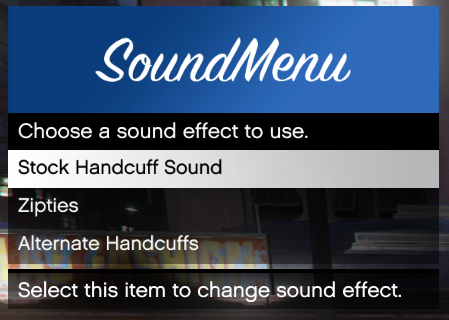
DifferentHandcuffSounds allows you to choose between different sounds for handcuffs during runtime. This is done through "hotswapping" the default sound effect to the desired one. This is useful if you want that extra point of realism when acting as a SWAT operator using zipties, for example. Sounds can be selected through a simple menu powered by RAGENativeUI. You can also select the original sound effect. Due to the method used, the stock sound effect might not be restored if the plugin does not close gracefully. To manually restore the stock sound effect, rename lspdfr/audio/sfx/CUFFS_TIGHTEN_01.wav.old to lspdfr/audio/sfx/CUFFS_TIGHTEN_01.wav. The stock LSPDFR sound effect is roughly 15 KB. The hotkey for the menu is configurable and supports a modifier key. There is no controller support in the initial release of this plugin. By default, the menu key is F10. You can choose which sound effect to default to using the ID specified in the .xml. This value is changed when a sound effect is changed in the menu and will persist between game sessions. As of the second release, DifferentHandcuffSounds will check to ensure required dependencies are running and check for script updates (if enabled). Different sounds are also provided in the default installation. Install instructions: - Move files in the archive to your GTA V/LSPDFR installation. To install different sounds: - Place new sounds in lspdfr/audio/sfx - Edit plugins/LSPDFR/DifferentHandcuffSounds.xml accordingly - I've included an example .zip for those who pack sounds using the two example sounds provided: - The sound config file is different from the plugin config file to allow exactly this - packers can pack the .xml together with the sound files into one drag-and-drop package - The sound ID for the stock handcuff sound is 0 (and will default to 0 with the config provided) Disclaimer: This software ("Software") is closed source. Unauthorized modification or distribution of this file is prohibited. This Software is only available on lspdfr.com. The creator of this Software waives any liability for use of this modification resulting in undesirable effect. Sound samples provided (alt_handcuffs.wav, zipties.wav) are not part of this license and were not created by the author of this plugin. No liability.
-
LSPDFR+ is a user made modification, it has nothing to do with this API thread. It’ll be updated when Albo1125 gets around to releasing the latest pull requests: https://github.com/Albo1125/LSPDFRPlus
-
I've pushed pull requests to both Traffic Control and Stealth.Common to introduce basic compatibility with LSPDFR 0.4. If you want to use this now and are capable of compiling both on your own, pull requests are here: https://github.com/Stealth22PD/traffic-control/pull/2 https://github.com/Stealth22PD/stealth-common/pull/1 Both will hopefully be made available through the download page when Stealth22 has time to do so. I am not affiliated with him and have made these changes through the open source GitHub repository.
-
I've pushed pull requests to both Code 3 Callouts and Stealth.Common to introduce basic compatibility with LSPDFR 0.4. If you want to use this now and are capable of compiling both on your own, pull requests are here: https://github.com/Stealth22PD/code-3-callouts/pull/6 https://github.com/Stealth22PD/stealth-common/pull/1 Both will hopefully be made available through the download page when Stealth22 has time to do so. I am not affiliated with him and have made these changes through the open source GitHub repository. Note that there are additional features in the Code 3 Callouts pull request that have not yet made their way to the download page either.
-
brilliant
-
In addition to what Ineseri has stated, please keep your code organized and consistent. It'll make creating and maintaining your codebase a lot less stressful.
-
You can try using this: The basic idea is that you load a plugin through RAGEPluginHook which interprets and runs ScriptHookV scripts. When I tried using this with ELS, I experienced nasty frames as soon as the game spawned me in which made using it unplayable (unloading the plugin returned normal FPS).
-
Going on a cursing rampage and demanding that you be assisted because you're oh so special is not how lcpdfr.com works. Everyone who helps out on these forums is volunteering their time and effort to help you with problems that have more than likely been resolved elsewhere and are accessible on Google. There is no secret agenda to set you back in doing things that are straight forward and naively supported by the game, and there most certainly is no obligation for anyone to help you at all. The most ludicrous part of this response is that your tirade began a mere 4 hours after you posted this topic, not even a whole day passed. Since you're so adamant about having a proper SDK (which by the way, all three of your questions aren't even related to the LSPDFR API. RAGEPluginHook isn't a product of G17 Media), you surely can make your own extensions for RAGEPluginHook that do what you want how you want. Not good enough? Make your own hooking system that is everything you've ever dreamed of. If you are not up to such task, I strongly advise you to use resources such as Google and NativeDB and make do with the freely available systems that have been developed and made available for free. This topic will more than likely be locked due to your behavior. P.S: Being toxic is not going to magically make people help you (in case you haven't understood that part yet). Don't bother releasing anything on these forums if this is how you plan on acting. There are other places you can do that.

