




Yasd
Community Team
-
Joined
-
Last visited
-
Currently
Viewing Topic: Content available for LSPDFR Enhanced
Everything posted by Yasd
-
Hello! 🙂 I wonder where you got that plugin? Unfortunately this is a very outdated plugin and is no longer compatible.
-
Pls load your gta without RPH. If it works, start it with RPH. Otherwise rename mods folder to _mods
-
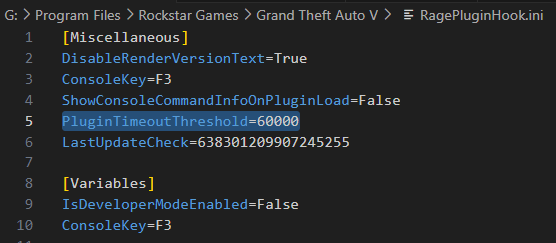
Hi! Post the Ragepluginhook.log from the main gta folder. Do you have a crash to desktop or just LSPDFR crash where you are still in gta?Hey! Your crash error is: Could not find a part of the path 'F:\Grand Theft Auto V\Plugins\LSPDFR\StopThePed\Localization.ini'. Pls reinstall StopThePed completely, cause you're missing some files.Hello! The default EUP Menu only has a "F11" Menu, where you can create/ edit the character or choose an outfit. Maybe you refer to another plugin, when talking about "F3" Menu.Hey! I tried to search for a solution to reset the chosen app to default, but i havent found anything. Anyways, you do not need to open a .dll file, so just ignore the fact it will use notepad when the user tries it to open (which you wont need to do 😉 )Hi! If you have ScriptHookVDotNet, remove it and check, if it fixes your issue. If it fixes it, you still can try to install a nightly build.Hi! rename the mods folder to _modsHello! rename the mods folder to _modsHello! 😉 Your error "bad antivirus" luckily is a common one, chek out the FAQ on page 3 and further for the solutions: https://docs.google.com/document/d/1Hp2Qco0qsgKfohkhjYWUxTr2OF7NSCkp8uSZwWz6rRQ/editAccording to this log, which is from yesterday, you played for 40 min. Generally you can disable plugins by removing it & then try to restart the game to see if the crash is gone. Your 2 new plugins should run fine. I found one error to SimpleCTRL: SimpleCTRL: SimpleCTRL dependency RAGENativeUI.dll does not meet minimum requirements (1.9.2.0 < 1.9.3.0). Pls install the RageNativeUI that comes with SimpleCTRL in the main gta folder.Hello! You seem to have unstable/ outdated callouts, i suggest remove them until you have a stable game. Your crash was caused by "Sergant", remove it. Update: HeliAssistance MegaphoneUI Remove: Immersive Dispatch PragmaticCallouts Richs Police Enhancements Those next i feel free to remove, since they are not updated for the recent lspdfr version: AssortedCallouts BeAPrisonGuard BetterEMS ChillCallouts Code 3 Callouts Corrections Callouts redCallouts SergantPost the Ragepluginhook.log from the main gta folder.check out this article:Pls attach the Ragepluginhook.log as a file, this makes the life for the support team easier.Hello, 1. it appears that LSPDFR gets loaded multiple times. If you haven't loaded them manually more than once, open startup.rphs with Notepad++ and make sure LoadPlugin "LSPD First Response.dll" is only once in there. 2. Go to RagePluginhook.ini (open with Notepad++ or Editor) in the main gta folder & make sure PluginTimeoutThreshold=60000 is in there. Chris 🙂
 From what i can see your log looks fine, you have played 40 min which is quite good for a modded game. I cant help you based on the log.https://support.rockstargames.com/articles/19138585780499/Social-Club-Error-Code-1005This topic has been moved to the appropriate forum. Please post in the correct location in the future.Update RageNativeUI in the main gta folder. If you really want TrafficPolicer, ArrestManager & PoliceSmartRadio, use the updated versions on this site. They were updated by another user. Do not use the ones on lcpdfr.com, because they are outdated.hello, pls only write in english here, thx.Failed to load backup data: System.Xml.XmlException: Unexpected end of file has occurred. The following elements are not closed: Regions, Regions. Line 201, position 14. from file: GTAV/lspdfr/data/regions.xml you have an error there.Exception message: Could not find a part of the path 'D:\Grand Theft Auto V\Plugins\LSPDFR\UltimateBackup\DefaultRegions.xml'. Pls reinstall UltimateBackup completely.this looks like a gta event, not lspdfr related. install a 100% savegame: https://de.gta5-mods.com/misc/100-save-game


