




Yasd
Community Team
-
Joined
-
Last visited
Everything posted by Yasd
-
If you do not have an internet connection, alternatives to Bejoijos mods are https://github.com/Aschtar?tab=repositories TrafficPolicer LSPDFR+ ArrestManager PoliceSmartRadio In my opinion its not as good as STP and is missing some features, but it doesnt force internet connection.
-
Unfortunately if you do not have a backup, there is no way. We only offer support for the latest version. And only the latest version of lspdfr is downloadable.
-
 Thanks for reporting! It's a known problem and will be fixed in the next update!
- 237 comments
- 20 reviews
-
- lspdfr callout
- rph
- translation
- legacy
-
Tagged with:
-
Install RageNativeUI in the main gta folder. Link Next time pls attach the log as a file.
-
When exactly is it crashing? On startup or when activating a siren on a specific vehicle?
-
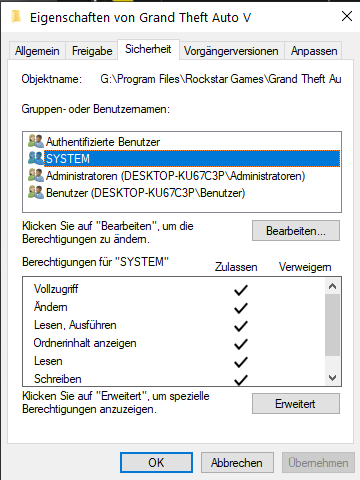
Exception message: Access to the path 'D:\Program Files\Epic Games\GTAV\lspdfr\stats.dat' is denied. Add your gta folder as an exception in your antivirus. RIght click on your g ta folder -> Properties -> Security -> make sure system, admin & user has all hooks/ permissions Start gta/ rph as an admininstrator
-
The error is related to SimpleHud. Try reinstalling or remove it temporarily.
-
Update RageNativeUI in the main gta folder https://github.com/alexguirre/RAGENativeUI/releases
-
Open a topic in the support forums and ping me, thx.
- 237 comments
- 20 reviews
-
- lspdfr callout
- rph
- translation
- legacy
-
Tagged with:
-
lol I mean I did push a lot of updates recently, but isn't that a good sign? New updates means more fixes & new content?
- 237 comments
- 20 reviews
-
- lspdfr callout
- rph
- translation
- legacy
-
Tagged with:
-
Disable ambient events, by adding those lines to your lspdfr.ini: Main.DisableGameBlipHiding = true Remove the oudated ones, once you have a stable game you could add them back: - CalloutManager - Federal Callouts Im unaware of LSPDFRCallout, probably remove it too. You're missing Pyro.Common in the main gta folder from SuperCallouts. Narcos is missing System.Net.Http.Formatting, completely reinstall it.
-
You can ignore those messages.
-
Replace vehicles are: police police2 police3 police4 policet sheriff sheriff2 fbi fbi2 You can use any of it
-
Its something in the mods folder. Revert the latest changes or start a new one.
-
Sorry, I don't understand. Do you mean: What are the police cars names to replace a SAHP unit in OpenIV?
-
@chorg blorgPlease open a new topic for your issue, thanks.
-
rename your mods folder to _mods
-
You have installed 686Callouts twice, remove one in gtav/plugins/LSPDFR/ Error while initializing plugin: RansomAmbience.Main: Could not find file 'A:\Grand Theft Auto V\plugins\LSPDFR\RansomAmbience\EventWeights.json'. Reinstall RansomAmbience completely. Error with Section136Callouts: Reinstall it completely. The crash: Exception message: 'EventWeights' were not loaded successfully. Make sure you copied 'Newtonsoft.Json.dll' to your GTA5 main directory!!! As I said: Reinstall RansomAmbience completely.
-
You played for 50 min, then it crashed. Unfortunately there is nothing I can do for you. Remember that this is a modded game & follwong that its somehow unstable.
-
post the ragepluginhook.log from the main gta folder
-
Post the Ragepluginhook.log from the main gta folder.
-
Be aware that this mod is 7 years old. I'm sure its broken and won't work.
-
Install: - custom gameconfig - HeapAdjuster - packfile limit adjuster recommended: - Resource Adjuster
-
Hello, this not not a problem with MCCallouts. The reason for the crash is caused by MoreRadioChatter, which requires an very old version of NAudio, MCCallouts comes with the newest version. Be aware that this is the section for MCCallouts, for further support open a topic in the support forums.
- 237 comments
- 20 reviews
-
- lspdfr callout
- rph
- translation
- legacy
-
Tagged with:
-

