




Yasd
Community Team
-
Joined
-
Last visited
Everything posted by Yasd
-
 Hey, tolle Arbeit, freut mich, dass bei eurer Zusammenarbeit so etwas tolles herausgekommen ist!
- 3 comments
- 1 review
-
Happy holidays and good presents!
-
-
Bewege RageNativeUI von gtav/plugins/LSPDFR nach gtav/
-
Be aware ScripthookV itself is not the problem, because it loads .asi files. You have to search there for errors. ScripthookVDotNet only loads after ScripthookV loads it. F. e. if you have ScripthookV and ScripthookVDotNet installed, but remove ELS, would be a step to exclude errors. A common problem is the outdated ScripthookVDotNet, you might update the latest nighly release: https://github.com/scripthookvdotnet/scripthookvdotnet-nightly/releases Or keep ScripthookV and remove ScripthookVDotNet, which normally loads scripts in the scripts folder.
-
First try to start gta, once ingame tab out and start rph. 2. Make sure to have a gameconfig, heap adjuster and packfile limit adjuster otherwise rename your mods folder to _mods and try again
-
Traffic Policer & Police Smart Radio werden nicht mehr geupdated und ich empfehle sie zu entfernen.
-
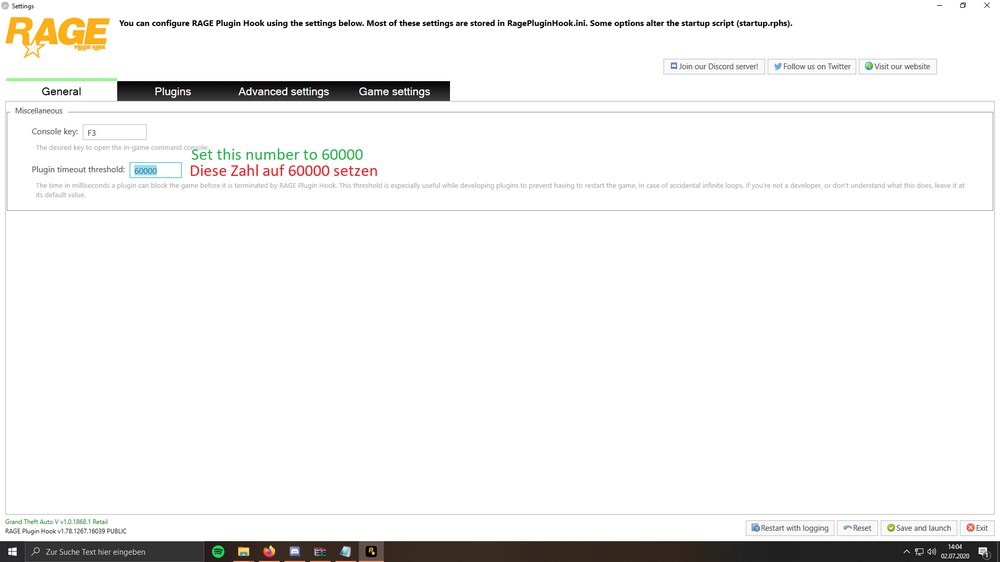
Set the RPH plugin loading time to 60000. If you still have issues, post the complete Ragepluginhook.log.
-
Update/ Install ScripthookVDotNet nightly in the main gta folder: https://github.com/scripthookvdotnet/scripthookvdotnet-nightly/releases
-
Post the Ragepluginhook.log from the main gta folder.
-
https://www.lcpdfr.com/downloads/gta5mods/scripts/?sortby=file_updated
-
About what callout pack are you talking? Post the Ragepluginhook.log from the main gta folder.
-
nope, only the newest one is available and supported
-
you are playing on an old version of gta & ragepluginhook, but with the newest lspdfr version, thats incompatible. update gta & rph.
-
The link doesn't work. Please give good description on your error.
-
Yep, sounds like a perlission issue. Add the whole gta folder as an exception in the antivirus Set the gta folder permissions by right click on the gta folder - properties - permissions - make sure user, system has all hooks/ permissions
-
This file comes with the lspdfr download, install it
-
open the rph console with f4 and type in LoadPlugin LSPD First Response.dll
-
are you saying when you install the mod in gtav/plugins/LSPDFR, gta and the mod is working? And when you install it in gtav/plugins, you get the blocking message and the mod is not working?
-
You need to update LSPD First Response.dll & .pdb in gtav/plugins.
-
This topic has been moved to the appropriate forum. Please post in the correct location in the future.
-
This topic has been moved to the appropriate forum. Please post in the correct location in the future.
-
-
dinput8.dll loads .asi files, so you have to search there. Remove some .asi files and see which one is causing it.
-
Update LSPD First Response.dll & .pdb in gtav/plugins


