




Yasd
Community Team
-
Joined
-
Last visited
Everything posted by Yasd
-
post your ragepluginhook.log
-
so renaming mods folder to _mods doesnt help? does gta without lspdfr work?
-
set your rph load time to 60000. if problem insists, post ragepluginhook.log
-
update your RageNativeUI. https://github.com/alexguirre/RAGENativeUI/releases
-
post your ragepluginhook.log
-
post your ragepluginhook.log
-
when you wanna play lspdfr, you just need to start ragepluginhook. then it automatically starts in offline or story mode. you must not start gta alone and then choose online, otherwise you might get banned. if you choose story mode, you play offline and everything's alright.
-
add an exception to your antivirus.
-
tutorial on screenshot software snipping tool (Windows 10 default software): https://support.microsoft.com/en-us/windows/open-snipping-tool-and-take-a-screenshot-a35ac9ff-4a58-24c9-3253-f12bac9f9d44
-
rename scripts folder to _scripts
-
post your ragepluginhook.log
-
you can download the latest version from the official website: https://www.dev-c.com/gtav/scripthookv/
-
sure, post your ragepluginhook.log
-
install gramar police and post your ragepluginhook.log
-
rename mods folder to_mods
-
Update deine RageNativeUI. https://github.com/alexguirre/RAGENativeUI/releases
-
you're right, your files installed in your mods folder do not load, because we figured out, that your error is in your mods folder. If you can remember what you installed after it crashed, you can undo it.
-
rename mods folder to _mods
-
its in the main gta directory
-
you cannot. this file is in the main gta directory on your pc xD
-
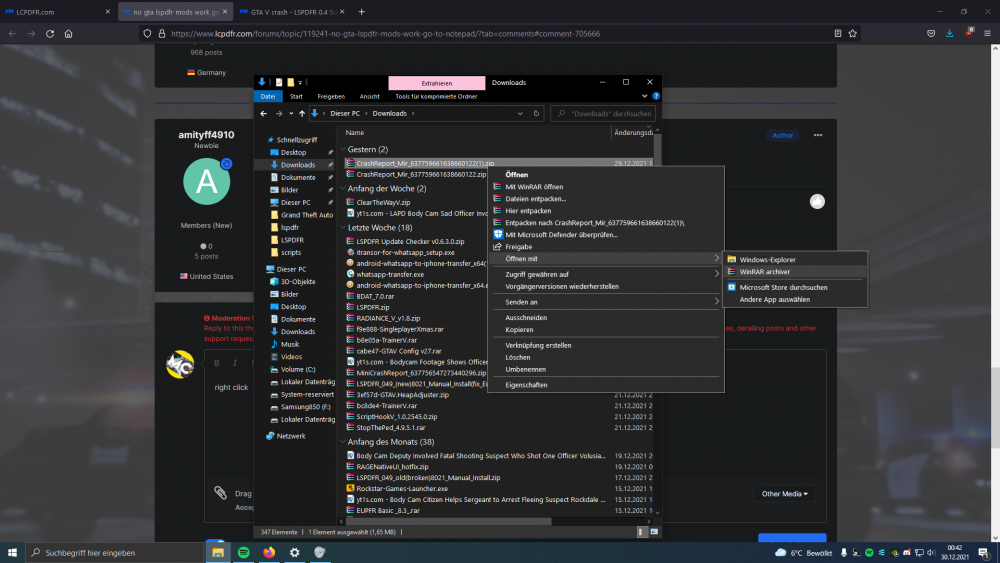
right click
-
rename mods folder to _mods
-
So you have winraror 7zip installieren?
-
right klick the file -> open with winrar or 7zip or whatever you use
-
nope thats hiding, could be "MALICIOUS" software xD


