




Yasd
Community Team
-
Joined
-
Last visited
Everything posted by Yasd
-
is the lspdfr plugin loaded at all? hit F4 for ragepluginhook post your ragepluginhook.log
-
https://dotnet.microsoft.com/en-us/download/dotnet-framework make sure you have framework installed.
-
The date of the Ragepluginhook.log is from 2019, pls post the current one 👍🏽☺️
-
That feature only sometimes work ^^ make sure you are close behind the suspect when using it
-
You can remove your trainer to see if it comes from that
-
-
-
Hast du Scripthook und ScriptHookVdotnet installiert? https://www.dev-c.com/gtav/scripthookv/ https://github.com/crosire/scripthookvdotnet/releases
-
Update RageNativeUI. You have an outdated version.
-
Install RadianceV. It makes your police lights brighter.
-
Post your Ragepluignhook.log from the main gta folder.👍🏽😅 Also rename mods folder to _mods and try again. If its working, then some files are broken or wrong installed.
-
Install RageNativeUI. https://github.com/alexguirre/RAGENativeUI/releases It still might be unstable, since its outdated, but try it. I use it, too.
-
post your ragepluginhook.log from the main gta folder, after the crash occured. 👍🏽😅
-
Its a known bug in your old version. Can be solved by simply updating LSPDFR. Update StopThePed, otherwise it crashes when calling a tow truck.
-
if you deleted your harddrives where gta was installed, there is no way to recover this. you can manually reinstall that stuff.
-
as i explained, there is sth in the mods folder that causes this. you can start a new mods folder and add stuff one by one and check if it works, or you remove stuff and check if it works, i would start by vehicles, then guns. Good luck!💘
-
You can choose the settings recommended in GeForce Experience.
-
make sure your mods folder is updated after the gta update. otherwise rename mods folder to _mods
-
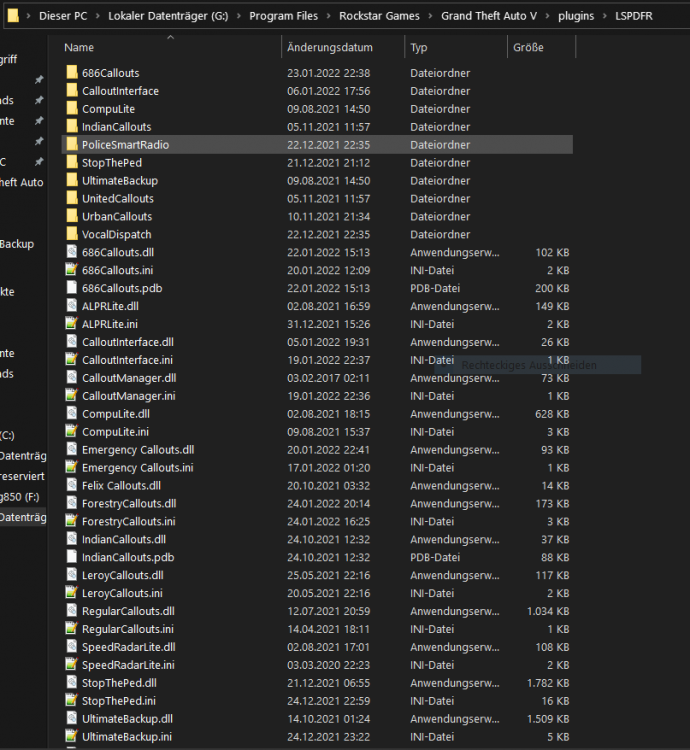
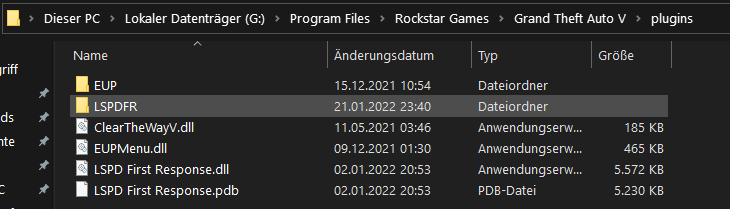
Create a LSPDFR folder under gtav/plugins/ so it is gtav/plugins/LSPDFR in that folder, you put your callouts, f.e. stoptheped, ultimatebackup, simplecallouts etc gtav/plugins/ Here you have LSPD First Response.dll
-
wihtout a problem. 👍🏽
-
yes. very good graphic card, good cpu and ram is ok.
-
thedothedo too easy...
-
if it gets created, post your ragepluginhook.log from the main gta folder.
-
so you have a problem with the mods folder, what did you install lately after the crash occured?
-
Install ScripthookV. https://www.dev-c.com/gtav/scripthookv/
-
the error is path not found, install manually the update.rpf in your mods folder and try again.


