Yasd
Community Team
-
Joined
-
Last visited
Everything posted by Yasd
-
Update RageNativeUI.
-
set your whole gta folder as an exception, for example G:\Program Files\Rockstar Games\Grand Theft Auto V
-
Update LSPDFR. no crash in your log.
-
Update RageNativeUI here from the official site.
-
Update RageNativeUI, it cause your game to crash. You have to update stoptheped remove LSPDFR+, its outdated and may cause your game to crash. What is Interop.MediaPlayer in Plugins/LSPDFR folder? If unknown remove that.
-
update LSPDFR. remove computerplus, policesmartradio and traffic policer. they are outdated and cause your game to crash.
-
Next time, create your own topic… rename mods folder to _mods
-
when you rename mods folder or remove software that enables the mods folder, you have the orginal files back.
-
i suggest to remove backweapon
-
is that file in your main gta folder?
-
If i uninstall any software, its always gone. - OfficerChris1, 30.01.2022
-
you have 3 crashes, first is sth related to weapon, have you changed anything related to that? second is caused by an outdated plugin, remove FederalCallouts. third is caused by CrazyCallouts, it outdated too. remove that.
-
post your ragepluginhook.log from main gta folder.👍🏽
-
no crah in your log, last thing thats loaded it grammar police, try remove that.
-
Exception message: Could not load file or assembly 'EasyHook, Version=2.7.6578.0, Culture=neutral, PublicKeyToken=4b580fca19d0b0c5' or one of its dependencies. The system cannot find the file specified. Thats a file from the LSPDFR software.
-
post your ragepluginhook.log
-
Update GTA.
-
have you added the gta folder as an exception in antivirus? if you have none installed, add it to default win antivirus: https://support.microsoft.com/en-us/windows/add-an-exclusion-to-windows-security-811816c0-4dfd-af4a-47e4-c301afe13b26
-
post your ragepluginhook.log from the main gta folder. 👍🏽😅
-
Install it. https://www.microsoft.com/en-US/download/details.aspx?id=26999
-
Exception message: The 'BlaineCounty' start tag on line 2828 position 4 does not match the end tag of 'NorthYankton'. Line 2935, position 5. Have you changed anythin related to that?
-
yes
-
if the upload of the file does not work, you can copy the text from the file an post it here.
-
It’s the same. if I say: plugins/lspdfr it’s the same as gtav/plugins/lspdfr
-
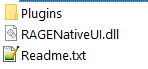
callouts belong to gtav/plugins/lspdfr you installed them wrong! that applies to compulite prowlerradar speedradarlite stoptheped and supercallouts 😄 lets pick an example on how to install a callout: stoptheped is the example: if you open the downloaded file you see the following: Plugins (folder) RageNativeUI Readme.txt The readme explains how to install and more: INSTALLATION: ------------- - Copy the contents of "Plugins\LSPDFR" in this package to: "GTA V directory\plugins\LSPDFR" - If you haven't had "RageNativeUI.dll" in your "main GTA V folder", don't forget to copy the file from this package - If you already have newer "RageNativeUI.dll", please keep using it. No need to overwrite the file - Please open and edit "StopThePed.ini" file, if you want to replace the keyboard key or controller button bindings if you open the Plugins folder, you get an underfolder which is called LSPDFR inside, there are 3 folders called PoliceSmartRadio, StopthePed and vocaldisptach. inside these folders, there are f.e. audio files and further settings to match the 2 callouts/ plugins. Also, there is a stoptheped.dll which is the plugin, and a .ini, which you can adjust to yourself. 👍🏽❤️