




Yasd
Community Team
-
Joined
-
Last visited
Everything posted by Yasd
-
post your ragepluginhook.log from the main gta folder👍🏽
-
One time, your LSPDFR crashed because LSPDFR+ is missing. One time it crashed with an invalid model, after and stolen vehicle event was created.
-
go to GTAV/lspdfr/lspdfr.ini and set: Main.PreloadAllModels = false
-
this is an english forum, write english. otherwise use the german forum
-
post your ragepluginhook.log from the main gta folder
-
this sentence doesnt make any sense 🙂 what have you done?
-
Have you installed ScripthookV in the main directory?
-
install the .xml for the vehicleyou get the crash while the vehicle SHERIFF2 is loaded. Either you have to disable preload all models or the SHERIFF2 you installed is broken.Does the lights on the specific car work when you turn them on?can you post your ragepluginhook.log from the main gta folder?Make sure, the file is in your mods folder, look via OpenIV under: GTAV / mods / update / update.rpf / dlc_patch and there should be an folder with mpxmas_604490 if there is the folder, make sure mpxmas_604490 is in the dlclist.xml.Your crash was caused by DeadlyWeapons, which is outdated and has to be removed. You have many many callouts, some of them are outdated, time for the SUPER MEGA UPDATE OUTDATE SOFTWARE FROM @Charlie686🧚🏽♀️🥸🥳🤑💦Oh, I'm sorry to hear you have problems starting it. 62 years old and insterested in computer games? I GD like that. Post your Ragepluginhook.log from the main gta folder.👍🏽ScripthookVDotNet is still missing. Show me a screenshot of the gta folder with ScritphookVDotNet in it. It should look something like this:
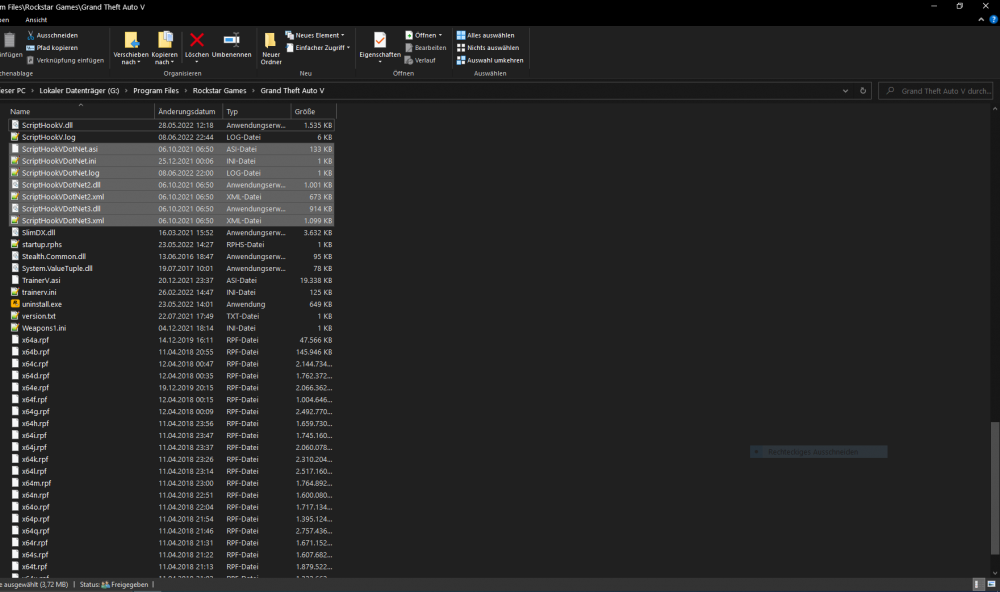 rename mods folder to _mods and try again. propably a problem with the vehicles you installed.Install ScripthookVdotNet in the main directory: https://github.com/crosire/scripthookvdotnet/releasesyes post the ragepluginhook.log from the main gta folderUpdate einfach RageNativeUI: https://github.com/alexguirre/RAGENativeUI/releases Dein Grammar Police hat auch ein paar Fehler, du hast da was nicht installiert (sollte aber nicht so tragisch sein): GrammarPolice: [ActionHandler] Could not find a part of the path 'E:\Grand Theft Auto V\plugins\LSPDFR\GrammarPolice\grammar\en-GENERIC\custom\actions'. GrammarPolice: [ActionHandler] Could not find a part of the path 'E:\Grand Theft Auto V\plugins\LSPDFR\GrammarPolice\grammar\en-GENERIC\custom\commands'.Failed to find settings file at C:\Program Files (x86)\Steam\steamapps\common\Grand Theft Auto V\lspdfr\lspdfr.ini. Failed to find file:lspdfr/data/outfits.xml I think you installed LSPDFR wrong. You just need to download LSPDFR and drag and drop all files in the main directory. Can you post a screenshot of the gta folder? And also screenshots of the missing files/ install those filesSimply replace RageNativeUI with the new version in the main gta folder: https://github.com/alexguirre/RAGENativeUI/releasespost your ragepluginhook.log from the main gta folder👍🏽🙂Model with hash 0x5e3da4a4 could not be loaded within a reasonable time. It may be invalid. you have a problem with a character. remove temporarily everything out of GTAV/lspdfr/chars except for Default_Female.ls and Default_Male.ls now try again and see if it crashes.post your ragepluginhook.log from the main gta folder.


