




Yasd
Community Team
-
Joined
-
Last visited
Everything posted by Yasd
-
post the log again. can you start gta on its own? if yes, start rph then?
-
if you start your game now, can you play gta with lspdfr or does it crash ingame or to desktop? if your log is the latest and you have a desktop crash, pls rename the mods folder to _mods
-
if you have stoptheped installed, its because the realistic weapon system is on. you can turn this off in the settings .ini file from stoptheped. i dont understand that problem. you can have guns and still switch to the fire extinguisher
-
hallo! probiere den lspdfr ordner aus dem gta hauptordner herauszunehmen und den ordner aus dem lspdfr download zu nehmen. die fehlermeldung ist: Rage.PedInventory.GiveNewWeapon(WeaponDescriptor weapon, Int16 ammoCount, Boolean equipNow) [1/31/2023 12:44:54 AM.178] at Rage.PedInventory.GiveNewWeapon(WeaponAsset asset, Int16 ammoCount, Boolean equipNow) [1/31/2023 12:44:54 AM.178] at LSPD_First_Response.Engine.Scripting.Entities.WeaponSkin.ApplyToPed soweit ich es herauslesen kann, ist das ein problem mit einer waffe oder einem skin einer waffe.
-
1. Failed to parse value for WorldEvents.IntervalMultiplier; change that value back to default 2. Could not load file or assembly 'Newtonsoft.Json Version=6.0.0.0; install that in the main gta folder, it comes from narcos im not sure about that error, because: [Section136Callouts] Installed version of dependency Newtonsoft.Json.dll is not expected. Expected version: 13.0.0.0. Actual version: 13.0.1.25517 this means it is installed, but its an other version than narcos wants i guess? pls check if you have a version installed. 3. Error while initializing plugin: AmazingCallouts.Main: Must specify valid information for parsing in the string. at System.Enum.EnumResult.SetFailure(ParseFailureKind failure, String failureMessageID, Object failureMessageFormatArgument); at System.Enum.TryParseEnum(Type enumType, String value, Boolean ignoreCase, EnumResult& parseResult) [1/30/2023 8:28:25 PM.909] at System.Enum.Parse(Type enumType, String value, Boolean ignoreCase) [1/30/2023 8:28:25 PM.909] at AmazingCallouts.Main.Initialize() in F:\[LSPDFR-Callouts]\Repos\AmazingCallouts\Main.cs:line 68 [1/30/2023 8:28:25 PM.909] at ljlCKpkQLRmfLhRrRQiywbKCIJjq.XatdUoufdhhoJAFQiwKcUqTqdgqT() in D:\GTA V\LSPD First Response\LSPD First Response\Mod\Callouts\CalloutManager.cs:line 765 im not sure about this error either. 4. the crash at the end of the log seems random to me. The Following Plugins Need To Be Removed (just for a stable game, if you have a stable game you can readd them if you want): LPCallouts Wilderness Callouts
-
-
I keep getting the “Insufficient Permissions or Bad Antivirus” message. What do I do? https://docs.google.com/document/d/1Hp2Qco0qsgKfohkhjYWUxTr2OF7NSCkp8uSZwWz6rRQ/edit#
-
delete the files inside the mods folder and install again
-
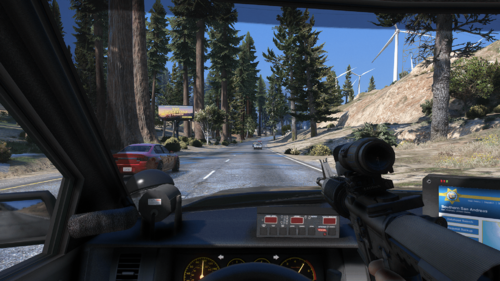 Awesome mod and idea! Actually it is so simple to make, but finding it was the key! So thank you! Ive combined it with the no reticle mod, which is in the weapons.meta
- 30 comments
- 4 reviews
-
-

- 1
-
-
You have a very old game version. but you still have to update gta, that’s the only way. verify your game files.
-
try reinstalling all files for compulite, maybe sth was missing
-
The tablet opens with control + o by default 2 buttons at the same time
-
Nope. no log etc. gets created for the mods folder. No options
-
And update rph to 102
-
Post the ragepluginhook.log from the main gta folder. you sure lspdfr is loaded?
-
Renaming the mods folder means disabling it from loading, something inside is causing the crash, I still think it’s the police vehicle. if you can’t find it, you have to restart the mods folder.
-
do you use lml? or did you install it in the mods folder? pls rename mods folder to _mods and try again
-
-
There has to be a way to install that. otherwise you can switch the character and save or play the story mission with the specific character and save all without rph and lspdfr. after that it should work
-
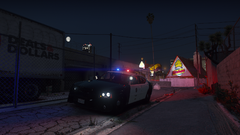 Awesome vehicle and awesome picture! 🚗 You got a link for the car?
 -
how do you got that realistic looking spotlight on the vehicle?
-
yes
-
your vehicle "police" causes the crash. remove it f.e.
-
pls install a 100% savegame: https://de.gta5-mods.com/misc/100-save-game
-
your log verifies it, menyoo, openinteriors, pld and scripthookvdotnet failed to load. make double sure youve updated scripthookv. the date behind the file should be 18th december 2022



