




Yasd
Community Team
-
Joined
-
Last visited
Everything posted by Yasd
-
The log doesn't help in this case. Sth in your mods folder you recently installed is causing the crash. Revert the latest changes or start a new folder
-
Post the ragepluginhook.log from the main gta folder
-
Exception message: Could not find a part of the path 'C:\Program Files (x86)\Steam\steamapps\common\Grand Theft Auto V\plugins\LSPDFR\overlays'. In your log you have a complete lspdfr crash, not just stoptheped. Install lspdfr correctly.
-
Pls send a Screenshot of the error. Do you have a legal version of gta or not?
-
Who told you that it's missing? I've never heard of this file. The website is down and not needed, all files, even the rph files, are included in the download of lspdfr.
-
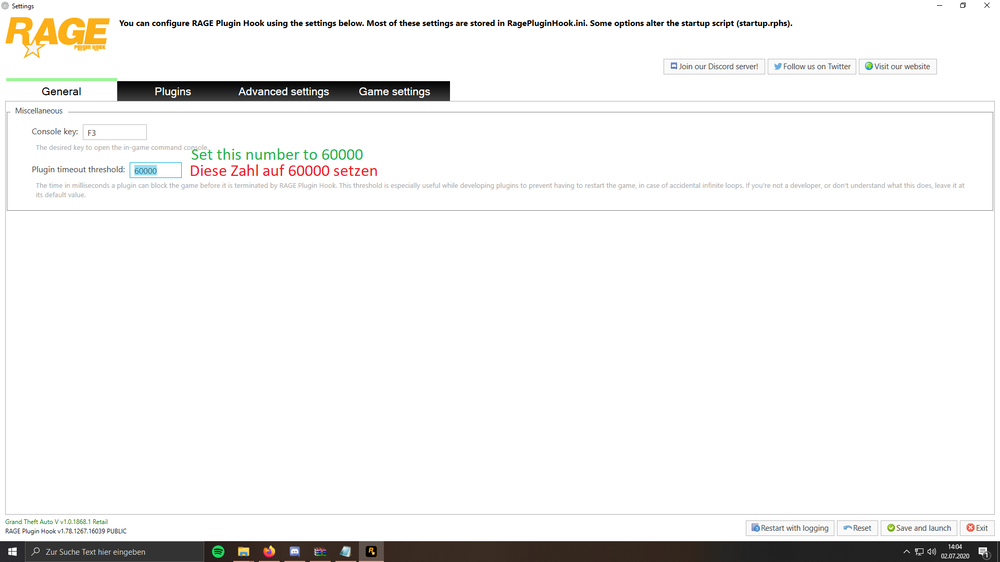
Set the ragepluginhook loading time to 60000.
-
-
Install albo.common from arrest manager in the main gta folder Install parktools from better Ems in the main gta folder Pls install dark.common in the main gta folder (from trafficevents) Grammar Police: Could not find a part of the path 'C:\Program Files (x86)\Steam\steamapps\common\Grand Theft Auto V\plugins\LSPDFR\GrammarPolice\grammar\en-US\default\actions'. Install grammar police correctly. After all if you download a mod, make sure to install all files in the right location, some stuff belongs in the main gta folder You also have some outdated plug-ins, I can check those if you want per software
-
Pls in English, post the ragepluginhook.log from the main gta folder
-
Pls reinstall lspdfr, The error is Invalid node ID, which is strange
-
Crash message: Exception type: System.AccessViolationException This is often permission related, But the last thing gta did was spawning the sheriff2 vehicles.
-
1. The crash message said the game crashed because it could not spawn a vehicle. 2. Error while hiding ambient game blips: System.AccessViolationException: Disable ambient events, by adding those lines to your lspdfr.ini: Main.DisableGameBlipHiding = true
-
Pls update gta, or verify the Game files
-
Rename mods folder to_mods for a again working Game I cannot help you with installing mods
-
Pls provide more details, do you have a lspdfr or desktop crash? Pls post the ragepluginhook.log from the main gta folder Did you have at any time a working Game? Can you play GTA on its own? Have you changed anything lately since the game is not working?
-
You installed basic callouts for read dead redemption, pls remove it 😂 Try again, if the problem still occurs, pls go on duty via police station and post the log again
-
Have you installed script hookv? If yes, post the els.log or the asiloader.log
-
This could be caused by a story mission. Install a 100% save game:https://de.gta5-mods.com/misc/100-save-game
-
youre missing ipt.common from prowler radar. install that in the main gta folder. crash reason: youre missing NAudio from moreradiochatter, install that in the main gta folder
-
those are different mods: GrammarPolice
-
this looks like an issue with one of your characters. pls move the folder gtav/lspdfr/chars out of the gta 5 folder and try again. let me know if it works
-
post the ragepluginhook.log from the main gta folder.
-
install ragenativeui in the main gta folder: https://github.com/alexguirre/RAGENativeUI/releases
-
i know why 😉 install ragenativeui in the main gta folder: https://github.com/alexguirre/RAGENativeUI/releases
-


