




Yasd
Community Team
-
Joined
-
Last visited
Everything posted by Yasd
-
no official date, but this or next week
-
Rockstar Games has released a new Title Update for GTA V "San Andreas Mercenaries" (v2944.0) LSPDFR and the RAGE Plugin Hook (RPH) require an update to work with this version. If you want to continue playing LSPDFR, do not update your game or RAGE Plugin Hook until an update for both LSPDFR and RPH is available. Note that an update for ScriptHook V - which is not required to play LSPDFR but is used by other mods - isn't currently available.
-
no official date, but i assume this or next week.
-
that is illegal/ not allowed to upload software owned by rockstar. you can simply verify your game files and it will automatically download the missing files (which is by the way faster)
-
I'm a real Bayern Fan Can you start gta on its own? Make sure to add the gta folder as an exception in your anti-virus
-
Fc Bayern Stern des süüüüüdens
-
There is no way to downgrade without a personal backup. You need to wait for an lspdfr update
-
just launch it normally via rph. renaming the mods folder does not stop gta or rph from starting, it just disables loading the folder
-
Click on yes to unblock these files
-
Post the ragepluginhook.log from the main gta folder
-
It's outdated and in your case may resolve the crash. It doesn't have to and can readded if you have no longer problems.
-
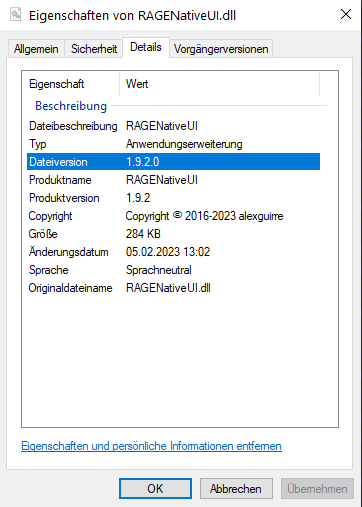
pls check if you have the latest ragenativeui in the main gta folder. it has to be 1.9.2, if not download here: https://github.com/alexguirre/RAGENativeUI/releases The Following Plugins Need To Be Removed (2): BetterEMS ComputerPlus, (Replaced by CompuLite) The Following Plugins Can Be Updated (1): GrammarPolice, Installed: 1.6.0.4 - Latest: 1.7.2
-
rename mods folder to _mods
-
post the ragepluginhook.log from the main gta folder
-
read this: https://docs.google.com/document/d/1Hp2Qco0qsgKfohkhjYWUxTr2OF7NSCkp8uSZwWz6rRQ/edit go to: 1. I keep getting the “Insufficient Permissions or Bad Antivirus” message. What do I do? 2. After I click “Save & Launch” nothing happens. Grand Theft Auto V itself runs perfectly fine. How do I fix this?
-
-
The ragepluginhook.log doesn't show what script hookv dot net is doing, for that there is a extra log called script hookv dot net.log Did removing solve the problem?
-
youre missing ipt.common from calloutinterface, it belongs in the main gta folder update grammarpolice
-
Hi! Do you have the latest RageNativeUI installed in the main gta folder? https://github.com/alexguirre/RAGENativeUI/releases Otherwise disable automatic plugin loading. Load it once you are ingame. If it still crashes, post the log again.
-
have you updated scripthookvdotnet to the latest version? it could be scripthookvdotnet itself, since there are known issues without a fix. also scripthookvdotnet is loading files out of the scripts folder. when removing this folder, is the game still crashing? otherwise sth in it is causing it.
-
You have to be an a certain of story missions, you can install a 100% save game to prevent that
-
Post the ragepluginhook.log from the main gta folder
-
So where is the screenshot I asked?
-
Pls load your plugins one by one so we can say what plugin is causing it, Which plugins do you have?
-
Search on YouTube how to change liveries Maybe

