




Yasd
Community Team
-
Joined
-
Last visited
Everything posted by Yasd
-
Post the ragepluginhook.log from the main gta folder
-
Have you changed anything in the settings of ultimate backup? Pls reinstall ultimate backup and replace all files
-
Then it's a desktop crash, not lspdfr crash. The difference is if lspdfr crashes, gta itself is still open, If you have a desktop crash, lspdfr and gta closes and you are at the desktop. Playing for one and a half an hour is a very good time for a modded game, which itself is unstable. There are highly no fixes for that.
-
Add the gta folder as an exception in the antivirus
-
Post the ragepluginhook.log from the main gta folder
-
Update ragenativeui in the main gta folder : https://github.com/alexguirre/RAGENativeUI/releases In your log I can see that lspdfr is loaded four times in a row, make sure it's only loaded once. For example, if it's loaded on startup automatically, do not, load it manually. Check the startup.rph, open with notepad++ f.e., and make sure "load plugin lspd first response " is only once there.
-
in your log is no crash, are you sure you have alspdfr crash and not a crash to desktop? otherwise post the log again after a lspdfr crash
-
post the ragepluginhook.log from the main gta folder
-
post the ragepluginhook.log from the main gta folder, if you get one. what have you done before those crashes appear?
-
have you tried this exact method?
-
this crash looks random to me, nothing i can find here. remember that lspdfr is a mod, which itself is a bit unstable and after some time may cause crashes.
-
Many users have that since the update. Dont worry, just enjoy LSPDFR! 🙂 🚓
-
? you just quoted my message
-
Maybe you are missing some audio files Frm those plugins you installed. Those files belong in the gtav/lspdfr
-
Error while hiding ambient game blips Disable ambient events, by adding those lines to your lspdfr.ini: Main.DisableGameBlipHiding = true
-
Exception message: Could not load file or assembly 'Spotlight Try to reinstall spotlight and heliassist
-
-
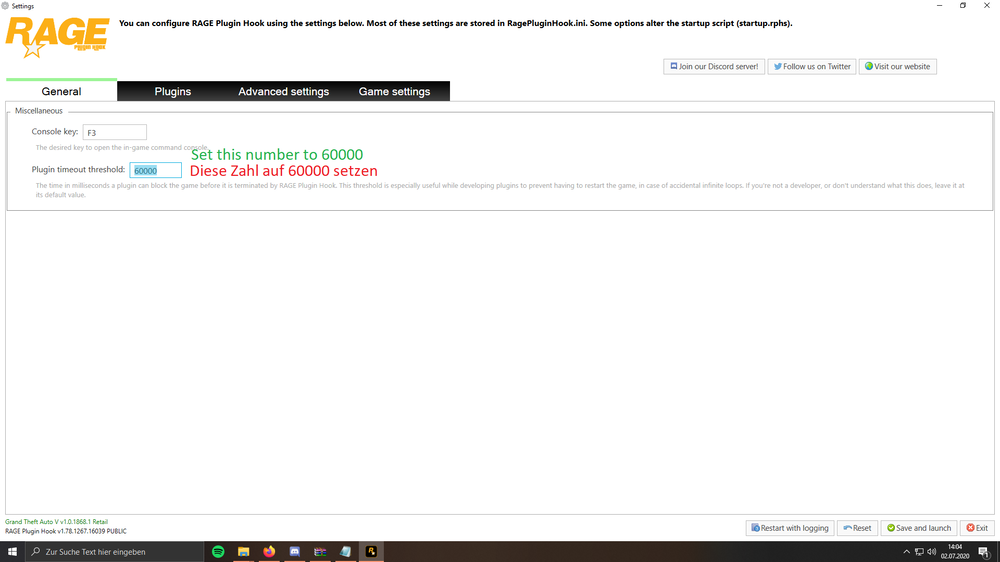
LSPD First Response: WARNING! Plugin "LSPD First Response" was terminated because it caused the game to freeze (Freeze was caused by game fiber: Console Command Fiber For "ForceDuty"). Set your ragepluginhook loading time to 60000. You can do that by starting rph, then hold shift till the window pops up
-
You're game has a crush on who? ❤️ It's called crashed 🤪 Rename mods folder to _mods
-
Unhandled exception occurred in console command "ForceDuty" [6/22/2023 2:06:08 PM.115] Exception type: System.MissingMethodException [6/22/2023 2:06:08 PM.115] Exception message: Methode nicht gefunden: "Void RAGENativeUI.UIMenu.RemoveBanner()". [6/22/2023 2:06:08 PM.115] Stack trace: at dlGlobal.dlSystem.CreateInteractionMenu() [6/22/2023 2:06:08 PM.115] at dlGlobal.dlSystem.Initialise() [6/22/2023 2:06:08 PM.115] at dlGlobal.dlSystemHandler.Initialise() [6/22/2023 2:06:08 PM.115] at CountyCalls.Main.Functions_OnOnDutyStateChanged(Boolean onDuty) Could that mean ragenativeui is missing? Make sure to have the newest ragenativeui in the main gta folder : https://github.com/alexguirre/RAGENativeUI/releases
-
I could find an error relating to section136callouts, remove that temporarily to make sure the error is there and not elsewhere.
-
Exception message: Attempted to read or write protected memory. This error can be a lot of things. First try to rename the Mods folder to _mods If that doesn't help, add the gta folder as an exception in your antivirus.
-
Pls post the ragepluginhook.log from the main gta folder
-
Error while hiding ambient game blips: Disable ambient events, by adding those lines to your lspdfr.ini: Main.DisableGameBlipHiding = true
-
Sry thats the wrong file, the file youve posted cannot be read. post a file called ragepluginhook.log, its s text file in the main gta folder.


