




Yasd
Community Team
-
Joined
-
Last visited
Everything posted by Yasd
-
Im just letting you know that your gta version is not the latest one, but upgrading could be difficult since you have to update much (mods folder, scripthookv, simple trainer etc.), but you dont have to. Error while initializing plugin: @Ӗ: Could not load file or assembly 'PyroCommon (install that file in the main gta folder, message is from SuperCallouts) your crash message is not a 100% it is this or this callout, it is a random one: -!!- ForestryCallouts - [DEBUG] [RANDOM CALLOUT STARTER] - Starting [Unsafe Callouts] Nightclub Disagreement
-
delete LSPD First Response.dll and LSPD First Response.pdb from GTAV/Plugins/LSPDFR update both files in GTAV/plugins from the newest LSPDFR download, you have an outdated version.
-
this is your path, which is wrong: GTAV/plugins/LSPDFR/Plugins/LSPDFR the right path would be: GTAV/plugins/LSPDFR you can delete the rest of that path, there are no files that belong in GTAV/plugins/LSPDFR/Plugins
-
Exception message: Could not find a part of the path 'C:\Program Files (x86)\Steam\steamapps\common\Grand Theft Auto V\Plugins\LSPDFR\UltimateBackup\DefaultRegions.xml'. install ultimatebackup again and completely.
-
Callout Interface is missing IPT.common, install that in the main gta folder thats the reason its not getting loaded
-
open your own thread pls
-
👋🏽 Hello and welcome! Nice to meet you!
-
pls post the ragepluginhook.log from the main gta folder
-
can you open the ragepluginhook console? maybe lspdfr jsut isnt loaded?
-
callouts you have to install in the LSPDFR folder then you have to go on duty/ load lspdfr of course
-
install a 100% savegame: https://de.gta5-mods.com/misc/100-save-game or switch character and save or play story missions
-
Error while hiding ambient game blips: System.AccessViolationException: Attempted to read or write protected memory. Disable ambient events, by adding those lines to your lspdfr.ini: Main.DisableGameBlipHiding = true it also shows some errors with grammar police speech engine...
-
-
post the ragepluginhook.log from the main gta folder
-
if you install nAudio from MoreRadioChatter (in the main gta folder), that will fix the issue 👍🏽
-
Command line option "verify" is specified twice. Please remove that. Exception message: Could not find a part of the path 'C:\Program Files (x86)\Steam\steamapps\common\Grand Theft Auto V\Plugins\LSPDFR\UltimateBackup\DefaultRegions.xml'. Install UltimateBackup again and completely!
-
Could not load file or assembly 'NAudio from MoreRadioChatter
-
make sure to add those lines to your lspdfr.ini under gta5/lspdfr: WorldEvents.IntervalMultiplier = 0.0f WorldEvents.MaxNumberOfEvents = 0
-
just reinstall tagcallouts and replace all files if asked, then it should work.
-
maybe yours is just named Ragepluginhook without the .log ending, it just has to be a text file
-
none of your named plugins have an automatic panic mode, pls post the ragepluginhook.log so i can see what plugins you have.
-
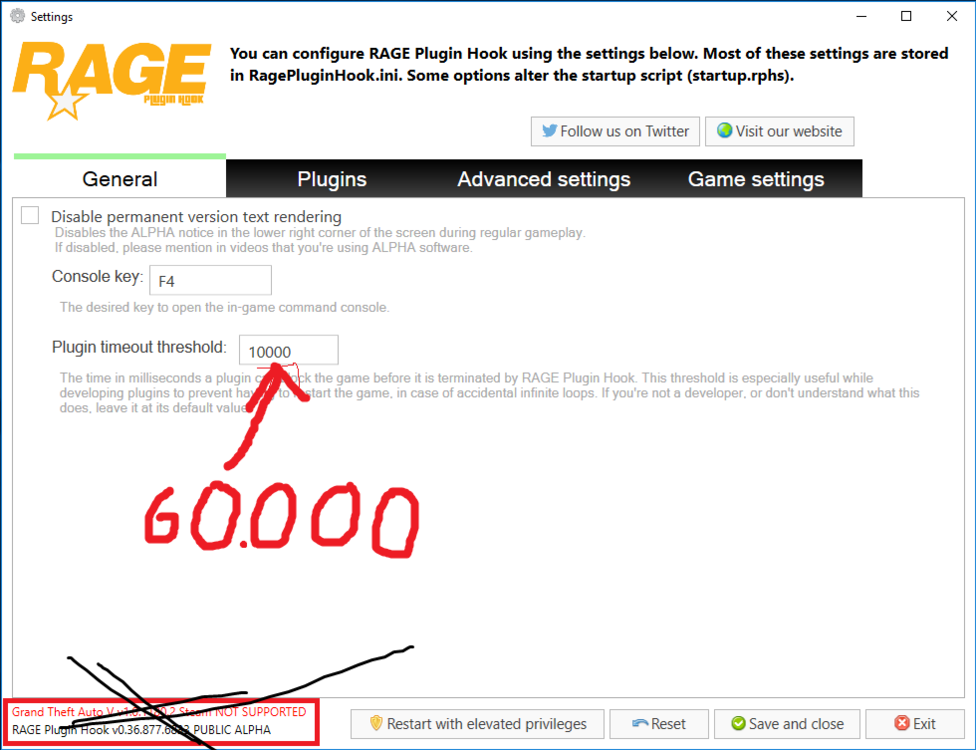
next time go to lspdfr 0.4 forum instead of lcpdfr gta 4 Exception message: Nie można załadować pliku lub zestawu 'ScriptHookVDotNet3 Install ScripthookVDotNet completely: https://github.com/scripthookvdotnet/scripthookvdotnet/releases set your ragepluginhook loading time to 60000: error with TAGsCallouts.Settings.LoadSettings: have you changed anything in the ini file? outdated plugin is coderedcallouts, only remove if it causes any problems
-
the error message from eup: EUP Menu: Exception type: System.ArgumentException [8/31/2023 10:11:16 AM.757] EUP Menu: Exception message: An item with the same key has already been added. [8/31/2023 10:11:16 AM.757] EUP Menu: ------------------------------ [8/31/2023 10:11:16 AM.757] EUP Menu: Inner exceptions: [8/31/2023 10:11:16 AM.757] EUP Menu: ------------------------------ [8/31/2023 10:11:16 AM.758] EUP Menu: Stack trace: [8/31/2023 10:11:16 AM.758] EUP Menu: at System.ThrowHelper.ThrowArgumentException(ExceptionResource resource) [8/31/2023 10:11:16 AM.758] at System.Collections.Generic.Dictionary`2.Insert(TKey key, TValue value, Boolean add) [8/31/2023 10:11:16 AM.758] at EUPMenu.Configs.GetConfigs() [8/31/2023 10:11:16 AM.758] at EUPMenu.EntryPoint.Main() [8/31/2023 10:11:16 AM.758] at Rage.GameFiber.Main() two steps to try would be: reinstalling eup; and disabling the configs by renaming G:\Program Files\Rockstar Games\Grand Theft Auto V\lspdfr\data to _data and replace those with the default ones from lspdfr.dll and renaming G:\Program Files\Rockstar Games\Grand Theft Auto V\plugins\EUP to _EUPIt is caused by a installed plugin, which do you have?





