




Yasd
Community Team
-
Joined
-
Last visited
Everything posted by Yasd
-
Exception message: Could not load file or assembly 'UltimateBackup it is required by certain plugins, so install ultimatebackup
-
FC BAYERN STERN DES S*ÜÜÜÜÜÜÜÜÜÜDENS just kidding, Failed to decrypt file:lspdfr/data/ai/links.ls reinstall that file from the lspdfr download
-
update RageNativeUI in the main gta folder: https://github.com/alexguirre/RAGENativeUI/releases
-
Start the game and go on duty via police station. Then Post the ragepluginhook.log from the main gta folder
-
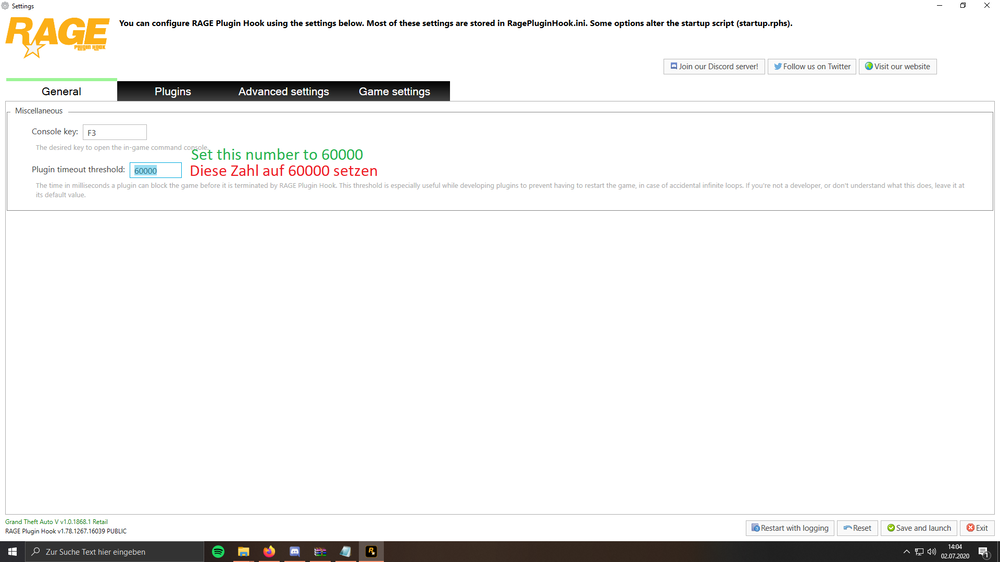
Set the ragepluginhook plugin loading time to 60000.
-
Post the ragepluginhook.log from the main gta folder
-
Exception message: Could not load file or assembly 'CalloutInterfaceAPI install that in the main gta folder, it comes with SuperCallouts
-
pls post the log again
-
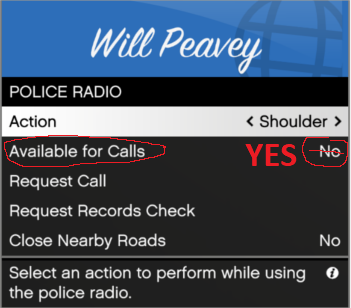
Could not load file or assembly 'Stealth.Common install that in the main gta folder, it comes with code 3 callouts Error while initializing plugin: SuperCallouts.Main: Could not load file or assembly 'PyroCommon install that in the main gta folder, it comes with supercallouts do you know how to come to that menu?
-
Pls post the ragepluginhook.log as I said
-
i disabled my adblocker, sometimes it still shows the message to disable
-
1. gameconfig does NOT belong there 2. scripthookvdotnet does NOT belong there the rest is installed correctly
-
post log again
-
Post the ragepluginhook.log from the main gta folder
-
Update RageNativeUI in the main gta folder: https://github.com/alexguirre/RAGENativeUI/releases
-
Post the ragepluginhook.log from the main gta folder
-
post the whole log pls. looks like sth with ragenativeui, do you have the newest version? https://github.com/alexguirre/RAGENativeUI/releases/download/1.9.2/RAGENativeUI.zip
-
Disable ambient events, by adding those lines to your lspdfr.ini: Main.DisableGameBlipHiding = true - move CalloutInterfaceAPI from gtav/plugins/lspdfr to the main gta folder. - ig callouts seems to cause the crash, looks like a network or security error. try to remove ig callouts temporarily. have you changed anything in the settings of that plugin? do you have internet connection?
-
update scripthookv in the main gta folder: http://www.dev-c.com/files/ScriptHookV_1.0.2944.0.zip
-
dont know a solution, but a goaround is killing the character or teleporting elsewhere.
-
Exception message: Impossible de charger le fichier ou l'assembly 'DamageTrackerLib install that
-
Error while hiding ambient game blips Disable ambient events, by adding those lines to your lspdfr.ini: Main.DisableGameBlipHiding = true rename mods folder to _mods to check if the mods folder is causing eup crash do you have the latest ragenativeui? https://github.com/alexguirre/RAGENativeUI/releases
-
Post the ragepluginhook.log from the main gta folder
-
Jup they’re missing, reinstall lspdfr
-




