GeorgeJetSam
Members
-
Joined
-
Last visited
Everything posted by GeorgeJetSam
-
 Definitely the best work I've seen come out for GTA V so far. The amount of vehicles and attention to detail is fantastic. I have all of these cars in my game and they will probably stay there. **Not sure if this has been mentioned and I'm not gonna sort through 100+ reviews*** The one improvement you could make is that the 2015 Dodge Charger Slicktop has the wrong front light setup. Here is a picture of the current setup: Again, fantastic pack. From one modder to another, I can truly appreciate the work that went into this. Just trying to help you improve the accuracy. Keep up the great work!
- 964 comments
- 158 reviews
-
-

- 1
-
-
Good evening LCPDFR universe. I recently decided to model a 2016 FPIU for GTA IV, however I need an LAPD style black and white texture for it. It doesn't have to be LAPD in particular, just your standard texture with the black all around and white doors and roof. I'm going to change the text and seals, so I'm just looking for that general design. If anyone knows of one that is already released and can point me in the right direction, or would be willing to make one up, I would very much appreciate the help! Here is a link to the DEV model I'll be using: -GeorgeJetSam
-
I got it fixed, I was told not to add a mods folder, but that's just to the original game...to make it easier not to get banned, I added a mods folder to my modded copy and its working fine.
-
I did install the ASI manager, and I am not using a mods folder, however I made a copy of the game and I'm modding that version.
-
So I finally decided to jump on the bandwagon and add modded cars to my GTAV. I added them to the proper directory in OPENIV (currently patchday11ng). However, when I start my game, the default vehicle models show up. When I exit the game and reopen OPENIV and navigate back into patchday11ng, the new files aren't there, they've simply disappeared. It has somehow reverted to the way it was previously and none of the models that I added are showing up. I tried to look into the forums to find a solution but I didn't find anyone with a similar problem to mine, anyone encountered this problem before or know how to fix it? Thanks in advance. -GeorgeJetSam
-
-
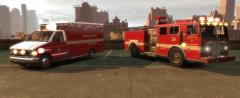 The ambulance is the AMR ambulance I released, with an unreleased Liberty City livery.
 -
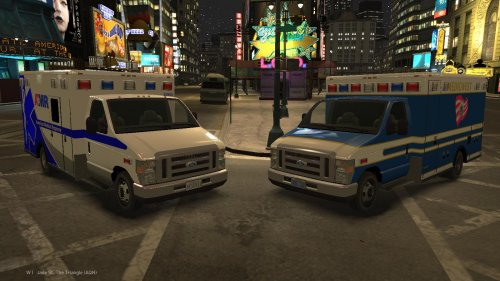 @DeRanKeR64 The model is the unlocked version of Lt. Caine's, the model and template for that can be found here:
 -
-
-
-
-
-
-
-
-
-
-
-
-
-
-
-
-