manu450
Members
-
Joined
-
Last visited
Everything posted by manu450
-
 Just a few things I noticed. The black bald dude is always shown as a white ped in the photos. Always the same white guy. Also, with STP, the driver's license shows as "Insurance STP" instead of "Driver's license STP" in the MDT when they provided a driver's license.
- 350 comments
- 9 reviews
-
 Yes, what I meant is that they don't hand me the papers when I ask for the license/registration/insurance. Which PR does. A little touch that makes all the difference. STP do in fact, have a hand-over animation when using the STP menu, and a take-back paper animation.
- 306 comments
- 15 reviews
-
-

- 1
-
-
There is no animation for handing over the paperwork when using STP in a traffic Stop?
- 306 comments
- 15 reviews
-
-
-
I am running plates using STP, and the plate doesn't update at all in the vehicle section of MDTpro, so I have to enter it manually. Did I install it wrong, or should I do a new install? Or it's a bug? Also, gun permits don't match with STP.
- 350 comments
- 9 reviews
-
@stocky789 So, I am about to switch to STP. So, just to confirm, with this new update, when I search for a plate with STP, MDTpro will give me the same result? If this is the case, it's amazing.
- 350 comments
- 9 reviews
-
With this new STP integration, are plates match and synch with STP plate/ped scan on any peds and vehicles due to being combine with CDF?
- 350 comments
- 9 reviews
-
I can confirmed that it is a PR issue. This drives me nuts. Takes forever and crash to everything. Darn tow truck
- 350 comments
- 9 reviews
-
@stocky789 Great job on the AI-generated photo. Unfortunately, I have to report that sometimes, the photos don't align with what the ped looks like. Not often, but a couple of times, a ped driver was black with black hair, and the photo showed a white male with blonde hair, for example. 🤷♂️🥴😂 Also, I am getting a lot of flags from the ALPR, including police vehicles, which feels a bit unrealistic for me. I don't know if there is a way to adjust the flag percentage right now, or perhaps, could you add this possibility in a future update? I don't think this is also supposed to happen. See the pic attached. Apparently, my perp is a Seagul. 🤣
- 350 comments
- 9 reviews
-
You should really try this mod along with PR and MDTpro for great immersion. You can talk to your ped and command them to leave(dismiss), turn around and get arrested, get out the vehicle, stand by my vehicle, following you. Works on a speech engine like Grammar Police. It is really awesome. Phrases are totally customizable. I never noticed this bug, because I dismiss all my traffic stop using this mod and my voice.https://www.lcpdfr.com/downloads/gta5mods/scripts/50691-npci/
- 350 comments
- 9 reviews
-
 Same here. If I knew it, I wouldn't have downloaded the new GTA V version. 😢
- 272 comments
- 20 reviews
-
-

- 1
-
-
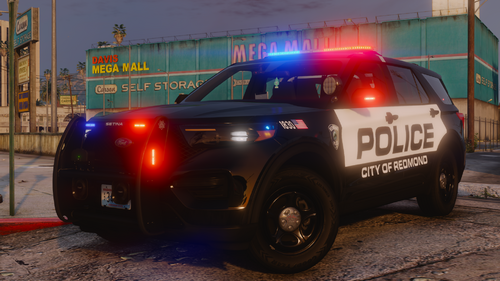 Awesome pack. Very good light pattern. I really hope you'll keep making DLS-compatible vehicles. I would like a nice lore-friendly LSPD or BSCO pack. Great quality vehicles. 👍
 -
This new MDT computer is really awesome and just blew my mind away, 7/5 stars. It is well thought out. Plates and info are automatically added after plate check, patdown or ID/DL request. The court system, especially, has a lot of depth to it; your documented findings weigh in on the court outcome, so make sure you enter all pertinent information, like drug and firearms found to have a favourable verdict. You can attach injury reports and justify your use of force. The MDT is also lore-friendly and will let you do reports quickly if you don't like the realistic, long reporting aspect of it. I think this MDT will please the majority of users, and I have to give credit to this developer, because this is really awesome, and it must've taken him a lot of work to be at this level, and this is only in the early stages. My suggestion would be to have Ped AI-generated photos, like Report Plus is currently using and more ways to personalize your background.
- 350 comments
- 9 reviews
-
Since the update, many of my standalone plugins are crashing when the MDT is open. Something is not right.
- 350 comments
- 9 reviews
-
-
F7 is the menu, not the computer. For the MDT to work, you need to enter the IP address in the Steam overlay in-game. Go to Steam/settings/in-game and set the browser address to 127.0.0.1:8080 and exit. In-game, open the Steam overlay using the associated keybind, and your MDT will appear. If you are using it on a different computer, you have to enter the provided IP address in a browser like Chrome or Firefox. Hope it helps. If that doesn't work, you need to do a clean reinstall and make sure you drag all the content of the download into your GTA V root folder. Make sure you don't mistakenly drop it into a different folder.
- 350 comments
- 9 reviews
-
-

- 1
-
-
-
8080 won't work if you are using it on another computer, only when using an overlay like Steam.
- 350 comments
- 9 reviews
-
I heard that many of the vehicles that were stopped came back as the driver was not the owner of the vehicle in most traffic stops. Apparently, the new version fixes some of that a little. Maybe you can link the new Common Data Framework on this website and update your MDT to work with it. On another note, when searching a ped(Pat down), the info doesn't come up in the MDT. You have to ask the ped to give you the ID/Driver's License.
- 350 comments
- 9 reviews
-
@stocky789 Did you make this plugin based on the latest Common Data Framework? Or the one that comes with PR? IDK if you are aware, but there is a new version on NuGet addressing some previous issues. The latest version is 1.0.0.8
- 350 comments
- 9 reviews
-
Blue line dispatch has nothing to do with this mod. It only changes the dispatcher audio voice line. NPCI also use a different interaction key than Grammar Police and works independently. So, yes you can use it.
- 306 comments
- 15 reviews
-
-

- 1
-
-
-
The SystemData.SqLite.dll goes in the gtav root directory. Also, information are not synching with PR. Stopped a car with revoked registration and Insurance and both shows valid.
- 350 comments
- 9 reviews
-
I don't think this goes to the LSPDFR or 64 folder? Still getting a crash. File not found NVM I put the files in the root folder, and now it works. Just to let you know, the download indicates putting them in the plugins/Lspdfr Folder.
- 350 comments
- 9 reviews