




Cyanotic
Members
-
Joined
-
Last visited
Everything posted by Cyanotic
-
 Ohhh ok. That's my fault then, I should've checked the layout in OIV. That means the rear windscreen lights are tied to 23. So they're just reading off my PRI light pattern. Simple mistake on my end. Thanks for the reply
 -
For some reason regardless of what the ELS xml reflects, the 18 charger's WRN lights are steady burn on stage 3. If I change to a pattern on sirensetting 1-4 they work however, nothing will change the steady burn appearance on standard stage 3. It's pretty bizarre but I've run out of ideas as to how to change it at this point.
-
@Othrin any hope for a taillight fix on the 14 Charger?
-
I am super picky about the cars I use. These however, are pretty damn phenomenal. 2 things though... I wish the main antenna was a bobble, and the lights when not braking at night are weird on the 2014 charger.. also the turn signals don't work on the back lights.
-
-
 Don’t have to go into your car regardless. Standing outside car and holding G will turn off siren and leave lights on.
- 262 comments
- 34 reviews
-
 integration with vocal dispatch would be awesome on this to be able to get dispatch to repeat the description whenever you wanted!
 -
Looks like this is never going to be addressed
-
Definitely getting the exact same crash due to ambient spawn "fake traffic stop" <spoiler>
-
.thumb.png.9d0943161b37f863c291d6d6664edefb.png) Man, during the heli orbit days there was a hotkey option in the ini for the helibackup. Would be great to have that or have this respond to UB/vocal dispatch for heli assistance
Man, during the heli orbit days there was a hotkey option in the ini for the helibackup. Would be great to have that or have this respond to UB/vocal dispatch for heli assistance- 366 comments
- 33 reviews
-
 how the hell do you have all those field sobriety tests in the STP menu lol nvm didn't realize there was an early bird release. Haven't been on discord.
- 10 comments
- 1 review
-
-

- 1
-
-
-
Works perfectly and does everything it says, adds realism and the author is responsive. I even play without the main ASC feature just because of personal preference and the mod is still a staple just for the added realism with other police vehicle interaction and the superb handling of yielding with other traffic. Traffic light control is still intense even with a 1080 Ti, 32gb ddr4 ram, and overclocked i7-8700k. Author however said this would probably be the case so no fault what so ever here. All around great mod and has become a must have in my game now.
- 262 comments
- 34 reviews
-
-
- 1
-
-
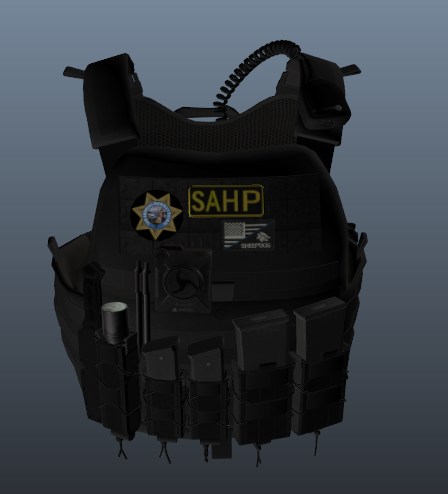 Amazing detail, looks perfect in game. Wish I could rate twice. So glad to have SAHP version now.
- 38 comments
- 3 reviews
-
-
-
Want to play with this but last time I used it, it made a crazy clicking sound when I was getting out of the car even when I had the ASC turned off. It also reverted my lights back to standard code 3 if I decided to turn on my TA. EDIT: upon testing newest version.. all clicking and stage 3 reverting seems to be fixed. Also the yielding seems to be working much better. Will review after a thorough play through later today with this mod enabled.
- 262 comments
- 34 reviews
-
-
- 1
-
-
 Sounds like something in the xml isn’t registering. It depends on the gun and holster that it’s referencing. I had that same issue about a year ago but mine works flawlessly now. I should note I only use pistol not combat pistol and when I get home I’ll check the actual “teef” model number that I’m using to try to help you further.
- 560 comments
- 97 reviews
-
make sure you disable the new holster animations from the LSPDFR update. They can interfere. add this line to your LSPDFR.ini : Ambient.DisablePlayerHolsteringActions = true
- 560 comments
- 97 reviews
-
I use a ton of plugins. I do use traffic policer, and stop the ped but I don't use lspdfr+ anymore as it was acting crazy and interfering with other plugins a while back.
- 560 comments
- 97 reviews
-
<Item FuncHolster="true" FuncIntim="true"> <Model>MP_M_FREEMODE_01</Model> <FuncIntimMeshes> <Item> <Component>7</Component> <Drawable>6</Drawable> </Item> <Item> <Component>7</Component> <Drawable>8</Drawable> </Item> <Item> <Component>7</Component> <Drawable>1</Drawable> </Item> </FuncIntimMeshes> <Weapons> <Item WeaponSet="Pistols"> <Component>7</Component> <Holstered>8</Holstered> <Unholstered>2</Unholstered> </Item> <Item WeaponSet="Pistols"> <Component>7</Component> <Holstered>1</Holstered> <Unholstered>3</Unholstered> </Item> <Item WeaponSet="Pistols"> <Component>7</Component> <Holstered>6</Holstered> <Unholstered>5</Unholstered> </Item> <Item WeaponSet="Pistols"> <Component>7</Component> <Holstered>110</Holstered> <Unholstered>111</Unholstered> </Item> <Item WeaponSet="Pistols"> <Component>7</Component> <Holstered>119</Holstered> <Unholstered>120</Unholstered> </Item> <Item WeaponSet="Pistols"> <Component>7</Component> <Holstered>120</Holstered> <Unholstered>121</Unholstered> </Item> <Item WeaponSet="Pistols"> <Component>7</Component> <Holstered>42</Holstered> <Unholstered>43</Unholstered> </Item> <Item WeaponSet="Pistols"> <Component>8</Component> <Holstered>16</Holstered> <Unholstered>18</Unholstered> </Item> </Weapons> </Item> </Peds> </CopHolster>
- 560 comments
- 97 reviews
-
 Still works for me. I use it religiously. I'm not sure why you guys are having issues. Maybe it's only the vocal side of it that still works as I don't use the menu?
- 132 comments
- 26 reviews
-
-
-
Great idea, and it works well. Unfortunately, even with i7-8700k, 1080ti, and 32gb of Ram it kills performance using the traffic light feature.
- 262 comments
- 34 reviews

.thumb.png.9d0943161b37f863c291d6d6664edefb.png)
.thumb.png.8e6da9460c9a92c3c4205a1e3b72a301.png)