
LtBronco
Members
-
Joined
-
Last visited
Everything posted by LtBronco
-
-
 Just installed. Tried to make a traffic stop. Only one person in the car. LSPDFR Crashed as I approached the car. Log attached... RagePluginHook.log
- 1,005 comments
- 68 reviews
-
-

- 1
-
-
-
-
-
 I redid my mods folder from scratch. The game loads, but the EUP menu crashes as soon as it loads.
- 633 comments
- 72 reviews
-
 Did you do what it says in the description? It worked fine for me when I first installed it, then a few days later it stopped. See if this helps... Known Issues Your cursor is frozen in the middle or does not move Pause GTA (if you cannot, unload LSPDFR) Go to Settings Keyboard / Mouse Mouse Input Method Set to "Raw Input"
- 1,743 comments
- 172 reviews
-
-
 Such a great mod. I've been waiting for this. I love how the tape blows in the breeze. One suggestion, actual yellow police tape. Great work
- 299 comments
- 25 reviews
-
See, crazy simple. I was actually trying that and it wasn't working. It looks like the EMSmod was overriding it or something. I think I have it figured out now. Thanks!
-
So I added a new ambulance model to my game. It comes with several different liveries. I wanted to edit my backup.xml so that the correct livery appears depending on where I am on the map. What part of the line (<Vehicle livery="1">ambulance</Vehicle>) do I have to edit so that it chooses the correct livery? I feel like the answer is really simple and I should be able to figure it out, but you know how it is sometimes....
-
Disable ELS after you make the stop so your horn doesn't go off (Scroll Lock). There is a setting in one of Albo's plugins (I think Traffic Policer) that makes the stopped car think you want it to move when you blow the horn.
- 1,743 comments
- 172 reviews
-
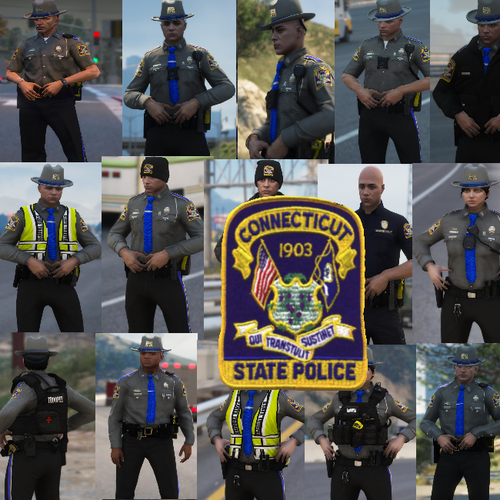 The uniform is spot on. Would have been 5 stars, but the hat isn't even close.
- 13 comments
- 5 reviews
-
This mod is truly a must have. I love it. I used to get some crashes after playing for a long time, but now I can't even use it. However, since updating it yesterday, I can't even open the computer without it crashing LSPDFR...
- 1,743 comments
- 172 reviews
-
I just stumbled upon this thread and downloaded version 1.6. I'm hooked. Can't wait to see the new version.
-
I'm not going to lie, even with the funny movement when the car went by and they were up on the hill, that still looks very cool. I wouldn't mind seeing something like this in the future, even if it isn't perfect.
-
-
-
This is a keybinding in the trainer. Go to the configuration file and search for "spawn attacking ped" and change the number to "0"
- 1,743 comments
- 172 reviews
-
Everyone else is giving their suggestions, so I figure I will too... One thing that is such a small detail, yet still drives me crazy. We need tasers on the duty belt.
-
-
 I've been having the same problem for over a week now. I just posted again in the discord channel to see if anyone has any clue how to fix the problem. It's weird, for me everything was working fine, then mid game last week it just stopped...
- 1,196 comments
- 127 reviews
-
-
-
 ELS is by far a must have for LSPDFR. I can never use non ELS police cars ever again. Great mod!
- 2,677 comments
- 235 reviews