


pcGAMEZguy
Members
-
Joined
-
Last visited
Everything posted by pcGAMEZguy
-
-
-
-
 Make sure you load it through Rage. Also if it doesnt seem to load with doing that, open Console F4 and type Loadplugin Bodycamsound
- 168 comments
- 36 reviews
-
-

- 1
-
-
What kind of graphic card do you have?
-
Do you have PreLoad Models to false in your lspdfr.ini
-
-
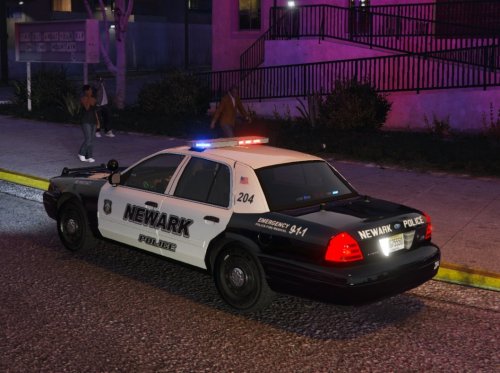
.thumb.png.2e98f42eb9ea9fb1d0f89e073e44e3f2.png) Yeah I do not think they have them, BUT they do have Craploads of CVPI's which are my favorite!
Yeah I do not think they have them, BUT they do have Craploads of CVPI's which are my favorite!- 20 comments
- 3 reviews
-
-
The pic above was taken in Newark, but we have them down in South Jersey all over the place including Slicktop versions.
- 20 comments
- 3 reviews
-
Your missing a lot of Text on this vehicle and missing color scheme on the rear.
- 20 comments
- 3 reviews
-
60000 Best thing to do is a fresh copy anyways.
-
Change your PluginTimeoutThreshold in RPH settings from 10000 to 60000. Start There. And also answer @UnknownBastion as there are solutions to the answer you give.
-
Sometimes it happens, i think its a bug. Rename all your files along with carvariations and meta files to something else. Ex. if its police20 rename to like police5. Not sure why but sometimes it works renaming.
-
-
You have to add RagePluginHook as an exception to your AntiVirus
-
Your gonna have to post you RagePluginHook log so we can take a look.
-
I would post your RPH log just in case, also does it say anything when it crashes?
-
Did you try updating the drivers for your video card
-
 Great work man, been using this for a while now. So much easier to change loadout on the fly. Honestly i don't see how anyone can play lspdfr without it.. A++++
- 68 comments
- 12 reviews
-
-
- 1
-
-
That doesnt even make any sense. These guys have nothing to do with plugins outside of LSPDFR that are created by other authors. No, but if your game says that it has blocked the plugin you have to add it (RPH) as an exception to your Antivirus or Windows Defender.
-
-
 Try putting your VocalDispatch Audio in Grand Theft Auto V\lspdfr\audio\scanner as the location has changed for audio now. Correct me if im wrong @turbofandude
- 587 comments
- 106 reviews
-
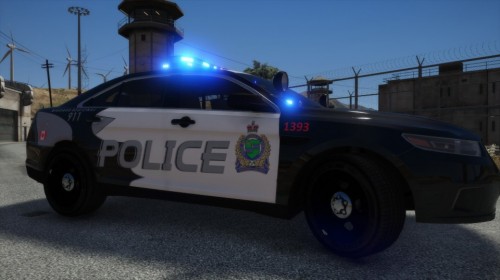 Did this really quick upon request as it is not exactly identical but close enough for who requested it. If anyone wants something changed ill be glad to do it. I was not going to upload but was requested to do so. The Vehicle is linked below in the description. This Livery uses the 2016 FPIS Police3 Slot. Change the livery in the police3.ytd in OpenIV. Established on January 1st, 1971, the Niagara Regional Police Service is the oldest regional police service in Ontario. In an area of 1,863 square kilometers, the Niagara Regional Police Service patrols one of Ontario's largest geographic Regions. The Niagara Regional Police is comprised of highly trained and motivated individuals dedicated to serving and protecting residents and visitors within the Regional Municipality of Niagara. Original Picture of Niagara Regional Police
 -
Maybe I'm just not following lol. If they are Pitting and Hitting your tracking doesnt do anything because your suspect is there. I assumed tracking is when the black X goes on the screen for the last location known. Then you use set to tracking call backup and those vehicles/helicopter Track until found or escaped. Once found I dont believe tracking comes into play anymore.


.thumb.png.2e98f42eb9ea9fb1d0f89e073e44e3f2.png)

