


pcGAMEZguy
Members
-
Joined
-
Last visited
Everything posted by pcGAMEZguy
-
Disable your AntiVirus and or Windows Defender or add an exception for RagePluginHook.exe
-
-
This isnt your whole log but try putting your ThresholdPlugin value to 60000 in RPH Settings
-
You can look in your RageHookPlugin.log in the game directory or post it in here and possibly someone can take a look at it for you
-
Try This Go to your GTAVLauncher in your directory / Right Click and select "Create Shortcut" Right click on the GTAVLauncher - Shortcut then go to properties You will see "Target" in the box to the right go to the end of the last character and do a space then type "Verify" [with quotes] So it will look something like this "C/gtav/GTAVLauncher - Shortcut" "verify" Click OK Now double click on the GTAVLauncher - Shortcut and see if it will verify the files and update anything that is missing like the GTAV Update to the current version When completed you can delete that Shortcut file or just do not use it unless you need it again.
-
So let me try to make this as simple as I can. Grand Theft Auto V \ lspdfr \ data [This is where you want to start] The most important thing is not to change the files you see in the above Directory. [Copying is Fine] For an example we will do LSPD - The agency file is what you want to copy and place into the custom folder. You can rename the file [custom_agency] if you want. Right click the file you just placed into your custom folder and you will have the Agencies inside of lspdfr. Right away you will notice inside the <Peds> </Peds> you can see the [mp_m_freemode_01] & [mp_f_freemode_01] variations. These are the spots that need to be changed. <Ped chance="60" outfit="lspd_cop.m_base" inventory="patrol">mp_m_freemode_01</Ped> <!-- Specifically the "base" variation, with no rank insignia --> to this below <Ped chance="60" >s_m_y_cop_01</Ped> <!-- Specifically the "base" variation, with no rank insignia --> So basically your first Agency will look like this s_m_y_cop_01 (Male) s_f_y_cop_01 (Female) Once you do below Vanilla officers should Patrol and be at the station.
-
Make RageHookPlugin.exe an exception to your AntiVirus and or Windows Defender Also make sure your Plugin Threshold is set to 60000 in your RPH settings Directx11 is selected in your RPH settings Borderless Window is selected in your RPH settings
-
I dont think its compatible with the RageHook.
-
What version is your RageNativeUI in your Directory? This is the most Recent https://github.com/alexguirre/RAGENativeUI/releases
-
For Better EMS did you do this? BETTER EMS 3.0 IS COMPATIBLE WITH LSPDFR 0.4 You should move all files from GTA V \LSPDFR\Police Scanner\EMSAUDIO to GTA V\LSPDFR\audio\scanner\EMSAUDIO. Everything else should work. You will get a warning that the LSPDFR version doesn't match, but it will still load. I will release a future update for Better EMS after LSPDFR 0.4 is updated with more developer API features. In your keys.ini [GTAV/lspdfr] make sure the spot "TRAFFICSTOP_INTERACT_ControllerKey" is set to None if you are not using it. It does seem like you play for a while in between crashes though.
-
AmbientSpawn.MaxCopsInArea=0 AmbientSpawn.MaxSpawnedCopsInArea=0 (added in 0.4.2)
-
Try Changing your RPH PluginTimeoutThreshold to 60000 Select DirectX11 (RPH Settings) Select Borderless Window (RPH Settings) Save and Launch
-
Did you try windows defender?
-
-
-
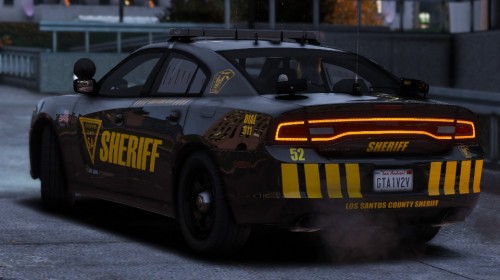 I mean i may add 1 or 2 more but if its just the triangle and the lettering on the back thats easy.
- 23 comments
- 1 review
-
-
Did you try this, i think it has most for 8.0+
-
Try Changing your RPH PluginTimeoutThreshold to 60000 Select DirectX11 (RPH Settings) Select Borderless Window (RPH Settings) Save and Launch
-
-
-
In the lspdfr.ini put preload models to false GTAV / lspdfr And it helps to make sure you use 2K liverys for vehicles just to be safe
-
-
-
 what Version of RageNativeUI do you have? Double Check make sure you have 1.6.3 https://github.com/alexguirre/RAGENativeUI/releases
- 3,646 comments
- 306 reviews



