


pcGAMEZguy
Members
-
Joined
-
Last visited
Everything posted by pcGAMEZguy
-
All of a sudden i am now having this problem. Went through my lspdfr.ini and plugin ini and not sure whats going on. 0.4.2 Never saw this problem in 0.4.1 but odd as it sounds only happens sometimes but it is becoming more and more.
-
Did you figure this out? All of a sudden it started happening
-
.thumb.png.2e98f42eb9ea9fb1d0f89e073e44e3f2.png) Just noticed as well the logo on the doors are incorrect. Missed that last when i downloaded.
Just noticed as well the logo on the doors are incorrect. Missed that last when i downloaded.- 20 comments
- 3 reviews
-
-
.ymt cant be edited how did you do this?
-
-
 Usually caused by AntiVirus Software. Add RagePluginHook as an exception to your AntiVirus/Windows Defender
- 1,005 comments
- 68 reviews
-
Mods..update...update.rpf...common...data...levels...gtav...vehicles.meta I'm not on my PC but I believe that's the location
-
Mine as well. Great Job on the list.
-
--
-
-
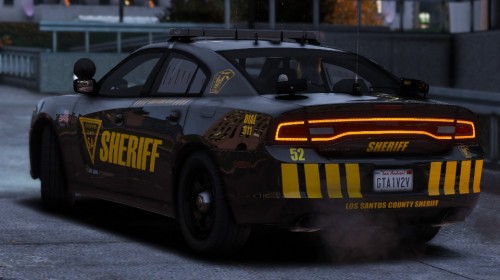 Did you guys replace the liverys in both of the .ytd files High and low resolution. The patrol ones only have (1) .ytd for the Tahoe and the Bike. The Charger and the Truck have (2) .ytd you need to replace the liverys for.
- 23 comments
- 1 review
-
-

- 1
-
-
-
Try going into the trainer and go to vehicle options, there should be Window Tint option put to stock or none see if that changes it. When you said Default Tint Value im asuming you meant through vehicles.meta.
-
Do you have all these installed? https://www.gta5-mods.com/misc/gta-5-gameconfig-300-cars https://www.gta5-mods.com/tools/heap-limit-adjuster-600-mb-of-heap https://www.gta5-mods.com/tools/packfile-limit-adjuster
-
-
 I think its Shift to blip the car and E to get them to pull over. If you have ELS it may be J to cycle to stage three lighting then they will pull over. Someone will correct me if I'm wrong
- 3,646 comments
- 306 reviews
-
It's part of lspdfr. I use a controller so if your a keyboard user either someone can help or look in the keys.ini to see what the Keybindings are
- 3,646 comments
- 306 reviews
-
-
Traffic Policer does not stop the traffic. You need the Plugin "Stop the Ped"
- 3,646 comments
- 306 reviews
-
-
-
-
Did you make sure it was like this in the vehicles.meta inside the DLC modding pack? <Item> <modelName>Police5</modelName> <txdName>Police5</txdName> <handlingId>POLICE</handlingId> [or whatever the handling may be] <gameName>POLICE5</gameName>
-

.thumb.png.2e98f42eb9ea9fb1d0f89e073e44e3f2.png)

