


HDgamerzPC
Members
-
Joined
-
Last visited
Everything posted by HDgamerzPC
-
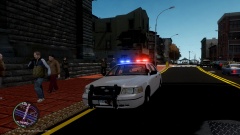
From the album: Connecticut State Police Crown Victoria
A current WIP that I will release when completed! -
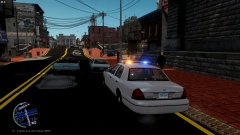
From the album: Connecticut State Police Crown Victoria
A current WIP that I will release when completed! -
Thank you, you posted that just as I had found it. I tried bxbugs' line but it did not work, and obviously Napolean does not have a line there. After looking at Sgt. Kanyo's CHP and seeing that he used the same base model I used Sgt. Kanyo's line and it worked. Thank you though! +1 for your effort!
-
I created my name in thought of YouTube. I started with GTAIVpoliceman (lol) because LCPDFR was what got me to get my PC and such. I then restarted my YouTube career and went with HDgamerzPC for High Definition videos, I'm a gamer, and I play/record on the PC.
-
Scratch that, after more investigation I got the handling line. Lesson learned, when you have exhausted all ideas to locate something, look some more.
-
The same happened to me, I lost a lot of work and all of my unlocked zmodeler files when my hard drive failed on me.
-
Umm.... what car is that? :OOOOOOO Edit: Guess I should post my wallpaper. '>
-
In agreement with aCoD, you could of built a computer yourself and saved some money on the labor. It really isn't as hard as it may sound, just make sure you do your research.
-
I re-imported the vehicle with the new lightbar colors, re-exported it, and now it works. I have no clue why I had to do that but it's fixed. If anyone knows the answer still go ahead and let us know.
-
What model did you use by chance?
-
SparkIV did not do anything, thank your for trying though.
-
Hey, so I have recently been working on a Palm Bay Police Department Impala which I have completed w/ pics in the photo gallery. I got bored a couple of nights ago and tried to change the color or the lights on the car and for some reason they will not change. I am changing the correct image that the lightbar uses for it's light textures, but it just doesn't change color, including in game. I have tried changing every light texture file I have on the cars with no return. So my question is, is there a way that I am somehow saving the textures to the actual model without knowing it, rendering the change of textures useless? Thank you, HDgamerzPC
-
 Great job Sameer, good to know you can still do such good jobs, haha.
 -
-
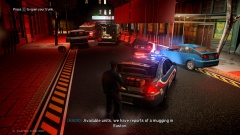
From the album: Mod Showcases
This is my close replication of the Palm Bay Police Department's 2006 Impala. It has the exact lighting as their cars do and a close replication of the equipment inside also. The only thing that is not the same as their cars is that the headlights wig-wag incorrectly (Outer lights flash when it should be the inner lights.) I think this is my favorite model I have made so far! **Not intended for public release, it was only made for personal use** -
Just me showing some pics of different mods I make! :)
-
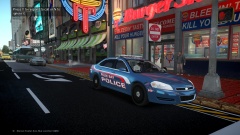
From the album: Mod Showcases
This is my close replication of the Palm Bay Police Department's 2006 Impala. It has the exact lighting as their cars do and a close replication of the equipment inside also. The only thing that is not the same as their cars is that the headlights wig-wag incorrectly (Outer lights flash when it should be the inner lights.) I think this is my favorite model I have made so far! **Not intended for public release, it was only made for personal use** -
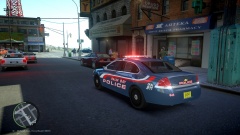
From the album: Mod Showcases
This is my close replication of the Palm Bay Police Department's 2006 Impala. It has the exact lighting as their cars do and a close replication of the equipment inside also. The only thing that is not the same as their cars is that the headlights wig-wag incorrectly (Outer lights flash when it should be the inner lights.) I think this is my favorite model I have made so far! **Not intended for public release, it was only made for personal use** -
I honestly agree with what all of the staff members are saying. If I would want to see anything, I would think we should come together to create some server system that is modifiable if all else fails in July and we lose our MP abilities.
-
Great use of ELS 8! I am going to have to get back into modeling now that there are so many different ways to make the cars. I personally am not into the front of the car with the triple two light pattern but it was a great idea.
- 31 comments
- 10 reviews
-
I did not see a yes or no on a previous question, are you editing the handling.dat like is GTAIV/common/data? You need to change that car's handling line to the appropriate one which is often found in the readme file of the car.
-
It is called emerglights lightsemissive. I do not get why it is doing this, because all of the lights are mapped the same exact way and work fine, including the same exact side extra5 and extra6 :I
-
AT&T U-Verse, I am not enjoying it too much after the price issues and down service times.
-
It is named emerglights.png, everything lights up fine it's just that odd part when the lights are not activated in ELS. Should I try re-mapping them again? I never mapped the base of the model, so could it be that also?
-
I am using the center of this image here.


