


HDgamerzPC
Members
-
Joined
-
Last visited
Everything posted by HDgamerzPC
-
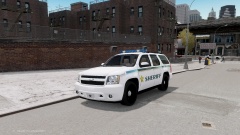
From the album: HDgamerzPC's WIP/REL Album
A new W.I.P. -
-
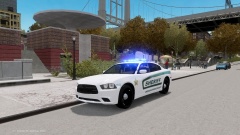
From the album: HDgamerzPC's WIP/REL Album
https://www.lcpdfr.com/files/file/7167-2012-dodge-charger-indian-river-county-sheriff/ -
Overview 2012 Dodge Charger Version: 1.0 Light bar: Whelen Liberty Multiple Liveries: Yes Optimized for: Any Installation Use Open IV to replace the corresponding files within vehicles.img with the .wft and .wtd files provided in this package. If the model supports multiple liveries, open the vehicles.ide file in your GTAIVcommondata folder, find the line beginning with the name of the model, and at the end of that line add +livery. Notes This vehicle is ELS enabled and requires the Emergency Lighting System to work correctly. This vehicle is optimized to use the handling line 1929 0.29 85 0.0 0.03 -0.4 0.0 4 0.195 1.0 223 0.45 0.55 0.6 33 1.65 1.0 13 0.15 0.48 3.0 2.0 2.0 0.1 -0.08 0.01 0.46 2.0 1.0 2.2 2.5 0.0 25000 400010 0 0 This modification is meant for gaming purposes only. This modification is exclusive to lcpdfr.com and gtamodshop.org. Credits and Acknowledgements Dodge Charger R/T by Real Racing 3,Taillights from Forza, ripped by DMN, converted to IV by GeorgieMoon. Edited into a PP by GeorgieMoon. Fixes by Him1250 & trewq34. Dodge Steel Rim by GerryStudio, converted to IV by Bxbugs123. Toughbook 19 by CAP'N CRUNCH. Whelen Liberty made by PFCBarefoot. Whelen Par 46 made by EVI. Whelen Avenger made by EVI. Traffic advisor lights made by HDgamerzPC. Console and console parts by Casey1989, modified by HDgamerzPC. Watch Guard 4RE made & converted by Caleb3019 Window Bars made HDgamerzPC. Setina The Bodyguard Partition by Bxbugs123. Shotgun by Grim. Livery by HDgamerzPC. Terms If you wish to modify the content of this package with the intent of distribution, authorization of the author is required. This product is freeware and may not be exploited for personal, financial or commercial gain. The product is provided without any form of warranty. Therefore, responsibility for any damages caused by this product or its misuse rest solely with the user, as the author(s) will accept no liability. You may redistribute this product unless instructed otherwise above as long as the following condition(s) are met: The contents of the archive file containing this file and the product must not be modified or tampered with; this file must remain in its original state and must not be modified in any way; this file must be alongside the product it is assigned to at all times when being distributed; all proper credits clearly are given. Release preview video!
- 2 comments
- 1 review
-
-
Yes it is.
-
That is all using LCPDFR. The expired registration was found with the ALPR, the expired license was found when he called the ID into dispatch, the drugs were found on him when he frisked him, and the drugs were found when he searched the car which is all using LCPDFR 1.0.
-
-
-
-
If you have multiple of the same extra you just need to attach the same extras to each other. It does not need to be attached to a lightbar, just the same extras. For example, if you have multiple extra_4_L0s you would attach them all together and put them inside of an extra_4 dummy.
-
-
-
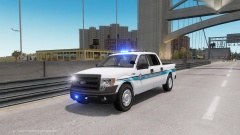
Overview 2012 Ford F-150 SSV Version: 1.0 Light bar: Whelen Liberty Multiple Liveries: No Optimized for: Any Installation Use Open IV to replace the corresponding files within vehicles.img with the .wft and .wtd files provided in this package. If the model supports multiple liveries, open the vehicles.ide file in your GTAIVcommondata folder, find the line beginning with the name of the model, and at the end of that line add +livery. Notes This vehicle is ELS enabled and requires the Emergency Lighting System to work correctly. This vehicle is optimized to use the handling line 2857 0.45 85 0.0 0.0 -0.24 0.5 5 0.126 1.0 215 0.44 0.55 0.5 33 1.4 1.5 12 0.12 0.48 3.0 1.5 1.5 0.15 -0.08 0.0 0.44 2.0 1.0 2.2 2.4 0.0 53135 440010 0 0 This modification is meant for gaming purposes only. This modification is exclusive to lcpdfr.com and gtamodshop.org. Credits and Acknowledgements Ford F-150 by Ubisoft. Converted, and templated by Chippy. Edits by trewq34, Him1250, and Vertex3D. Ford F-150 license pates mapped by trewq34. Grill by Sergiyj. Wheels by gfxle. Toughbook 19 by CAP'N CRUNCH. Whelen Liberty made by PFCBarefoot. Whelen Par 46 made by EVI. Traffic advisor lights made by HDgamerzPC. Console and console parts by Casey1989, modified by HDgamerzPC. Watch Guard 4RE made & converted by Caleb3019 Terms If you wish to modify the content of this package with the intent of distribution, authorization of the author is required. This product is freeware and may not be exploited for personal, financial or commercial gain. The product is provided without any form of warranty. Therefore, responsibility for any damages caused by this product or its misuse rest solely with the user, as the author(s) will accept no liability. You may redistribute this product unless instructed otherwise above as long as the following condition(s) are met: The contents of the archive file containing this file and the product must not be modified or tampered with; this file must remain in its original state and must not be modified in any way; this file must be alongside the product it is assigned to at all times when being distributed; all proper credits clearly are given. Click HERE to watch the video of the truck!
- 11 comments
- 2 reviews
-
If you are talking about a lightbar with rotators (NYPD for example) you must put it in police, police2, or police3 because they are the only car slots in GTA that register as having rotating lights. I do not know if the vehicle.ide can change this but as far as I know you must use those three slots.
-
 I am not sure what you mean by "realining" and yes it is for ELS 8. I saw your message and yes I will most likely be releasing this.
 -
-
From the album: HDgamerzPC's WIP/REL Album
-
![Palm Bay Police Impalas [WIP]](//s3-gallery.int-cdn.lcpdfrusercontent.com/gallery/album_1955/sml_gallery_33096_1955_61306.jpg)
From the album: HDgamerzPC's WIP/REL Album
More pictures of the slicktop AND normal unit below! Spoiler -
-
I personally use Norton, which I have no issues with. I can be playing a game and not slow down at all if I am doing a full system check. With McAfee on the other hand, it caused mad performance issues on my PC.
-
I am looking in the config file and am not seeing anything about the jump option but I do see the disable option for SECL if you just want that. I am not sure why you are crashing more in V8 than V7, my friends and I have only had positive results from V8 in MP.
-
[ MISC ] Slicktop = off LstgActivationType = jump <--- Switch to "jump" to go straight to PRML EnableArrowBoard = off AllowTakedowns = on UseCoronaTakedowns = off [ SECL ] Type = drct DisableAtLstg3 = on <--- Switch to "on" to disable at LSTG 3 ForcePatForLstg = off PatId_Lstg1 = 0 PatId_Lstg2 = 0 PatId_Lstg3 = 0 I don't know about WRNL since there is no disable option for LSTG 3
-
I love your LCPD cars! I wish I had more spots where I could use DROT :/ Is there a way to use the car without using Police, police2, or police3?
- 34 comments
- 7 reviews
-
1. Jeff Favignano/Buggs 2. Mattmcs2 (He would be on the top but I don't want him since most of the time I am in them) Honorable Mention 2. XapkpaX (When he did YT. If he still did he would be number 1 :D) 3. SpiersTheAmazingHD (When he did LCPDFR. He would be second since those were so funny. R.I.P. Jimmy.)


![Palm Bay Police Impalas [WIP]](http://s3-gallery.int-cdn.lcpdfrusercontent.com/gallery/album_1955/sml_gallery_33096_1955_61306.jpg)