viperwolf
Members
-
Joined
-
Last visited
Everything posted by viperwolf
-
-
 what vehicle are you using? Are you sure you have an XML in the correct location?
- 2,655 comments
- 234 reviews
-
 Thank you for the update! I enjoy your callouts very much. This was pretty big!
- 546 comments
- 103 reviews
-
 It may be the updated versions of SHV, Im using taco Callouts and Albos with no problems, but im still on 1032.
- 2,341 comments
- 236 reviews
-
-
Things you need and where to install • The Visual C++ Redistributable for Visual Studio 2015, • The GTA V C++ ScriptHook loader by Alexander Blade . • A good “visualsettings.xml” file modification to ensure ELS lights don’t appear dim or dull. • The presence of pro-ELS vehicle models. Tip: A code reading program (such as Notepad++) is highly recommended for viewing and editing ELS configuration files, especially those in “.xml” format. Installation Installing ELS may be done in a few easy steps: • Place the ELS.asi, ELS.ini, and ELS folder into your main GTA V game directory (this is the same folder that houses the gtav.exe file) overwriting any older ELS versions. • Unless you already possess the following file and it is more recent than the one provided, place the AdvancedHookV.dll file into your GTA V game directory. • If you do not already have any, download and install pro-ELS vehicle models to use with ELS. • Launch your game *copy and paste from installation section in docs.*
- 2,655 comments
- 234 reviews
-
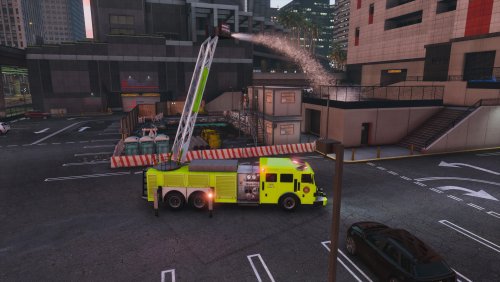 A really great addition to the fire dept. Im looking forward to future update for this beauty of a truck.
- 53 comments
- 7 reviews
-
yeah it definitely works ingame. Now just need someone to pump out a red skin :)
- 53 comments
- 7 reviews
-
I must be the only one having trouble with this. When i view the ytf the skin is not right, its a weird color. I tried this in several different spots. Any ideas? The other MTL truck looks fine when installed. Ive run it for a long time now .
- 53 comments
- 7 reviews
-
-
watch Albos modding Tutorial, the one you need is Tutorial #11 Im sorry I could not help I believe this is the problem as Howellp12 stated
- 2,655 comments
- 234 reviews
-
-
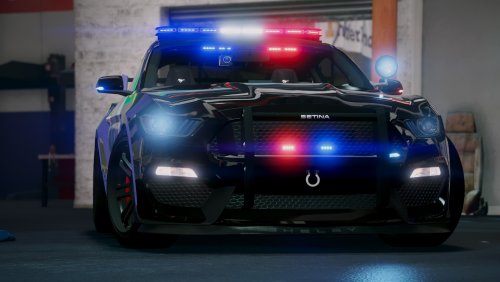 Its a beautiful car, you really did a great job bringing the mustang into gameplay. Ive used it a few times already, im a little confused on what MENYOO is. I looked it up and nothing really explains it, just a bunch of add on stuff from what i can tell. Back to the car, Thank you for this model. When you want to be a high roller Police,it works well. I wish the engine was different, but that is my fault for not understanding menyoo. I wish we had another way of changing audio instead of just the audiohash line. Maybe a little more police type rims, just my own preference. Not sure what would still look good and still have a Police look.
- 82 comments
- 17 reviews
-
-

- 1
-
-
So you er using Albos modding correct? Did you install the carvariations?
- 2,655 comments
- 234 reviews
-
You need to install the XML or you have two of the same vehicle name installed
- 2,655 comments
- 234 reviews
-
-
Im glad you got it, what i ment by revamp was take a few steps back and start over lol I have no idea, i asked but no response.
- 2,341 comments
- 236 reviews
-
you need RHP 52 for game version 1032 i believe that will support scripthookV
- 2,655 comments
- 234 reviews
-
ok man good luck, i have to go right now, so let me know how it works out.
- 2,341 comments
- 236 reviews
-
very cool then, this can be figured out. Where you confused on any of the uninstall/install steps? try this if you have time- Use the uninstaller, revamp, and go back through the manual uninstall process to make sure. Then reinstall, a small mistake was made somewhere, could of been just a file messed up -mods/update/update.rpf/common/data Find this xml file "dlclist.xml" -open/edit dlclist.xml and scroll down until you find this "<Item>dlcpacks:\eup\</Item>" DELETE this line. Then go to: -mods/update/x64/dlcpacks/ and delete the eup folder Install -mods/update/update.rpf Open the update.rpf folder that is in the rar you downloaded you will seee the x64 folder and the dlc_patch Just drag and drop each folder so it can install. It will be the same for serve and rescue addon. The menu is a simple root directory drop.
- 2,341 comments
- 236 reviews
-
Did you update your RPH? I think ScripthookV is out of date with the new RPH. Im not sure if that would make a difference. Did you follow the steps i listed above?
- 2,341 comments
- 236 reviews
-
.thumb.png.a8f56bdfe4aa7517ee4660233dc163a7.png) This is a great idea, not sure if its possible, but it would give the officer a different job. I would love if we could get an updated Fire fighter mod sense the other one flopped.
This is a great idea, not sure if its possible, but it would give the officer a different job. I would love if we could get an updated Fire fighter mod sense the other one flopped.- 101 comments
- 19 reviews
-
-
- 1
-
-
-
-
 Thats a beautiful Unit
 -


.thumb.png.a8f56bdfe4aa7517ee4660233dc163a7.png)